
Contents
First impression of the Cubot X15
The Cubot X15 was delivered in Cubot's typical glossy, brown-gold cardboard box. The package also included a user manual in multiple languages, a small tool for opening the two SIM card slots, a screen protector with a cleaning cloth, a plastic case to protect the smartphone, as well as a USB charging/data cable and a 5V 1A power adapter.
Upon unpacking, a carefully applied screen protector is already on the smartphone. This saves you the often difficult task of applying a screen protector. So that you are well supplied in the future, an additional screen protector is also included.
 Play video on YouTube
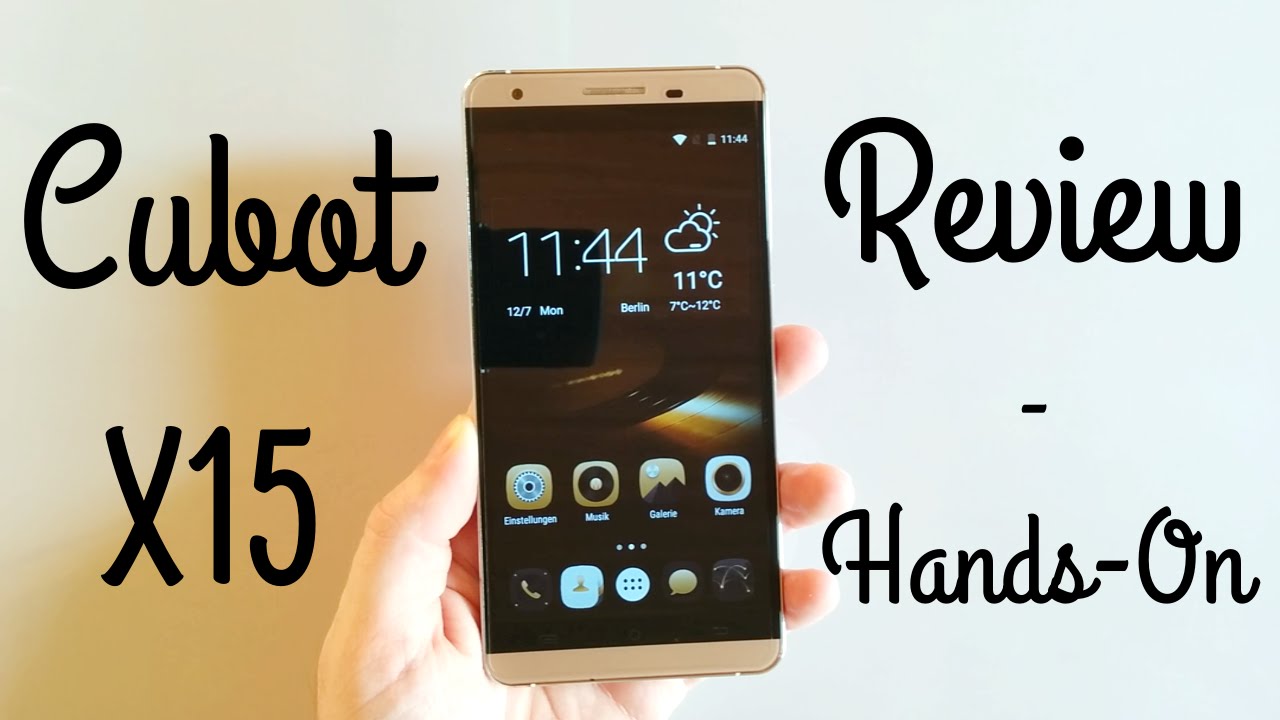
When I first picked up the Cubot X15, I immediately noticed the very good build quality of the smartphone. The frame of the Cubot X15 is made of brushed aluminium, which not only makes it feel good in the hand but also gives it a very high-quality appearance. On the left side of the X15 are the two SIM card slots, with one of the slots also usable for storage expansion. So you have to decide whether you want to use the smartphone as a dual-SIM phone and forgo storage expansion, or whether you want to use a microSD card in the second slot.
On the right edge of the housing are the power button and the volume rocker. These are also made of aluminium and visually match the housing. The keys are firm and I did not notice any rattling.
The back panel is made of plastic and is also coloured to match the housing. Unfortunately, the back cannot be removed, which also means the battery is not replaceable.
A micro USB port is located on the lower edge of the housing, and a 3.5 mm headphone jack is on the upper edge. The bezel of the Cubot X15 is 3.5 mm. Below the 5.5-inch Full HD display are three capacitive keys. These keys have no backlight and are also kept extremely minimalist. Initially, I had to get used to these keys and was somewhat disappointed by the lack of backlighting, but after becoming more familiar with the Cubot X15, I could easily reach the keys and the missing backlight does give the X15’s design a certain refinement. The only significant drawback is the missing notification LED.
Nevertheless, my first impression was entirely positive.
 Play video on YouTube


Display
The Cubot X15 features a 5.5-inch Full HD IPS display, offering a resolution of 1920x1080 pixels. The display is manufactured by Japan Display Inc. (JDI), which is far from an unknown producer. The front features 2.5D 'Curved Glass', meaning the edge of the glass is slightly rounded. According to CPU-Z, the DPI figure is an impressive 480 DPI.
The display was convincing in the Cubot X15 test. Individual pixels are not visible on this display. The colours look vibrant and the viewing angle is good. The colour temperature is extremely warm but can be corrected later thanks to MiraVision. MiraVision is permanently integrated into the Cubot X15 settings. Here you can choose between preset profiles or customise contrast, saturation, brightness, sharpness or colour temperature.
The display also supports "5-point touch" and all inputs were recognised without issue during my test.

Performance
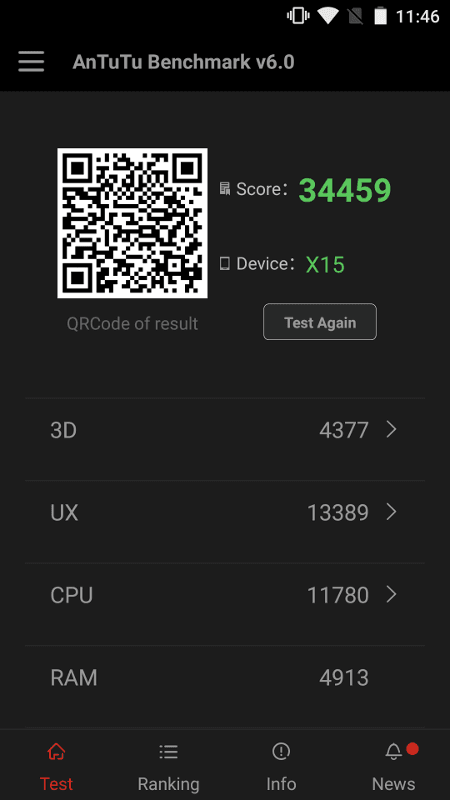
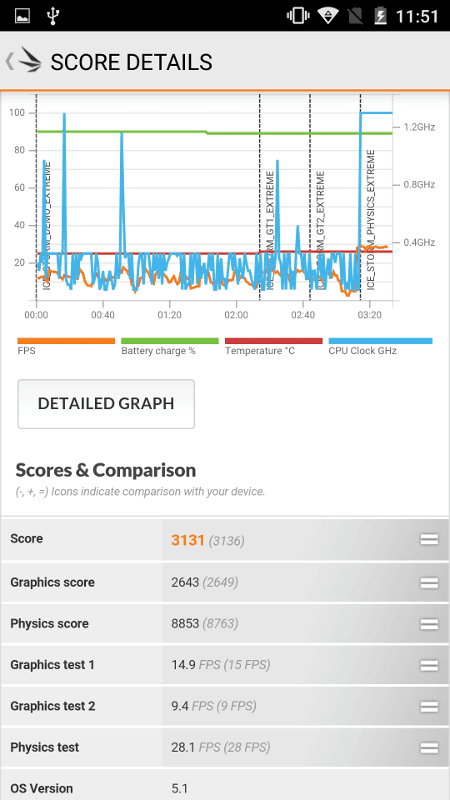
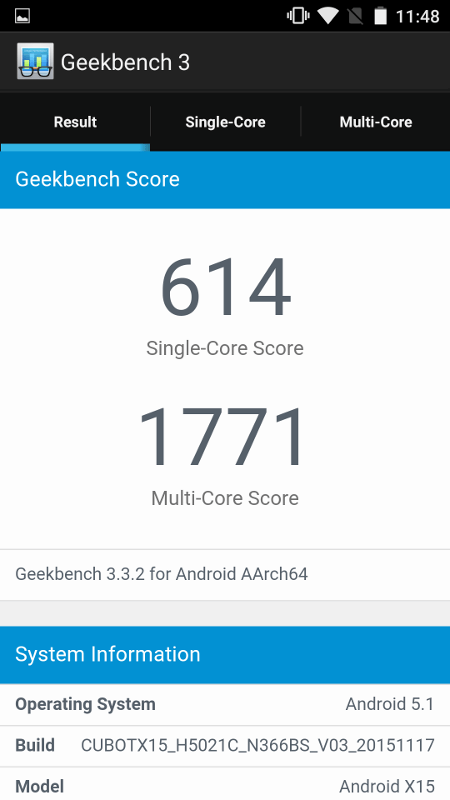
The Cubot X15 features a MediaTek MT6735. This is a quad-core processor with a maximum clock rate of 1.3 GHz. A Mali-T720 is used as the GPU. The smartphone also has 2GB RAM and 16GB internal storage.
In multitasking, the Cubot X15 performed well. Apps open quickly, and even with several apps open, I could hardly detect any performance drops. Movements across the user interface were smooth. However, those who want to play computing-intensive games on this smartphone should opt for a more powerful device.
Anyone who doesn't want to use the device purely as a "gaming smartphone" will likely be satisfied with its performance.
User interface
The user interface may take some getting used to for some, while others will likely be highly satisfied with the appearance of the Cubot custom ROM. Although Cubot relies on Android 5.1, which barely differs from Google stock Android, custom icons are used here that may not appeal to everyone. However, the gold custom icons used here match the smartphone's exterior design perfectly.
Hardly any third-party apps are installed. The only ones I noticed here were "HotKnot" and the "YouWeather" app.
The settings menu of the Coubot X15 has also been expanded with additional features. These include the 'HotKnot' menu item, which allows data exchange between two HotKnot-compatible devices. Under the advanced display settings, there is also MiraVision, which enables more in-depth display corrections, as well as menu items for gesture control and SmartWake.
The X15's gesture control works well. For example, you can configure the device to unlock with a swipe gesture without touching the display.
The SmartWake function allows apps to be launched when the display is switched off. For example, drawing a “C” on the switched-off display automatically opens the camera app.
These functions can also be completely disabled.
The Cubot X15 receives regular OTA (over-the-air) updates. Although I don't expect this smartphone to ever run Android 6, you will receive security updates or bug fixes more frequently. The last update, for example, is from the end of November 2015.

Camera
Cubot uses a 16-megapixel DW9714 (Dongwoon Anatech) image sensor with autofocus and LED flash for the rear camera. It also features an f/2.0 aperture and a 5P lens. Unfortunately, the image sensor of the 8-megapixel front camera is unknown. However, this one also uses an f/2.0 aperture and a 4P lens.
The camera app is the standard MediaTek camera app, which has been extended with additional functions. Among other things, you can select live effects, take a wide-angle shot, or capture a panorama. There is also a motion detection mode and a picture-in-picture mode.
In good lighting conditions, the rear camera produces quite usable images. Image noise is hardly noticeable even when zooming in closely. The autofocus works quickly and triggering the shot also happens swiftly.
In poorer lighting conditions, images taken with the rear camera were unfortunately somewhat washed out and image noise increased. However, the image noise remains well within reasonable limits. Comparable mid-range smartphones often produce significantly worse images in low-light conditions.
Telephony, Wi-Fi, Bluetooth
The voice quality of the Cubot X15 is good. During my test, I could both understand my conversation partner perfectly, and he could understand me well too. I did not notice any interference issues.
It is also worth mentioning that this smartphone is compatible with LTE Band 20. Consequently, the X15 can be used without problems on the German LTE network.
There is nothing to criticise regarding the Wi-Fi either. The signal is consistently stable and the range is average. Fortunately, the Cubot X15 is also dual-band capable, allowing the smartphone to connect to a 5GHz network.
Bluetooth 4.0 is the chosen Bluetooth standard. A connection to my hands-free device was established without any issues, and the signal was stable.
GPS
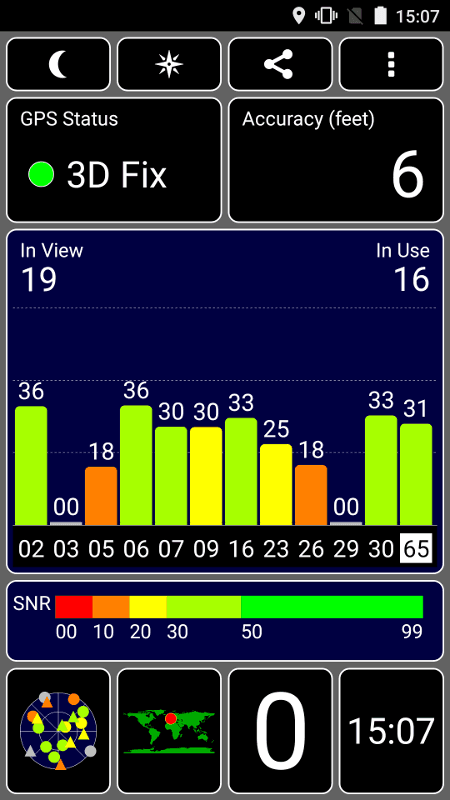
A GPS fix with the Cubot X15 is extremely fast. The position was accurately determined after a maximum of 10 seconds. Even when driving through narrow urban canyons, the signal remained largely constant and navigation was possible without problems.
Battery
According to the spec sheet, the Cubot X15’s battery has a capacity of 2750mAh. Thus, while the smartphone has a rather average battery, I achieved a screen-on time of 8 hours and 13 minutes on a single charge. The Geekbench 3 score is 3745 points, with a discharge from 100% to 1%. In everyday use, with normal usage, I have so far only needed to recharge the battery every two days.

Our verdict
With the X15, Cubot once again delivers an excellent overall package where everything works well. Although the X15 does not feature high-end Chinese hardware, the Cubot X15 scores points particularly with its build quality, decent display and good camera.
Specifications
General
- OS
- Android 5.1
- Display
- 5.5-inch HD display by JDI, 2.5D curved glass (1920x1080, 480 DPI)
- CPU
- MT6735, 1.3 GHz 64-bit quad-core
- GPU
- Mali-T720
- Camera
- Front camera 8MP, rear camera 16MP (sensor DW9714)
- Battery
- 2750mAh Li-Ion
- Storage
- 2GB RAM, 16GB ROM
- Mains
- GSM (850/900/1800/1900)
- WCDMA (900/2100)
- FDD-LTE (B1/B3/B7/B20)
- Other
- Dual-SIM, GPS/A-GPS, Bluetooth 4.0, WiFi, OTG, SD slot
- Sensors
- Accelerometer, gyroscope, brightness sensor, proximity sensor
What’s included
1x Cubot X15 (with pre-applied screen protector) 1x plastic case 1x SIM card tool 1x EU power plug and USB charging/data cable 1x Additional screen protector 1x Warranty card, manual

Comments