
Contents
ECOVACS DEEBOT X1 OMNI: Design and build quality
Behind the ECOVACS DEEBOT X1 OMNI lies the design philosophy of Danish industrial designer Jacob Jensen. Characteristic of the X1 OMNI's appearance is the colour scheme, which is rather unusual for a robot vacuum. Instead of plain white or black, ECOVACS uses a combination of black and silver tones for the X1 series.

The metallic colour combination gives the device a particularly premium feel. Those preferring a traditional look can now also get the DEEBOT X1 OMNI in white with silver accents.
Cleaning station
The cleaning station is definitely the largest we have encountered so far. It is a staggering 57.8 cm high, 44.8 cm wide and 43 cm deep. It can accommodate a 4-litre fresh water tank, a 4-litre dirty water tank and a 3.2-litre dust bag.
The tanks are accessed by opening the lid at the top. A picture-based quick guide explaining the initial setup steps is printed on the inside of the lid.

The tanks can be easily lifted out for filling or emptying. Centrally located between the tanks is a practical insert with a cleaning brush and two additional mop attachments, so you don't have to search for the accessories for long.
Operation of the cleaning station is also carried out from the top via three illuminated control buttons. The buttons can be used to start the cleaning run, summon the robot vacuum back to the station, and start the self-cleaning of the mop pads.

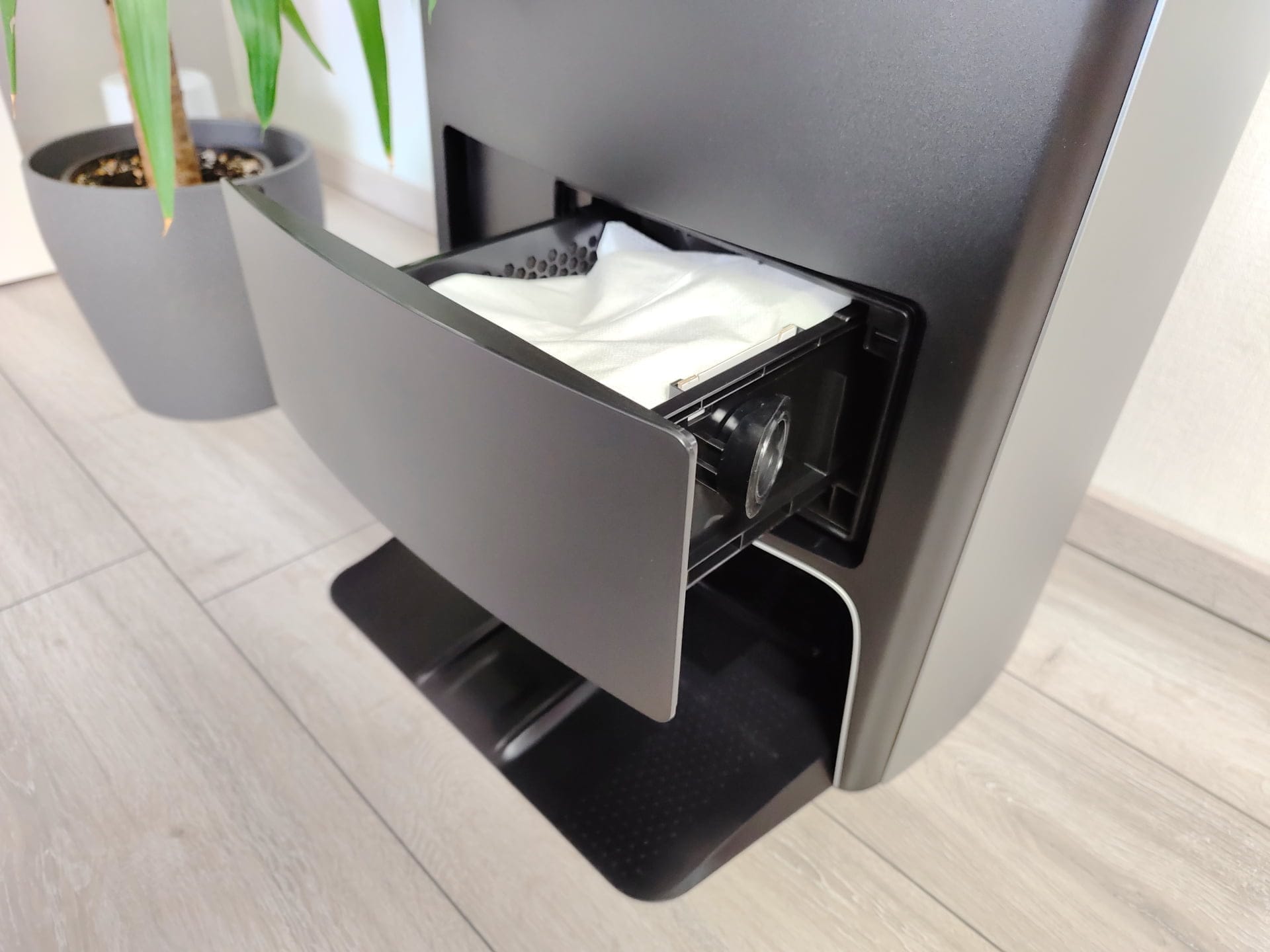
The dust bag is housed separately from the water tanks. If you reach into the lower opening, you will find a hidden switch that opens the dust bag drawer. The cleaning station closes off at the bottom with a base plate.
The robot vacuum parks backwards on the slightly angled base plate, ensuring no contact between the mop pads and the floor. Hot air drying dries the mop pads at the end of a cleaning cycle.
Robot vacuums
In contrast to the station, the robot vacuum has rather traditional dimensions. It has a diameter of 36.2 cm and a height of 10.35 cm. At the top is a laser tower with a laser distance sensor for room navigation.
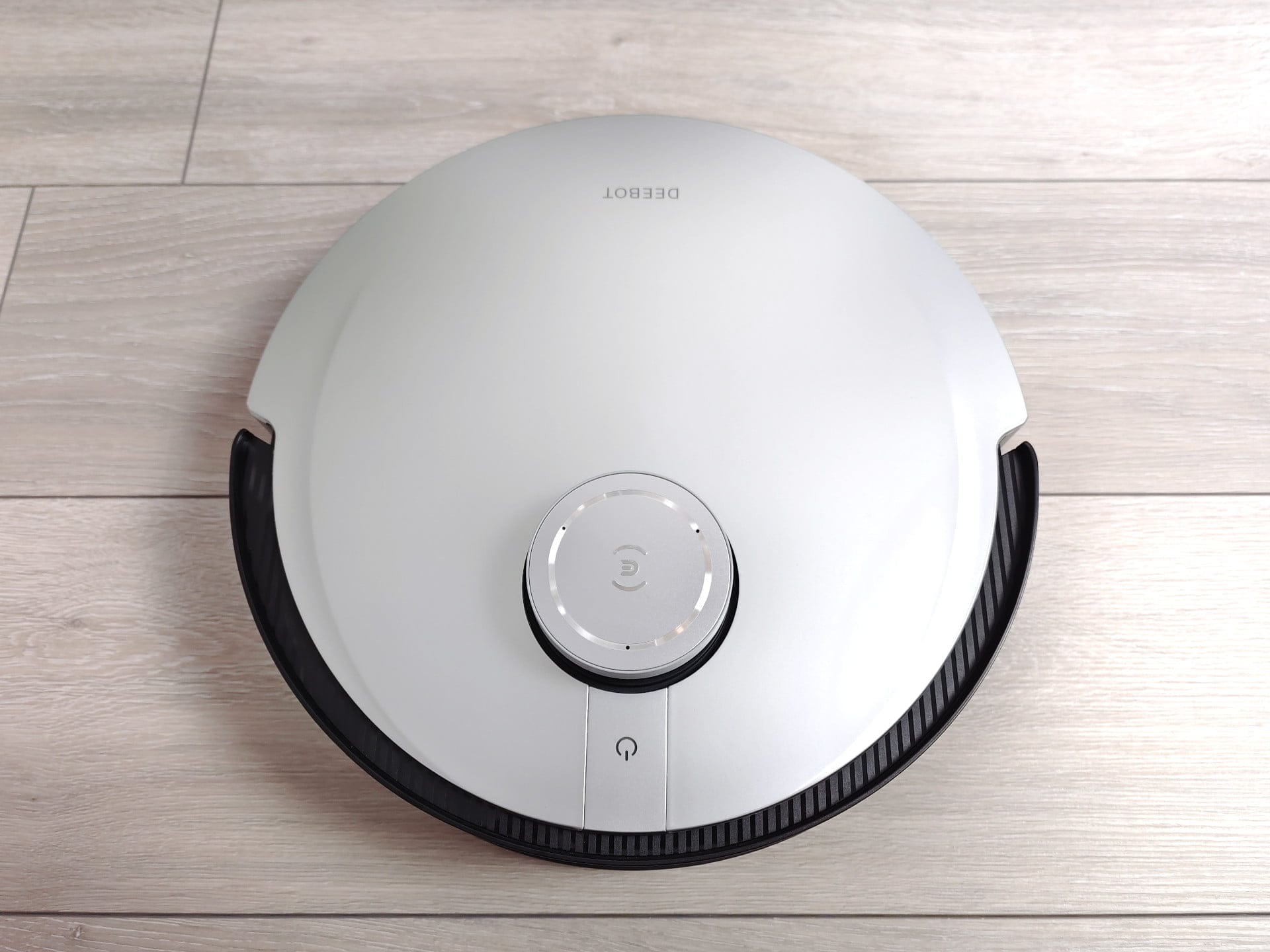
Also accessible from the top is a single control button, which starts the automatic cleaning process when touched. The control button is simultaneously illuminated, allowing the robot vacuum’s status to be identified by its respective colour.
The lid of the vacuum robot is completely removable and is held in place by several magnets. We already liked this about the DEEBOT T10 Plus, as the lack of a usually visible folding mechanism creates an aesthetic finish.

Once the lid is removed, the 400 ml dust container is revealed. Also located under the lid are a power switch, a Wi-Fi status LED and a reset button.
On the front is the AIVI 3.0 camera system, which has been integrated into the classic bumper. The camera system is said to be able to recognise particularly small objects with the help of artificial intelligence, which the laser distance sensor usually overlooks.
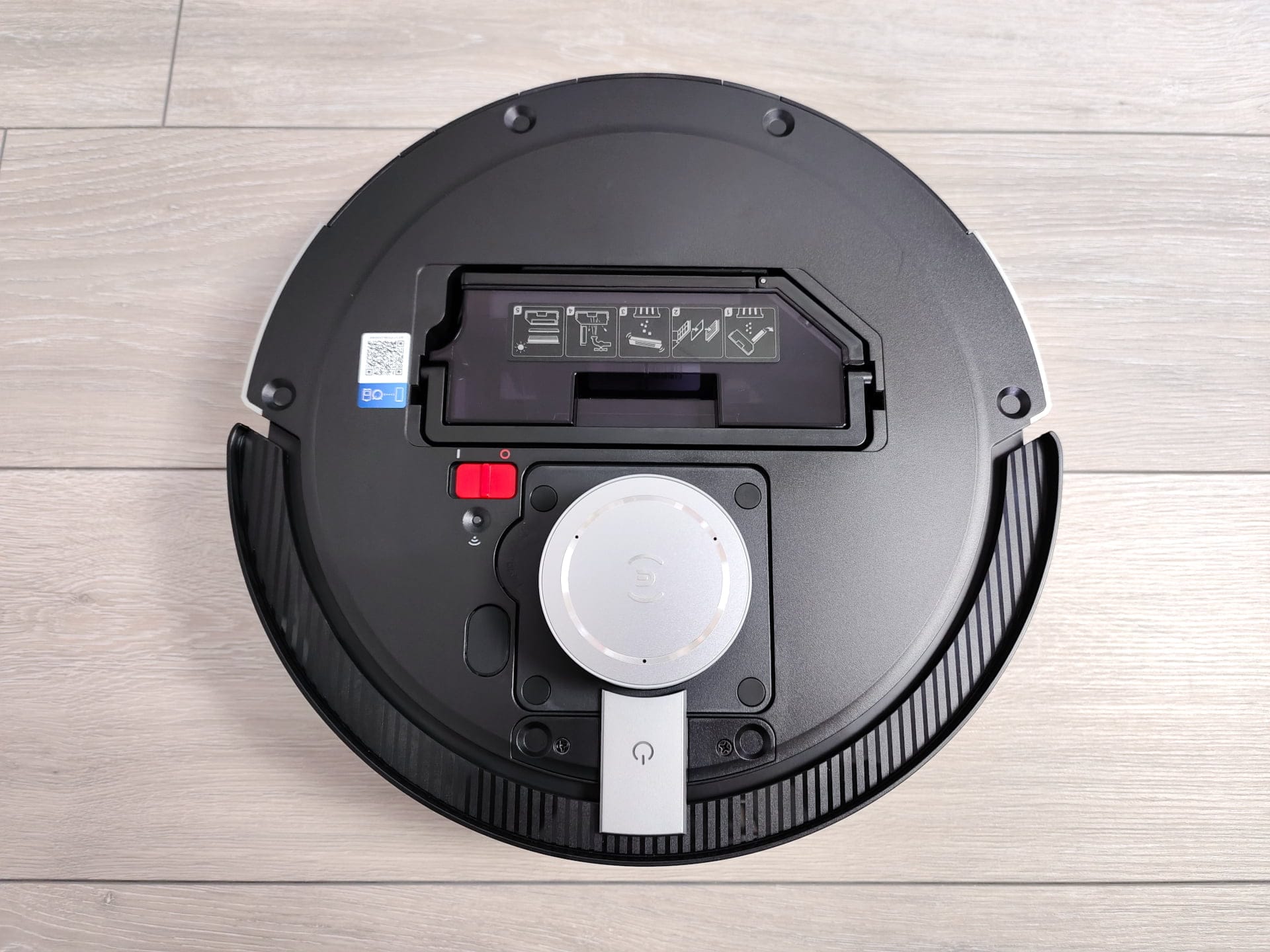
Furthermore, there are additional sensors on the edge of the housing and the opening for the suction function. Unlike many other robot vacuums with a suction function, the dust container is not emptied from below, but from the side.

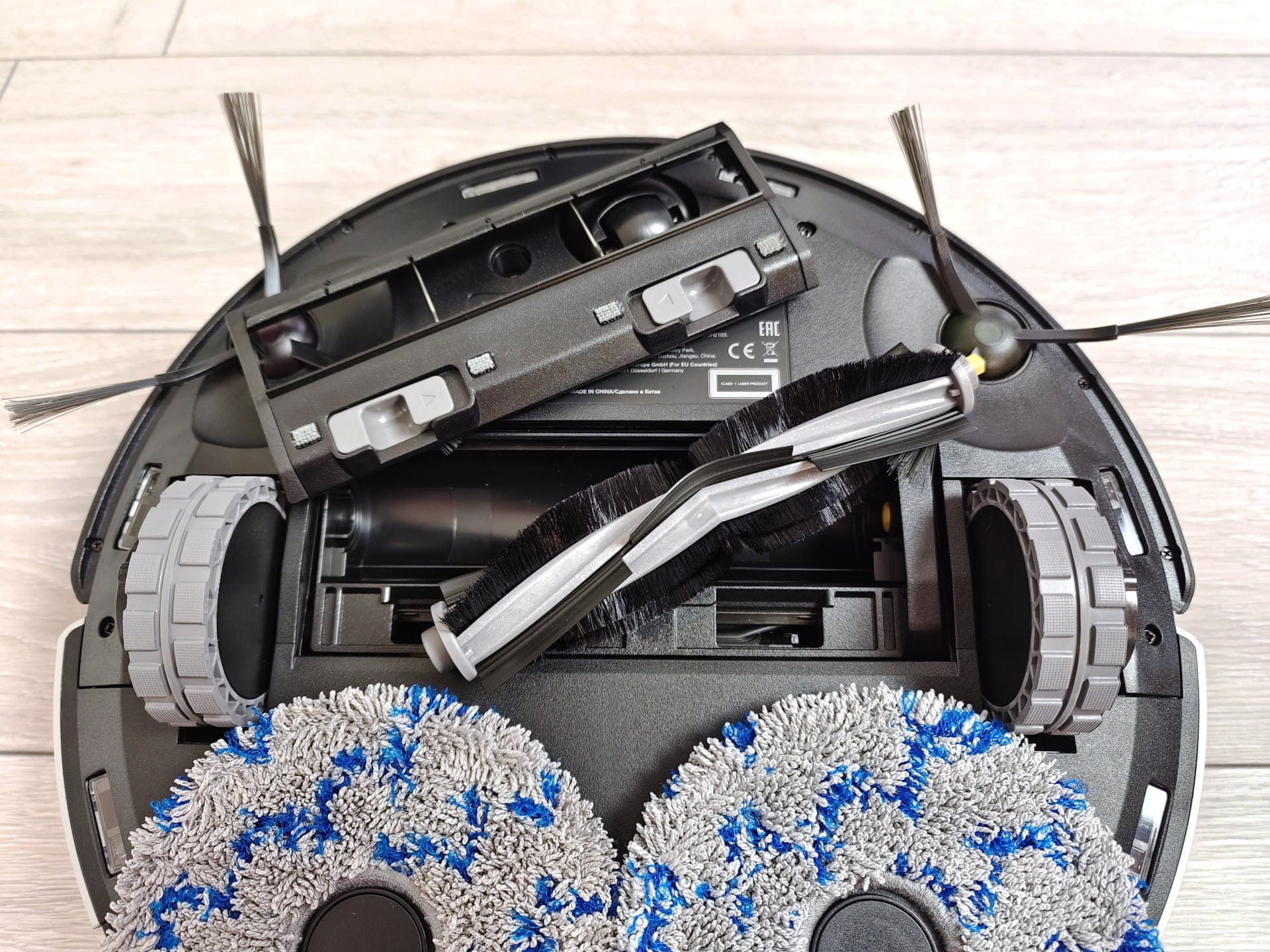
A look from below shows the drive wheels with the main brush in between. This is not a pure rubber brush, but a combination of rubber slats and bristles. How well or poorly hair gets tangled in it will be discussed later. The main brush is supported by two side brushes, which move dirt from the corners towards the main brush.
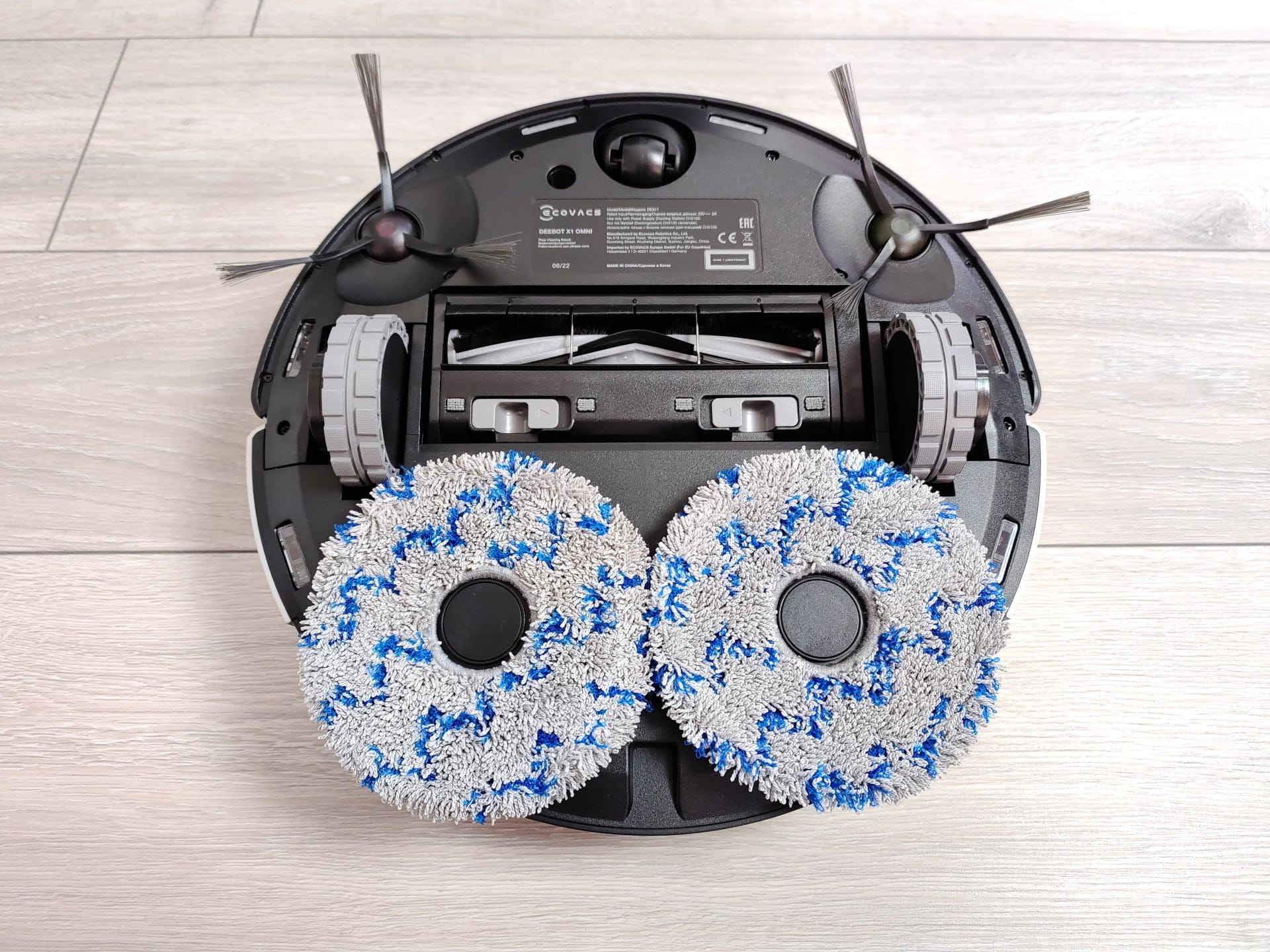
The two rotating mop pads are located behind the main brush, so dirt is first sucked up and then wiped over. The holders for the mop pads are attached magnetically, allowing easy switching between vacuuming and mopping modes. The water tank is invisibly integrated into the robot vacuum. ECOVACS does not provide information on its volume.
ECOVACS DEEBOT X1 OMNI: Setup
As with all other ECOVACS devices, setting up requires the ECOVACS Home app, which is available for free download from the respective app store for Android and Apple devices. Setup is very straightforward and completed in a few steps. You create a user account, scan the QR code on the vacuum robot or select the DEEBOT X1 OMNI from the list of devices, and then follow the instructions.
We did not encounter any problems during setup. You should only ensure that the vacuum robot can only be integrated into 2.4 GHz networks. But ECOVACS also provides a short hint regarding this supposed potential source of error. Once fully set up, the vacuum robot is ready after approximately 2 minutes.
ECOVACS DEEBOT X1 OMNI: App and features
Overview page
All products from ECOVACS are managed via the ECOVACS Home App, so if you own other ECOVACS products, you can manage all devices through a single app. Already set-up devices are displayed on an overview page, which provides, among other things, a brief overview of the device status, but also includes some quick start functions depending on the device.
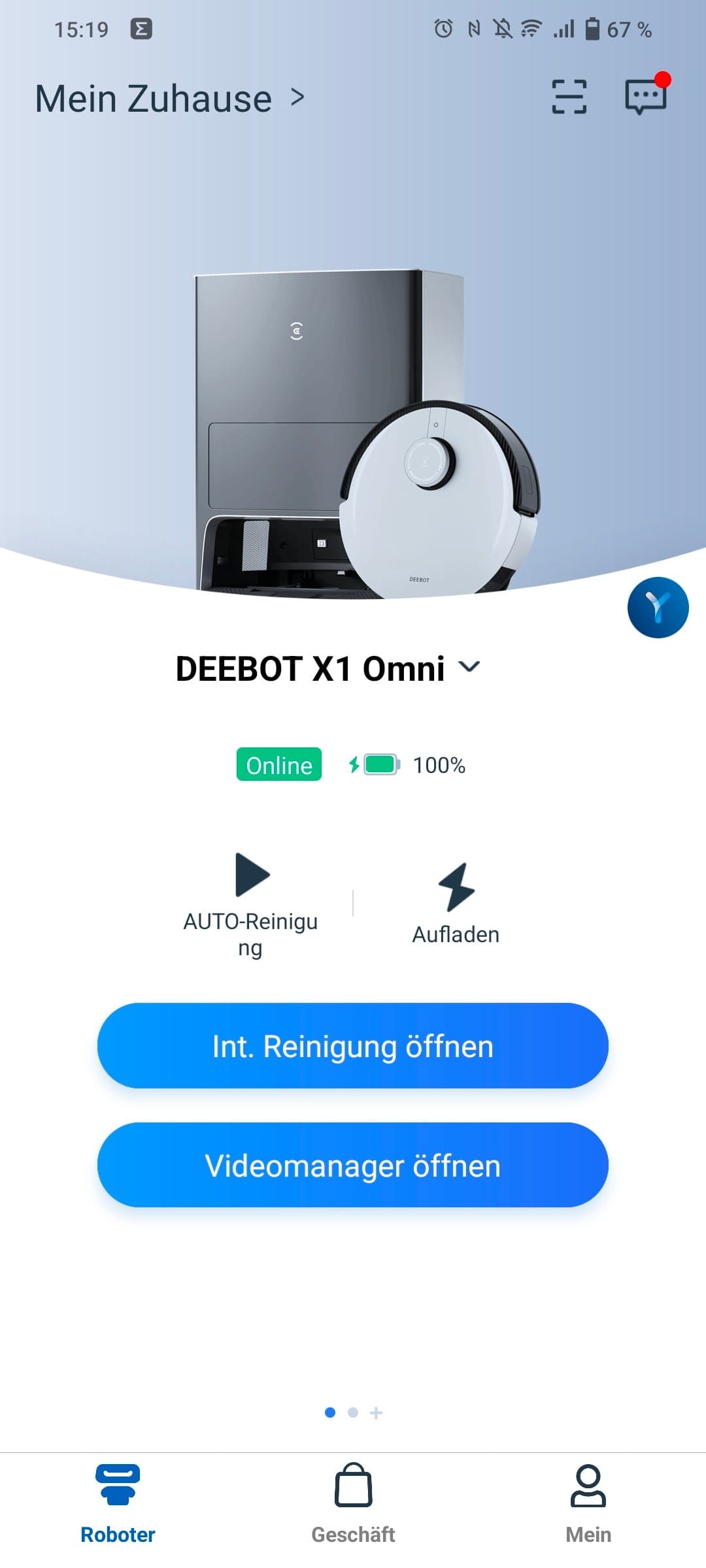


In the case of the DEEBOT X1 OMNI, the auto-cleaning mode can be started or the robot vacuum sent back to the station via the overview page, without having to switch to the detailed cleaning view.
Cleaning view
The cleaning view offers significantly more features. There, we have access, among other things, to the room map, which the robot vacuum creates automatically via the quick mapping feature or during the first cleaning cycle. In total, the robot vacuum can save up to three such house maps.
There is nothing to criticise about the accuracy of the room map. Floor plans and larger objects are correctly detected and mapped. During testing, individual rooms were even correctly named, as the robot vacuum uses the AIVI camera to recognise objects such as a bed and thus knows that it must be a bedroom.
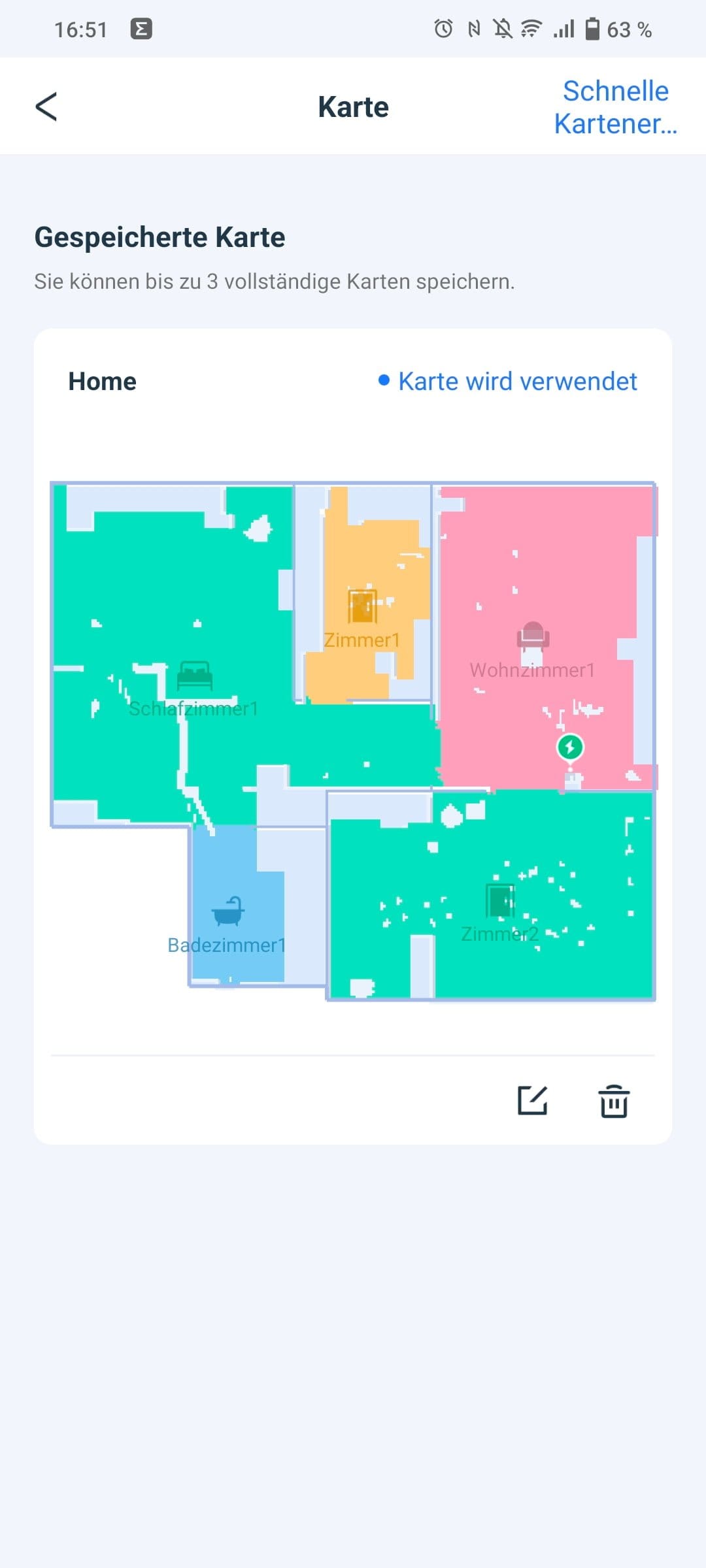
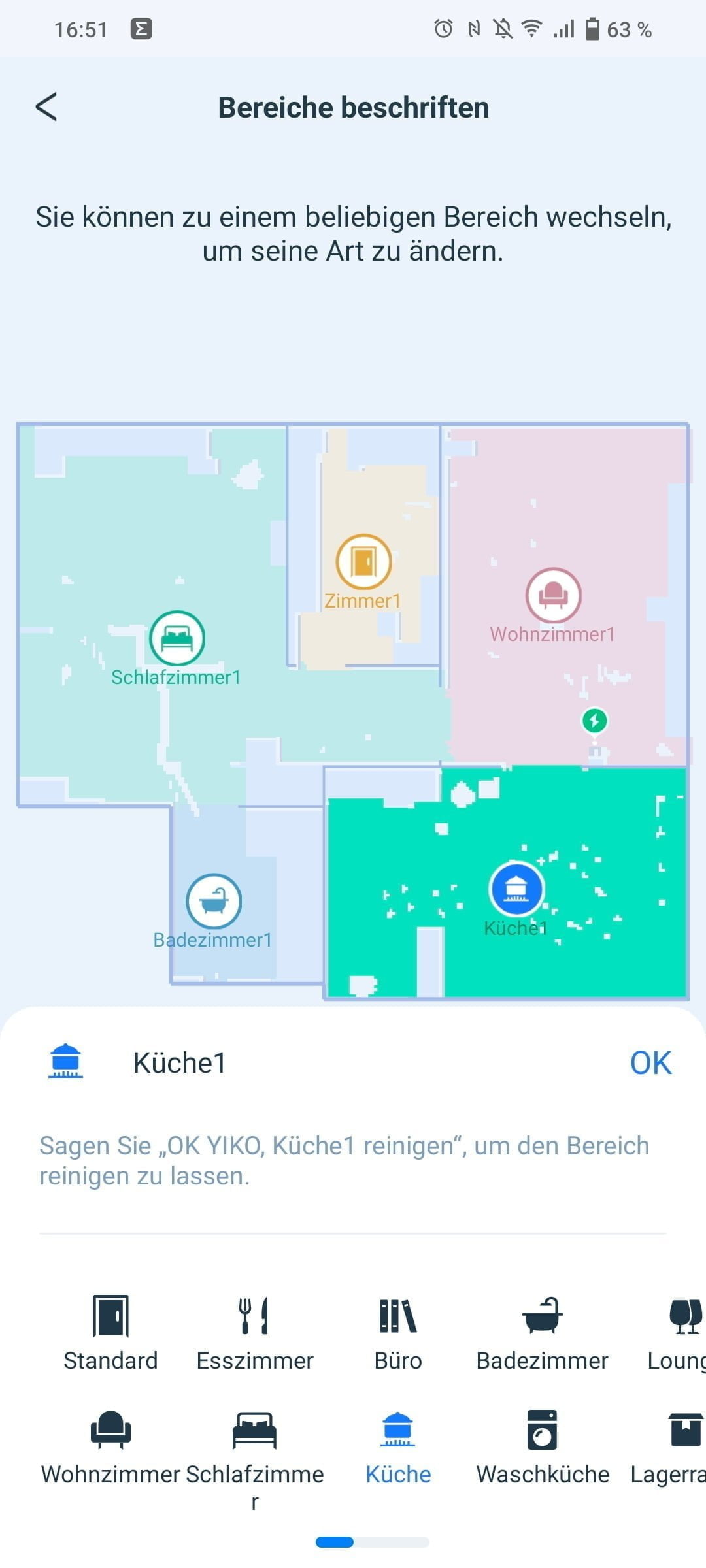
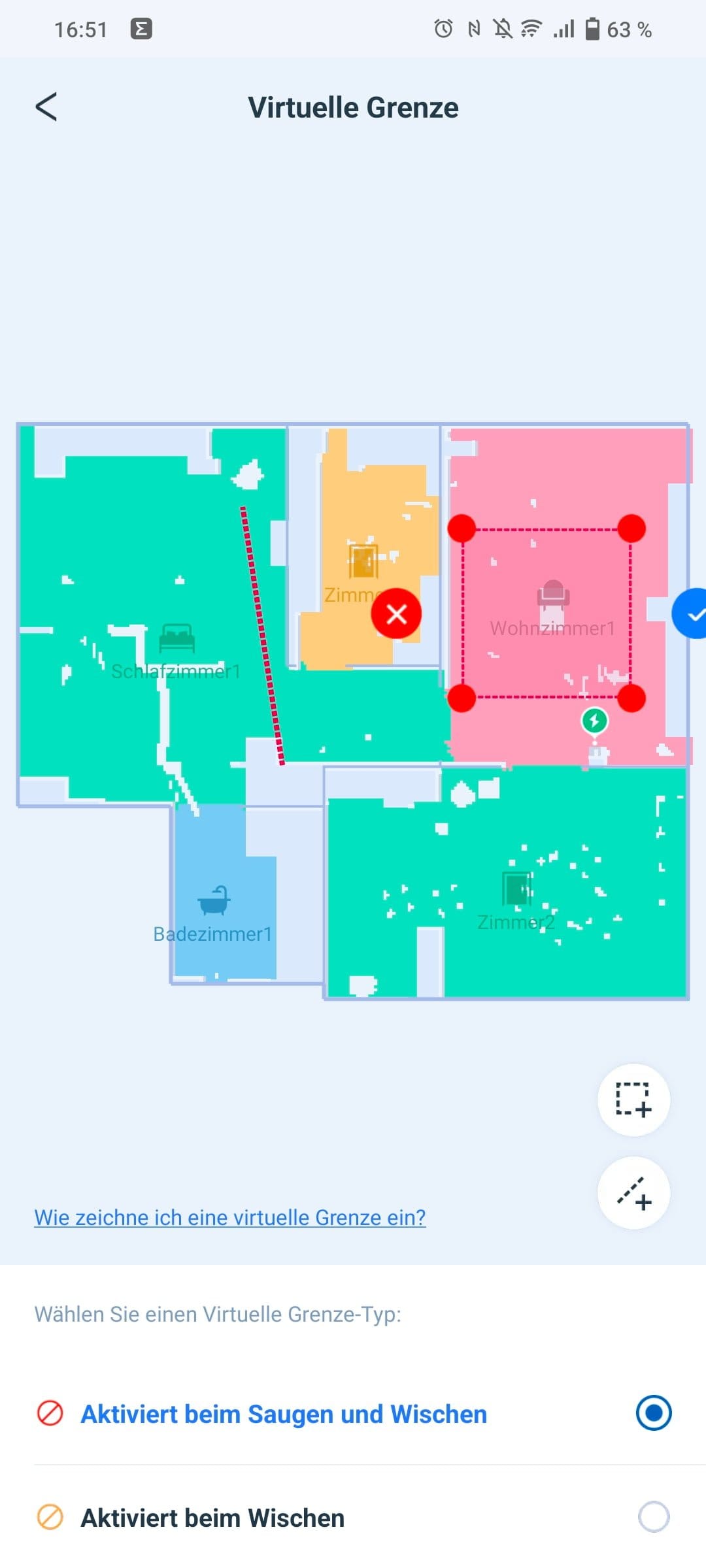
If something does go wrong, corrections can be made via the map management. Here, rooms can be merged, separated and renamed. It is also possible to define restricted zones, virtual walls and no-mop zones on the map. The robot vacuum can store up to three such home maps in total.
However, the main view offers more than just the room map. Via a collapsible menu below the room map, you can choose from a total of three cleaning modes.
- Area cleaning: On the room map, individual rooms can be selected for the robot vacuum to clean.
- Auto mode: All rooms are covered and cleaned.
- Custom: Areas marked on the room map are cleaned.
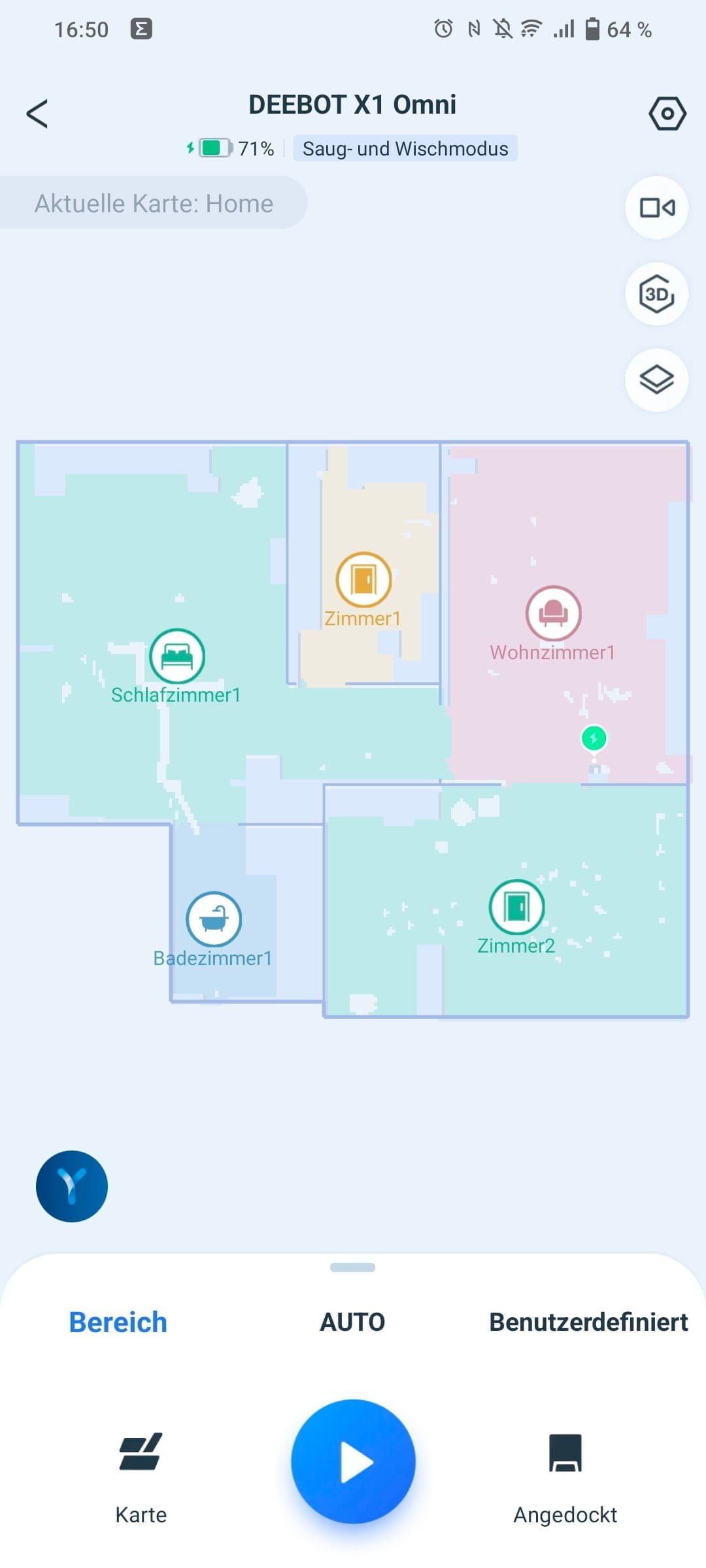

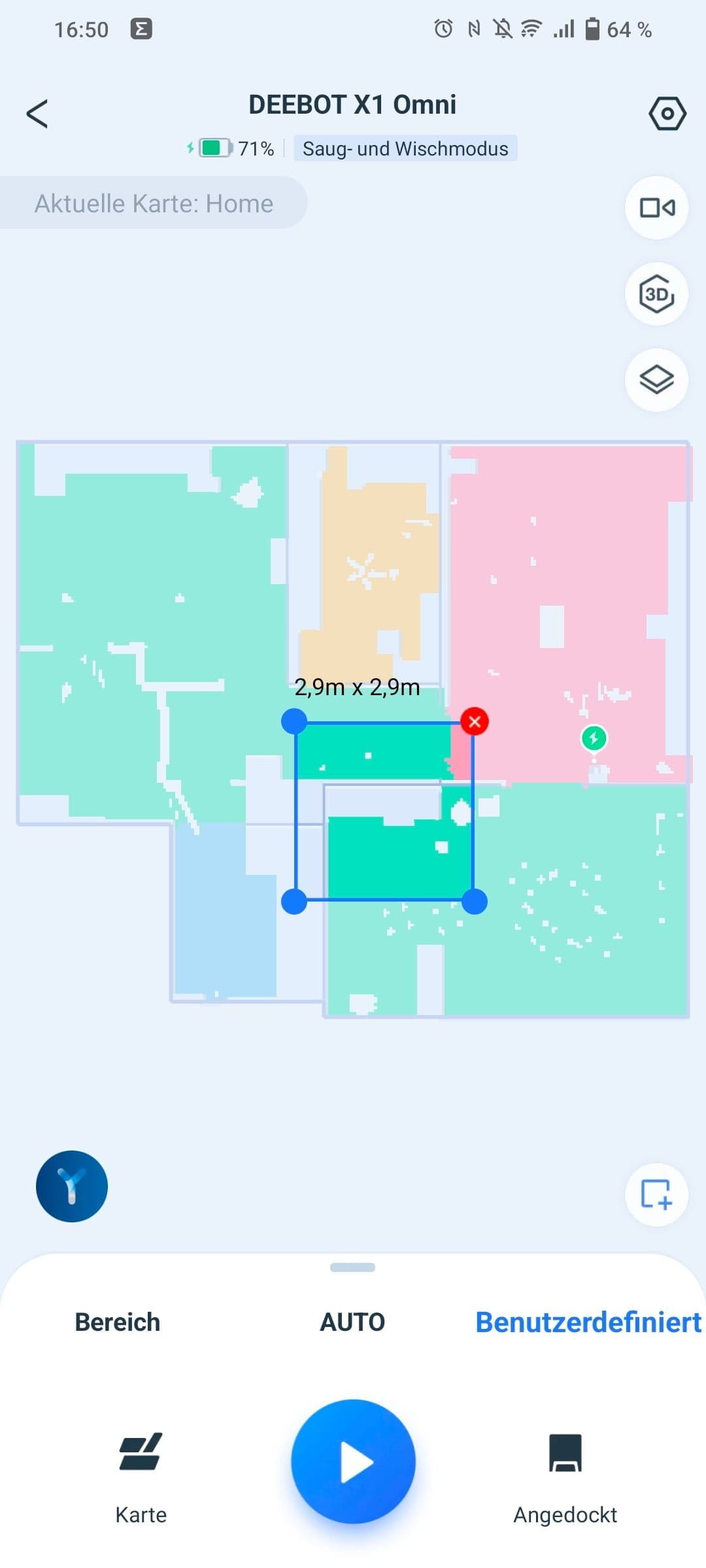
Pulling up the menu reveals the respective cleaning settings.
- Cleaning: Once or twice
- Suction power: Adjustable to the levels "Quiet", "Standard", "Maximum" and "Maximum+"
- Water flow rate: Adjustable in the steps 'Low', 'Medium', 'High' and 'Very High'
- Cleaning sequence: Defines the order in which cleaning is performed.
- Cleaning schedule: Schedule by weekdays and time
- Wiping modes: Quick scrub (S-pendulum wiping mode) or deep scrub (forward-and-back pendulum wiping mode with double cleaning)


You can access the general robot vacuum settings via the gear icon in the top right corner.
- YIKO voice assistant: On/Off, language and volume
- Cleaning log: Cleaned area, cleanings and duration
- Accessories & Parts: Overview of wear on brushes and filters
- Smart cleaning: Scrubbing intensity, cleaning reminder mop, self-emptying, resume cleaning, auto suction boost on carpets, AIVI 3.0 obstacle detection, and area unit (m² / ft²)
- Video Manager: Video password
- Quiet mode: Disables microphone and lighting.
- DEEBOT information
- Station details
3D room map
One feature that ECOVACS has been working on for some time and which is being implemented on all robot vacuums with an AIVI camera is the 3D room map. Unlike the 2D room map, larger objects such as furniture are drawn on the 3D map. Carpets, tables, sofas and beds are among the items recorded.
In earlier app versions, object recognition was not yet quite as good. In the meantime, however, recognition accuracy has improved significantly. In the test, the DEEBOT X1 OMNI was able to assign most objects and draw them correctly on the map. As with the 2D room map, corrections can be made within the map management. Recognised furniture items can be repositioned, and a number of predefined pieces of furniture can be added to the map.
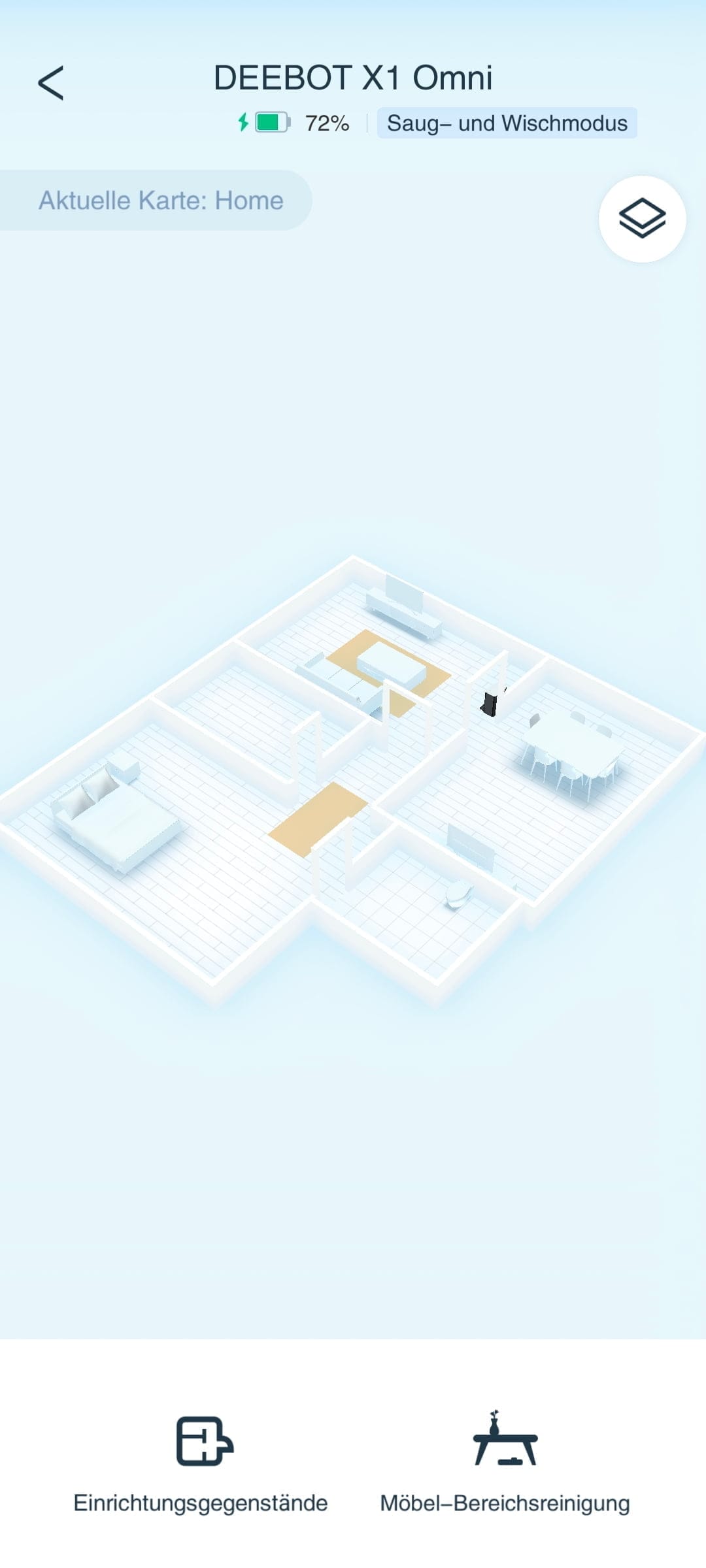
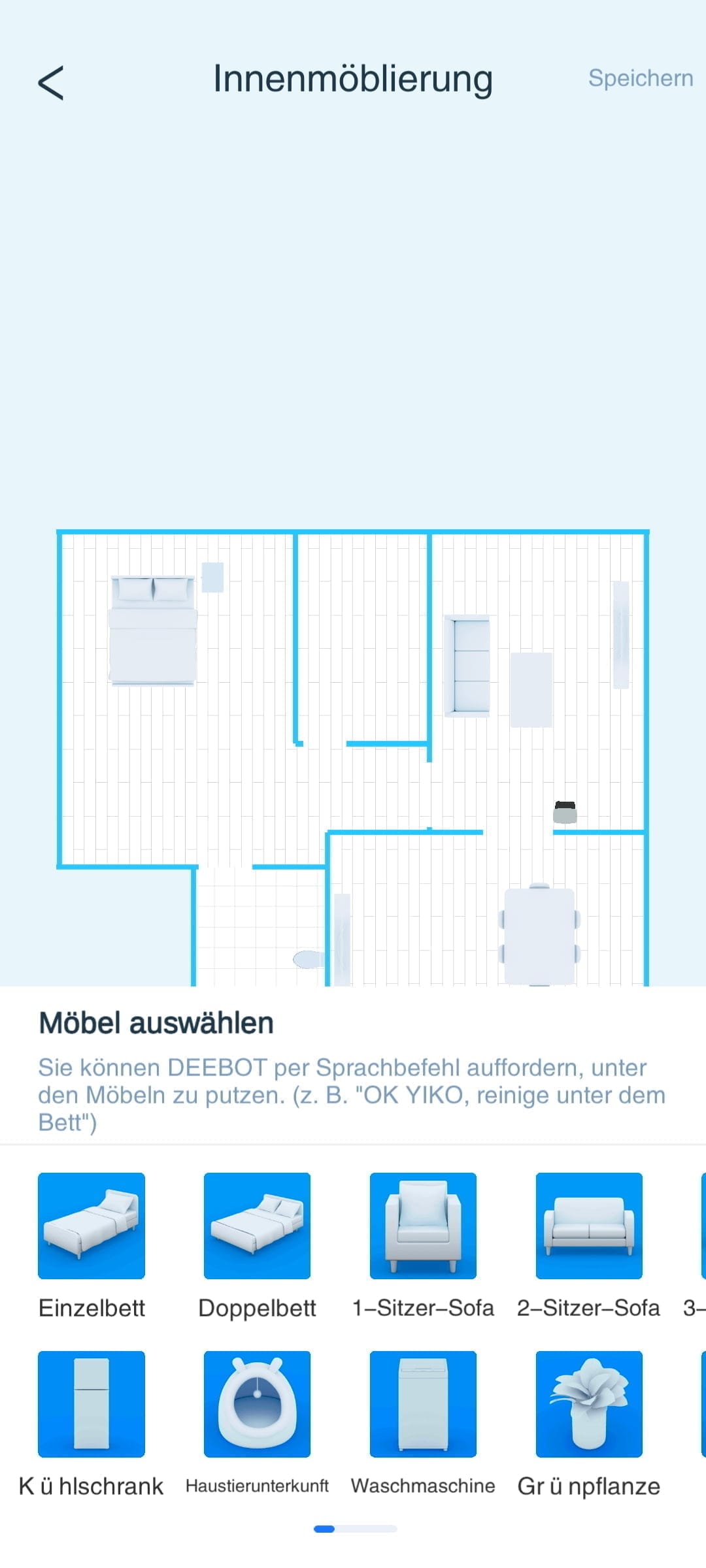
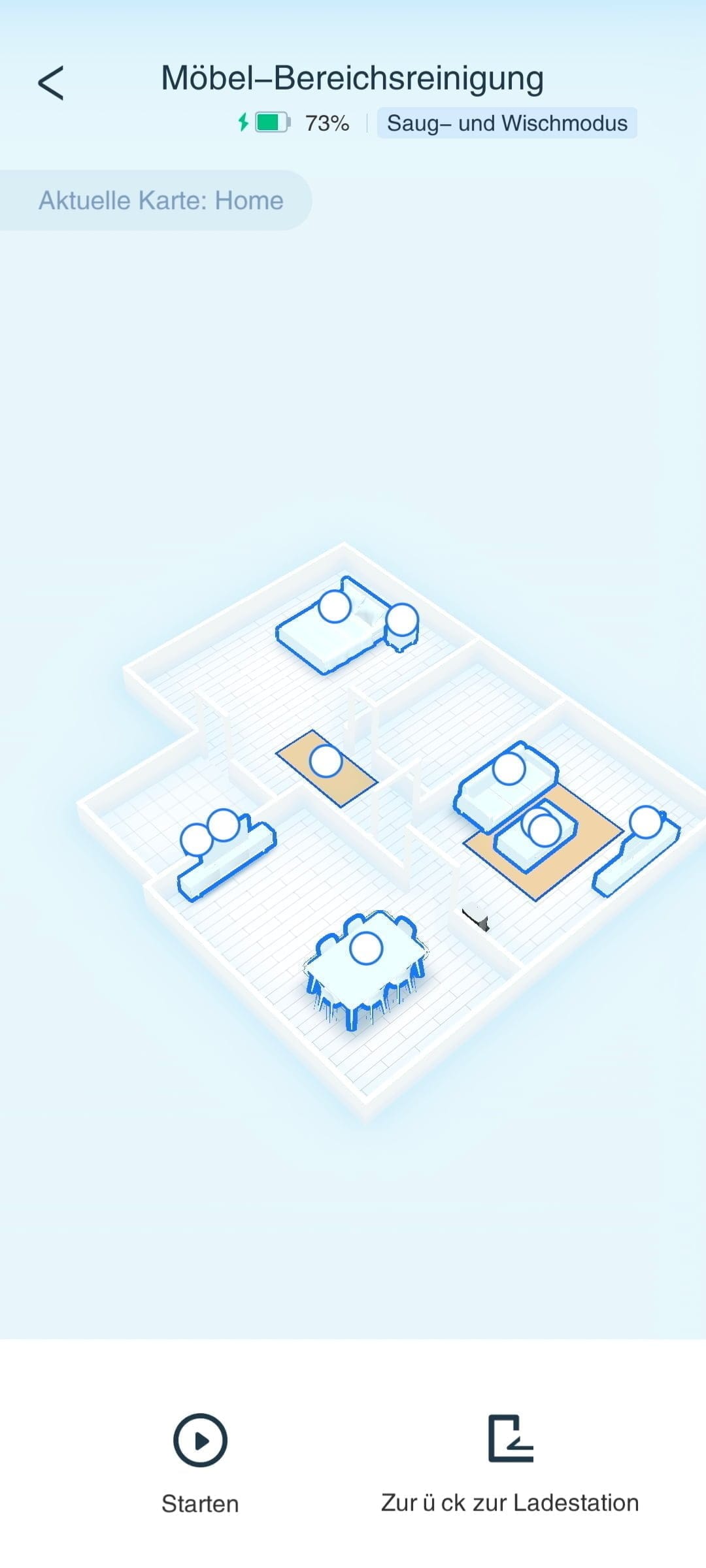
The 3D room map becomes more useful thanks to the furniture area cleaning, which is available within the 3D view. Instead of rooms, as is the case with standard area cleaning, individual pieces of furniture can be selected for furniture area cleaning, around and under which the robot vacuum should clean.
Video manager
Another feature the DEEBOT X1 OMNI offers is a video manager that turns the vacuum robot into a surveillance camera on wheels. Via the video manager, you have remote access to the AIVI camera image and can send the vacuum robot to various locations in the apartment either using a control pad or via waypoints. This is particularly useful when you want to quickly check in on things.

However, the video quality cannot compete with that of a real security camera. The image is slightly blurred and limited to 960p resolution. There is no night vision function, so the image remains dark in low light. Photos and videos can be captured and saved at the press of a button. There is also a two-way audio system, allowing two-way communication with people in the room.

Access to the video manager is protected by a four-digit PIN. ECOVACS promises to comply with all requirements for data protection and data security. The company highlights a TÜV Rheinland certification mark. To prevent misuse, the robot vacuum announces via voice output that video recording has started.
YIKO voice assistant
Another feature on the side is the in-house YIKO voice assistant, which allows the DEEBOT X1 OMNI to be operated via voice commands. YIKO understands more than 13 languages and recognises a wide range of voice commands that ECOVACS can expand at will. The assistant is activated with the command "OK, YIKO".
For example, voice commands allow the vacuum robot to clean specific rooms, start quick mapping, or interrupt cleaning. A list of all voice commands is available via the app.
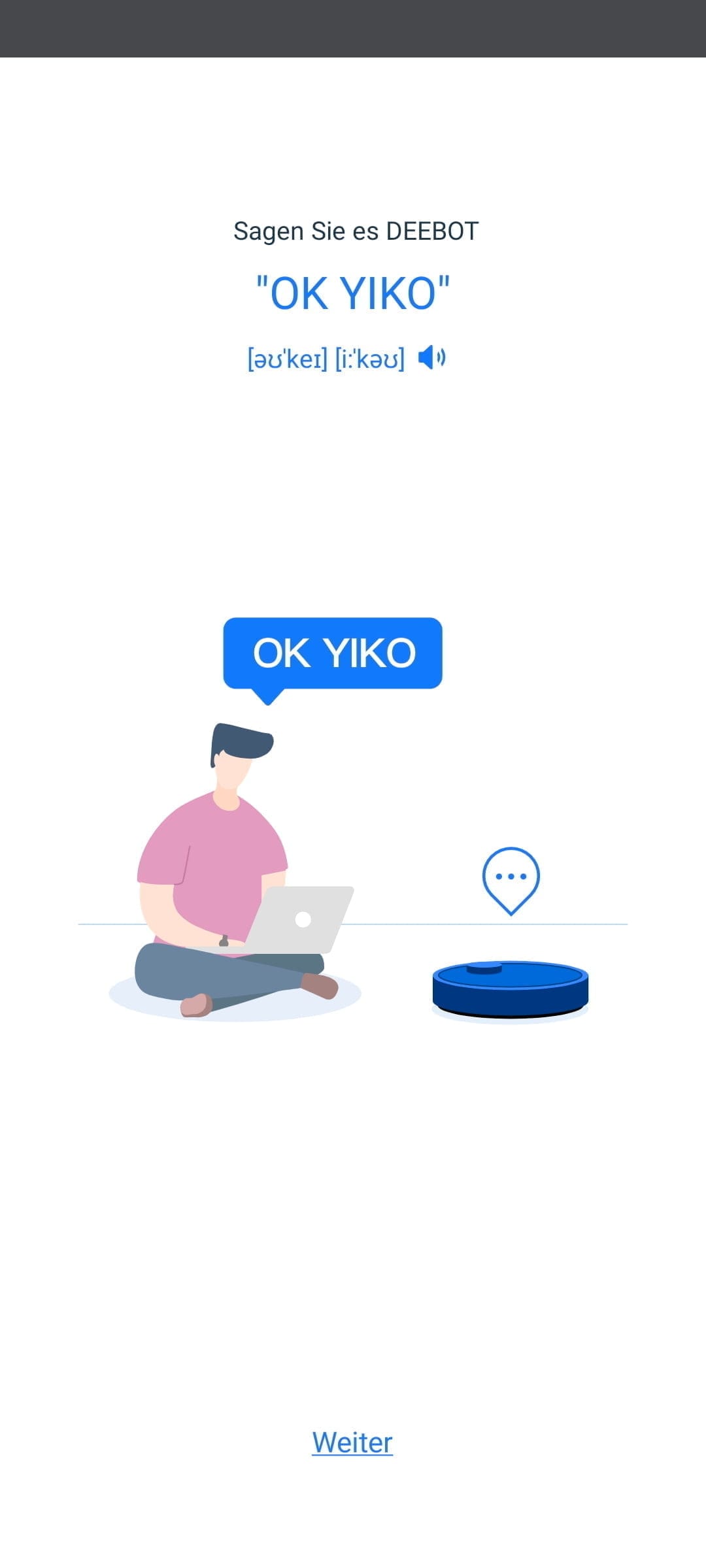
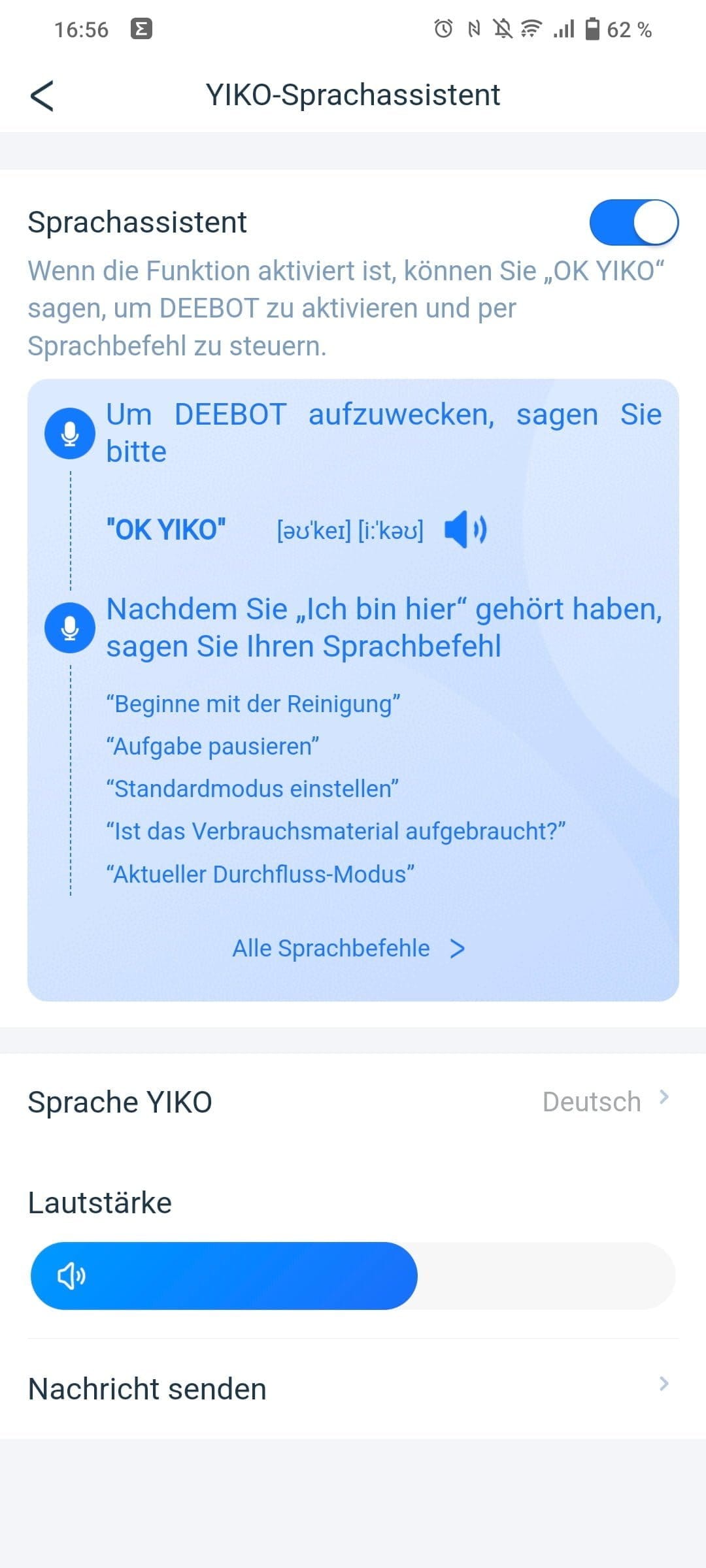
The voice assistant worked well in testing. However, you should be aware that YIKO is always listening and recognises commands even from a distance. During conversations or while watching TV, the voice assistant was occasionally triggered. This also happens with well-known assistants like Siri, Google Assistant, or Alexa.
ECOVACS DEEBOT X1 OMNI: Practical test
Vacuuming and Mopping
Just in time for the first cleaning run, we had guests over the evening before. This meant we couldn't avoid reaching for the mop the next day. However, we wanted the DEEBOT X1 OMNI to do the work for us.
We followed the DEEBOT X1 OMNI’s first cleaning run with great anticipation, because on the devices we have tested so far, vacuuming was the main focus and the mopping function was rather secondary. With the DEEBOT X1 OMNI, it is exactly the other way round. With its rotating mopping pads and the all-in-one OMNI station, it is much more of a wet vacuum cleaner than a conventional robot vacuum.
This is already evident in how the DEEBOT X1 OMNI prepares for its cleaning run. Once the two mopping pads are installed, the vacuum robot automatically switches to vacuum and mop mode, in which it vacuums (5,000 Pascals) and mops simultaneously. As soon as cleaning starts, the robot's water tank fills with fresh water from the station and both mopping pads are moistened. This takes approximately 15 seconds.
The device then leaves the station and begins its cleaning tour. During cleaning, the mops rotate at up to 180 revolutions per minute across the floor. The integrated water tank continuously supplies the mops with water. The water flow rate and wiping intensity can be adjusted in the app. The same applies to the cleaning interval, i.e., how often the robot vacuum returns to the station to clean the mops.
Cleaning result
Watching the DEEBOT X1 OMNI work is fun. The cleaning result brings even more joy, as the rotating mop pads perform noticeably better than competitors using ordinary wiping cloths. The DEEBOT X1 OMNI sucked and scrubbed away most of the previous evening's dirt. No shoe prints remained, and even dried-on stains in the kitchen were no longer visible.

However, stubborn water stains on tiles remained stubborn, so at this point you still had to reach for a manual mop and household cleaner. Also, the occasional unseen stain from times beyond the evening party was only removed to a limited extent.
The subsequently sparkling clean apartment remained spotless over the coming weeks with daily cleaning runs using the DEEBOT X1 OMNI. This was the case even with pets in the household!
The overall satisfactory cleaning result was also evident from the dirt water in the dirt water tank. It is recommended to clean the tank every 1-2 days if you have a daily cleaning routine. If you leave the dirty water in the tank, deposits and unpleasant odours develop very quickly.

The mop pads are thoroughly cleaned in the station at the end of the cleaning run and then dried using hot air. The drying time can be set to 2, 3 or 4 hours. In the test, the mop pads were usually fully dry after 2 hours. No unpleasant odours occurred, but it is still advisable to wash the mop pads regularly in the washing machine.
Carpets
One aspect that should definitely be taken into account before buying the ECOVACS DEEBOT X1 OMNI is the proportion of carpets and carpeted floors. As mentioned earlier, we are dealing much more with a wet-and-dry robot than a pure vacuum cleaner. With mopping pads installed, carpets and carpeted floors are completely avoided. This can lead to problems if a carpet blocks the way to other rooms.

For example, in our test apartment, a runner in the narrow hallway prevented the DEEBOT X1 OMNI from entering all rooms. This is quite frustrating when you want to mop the entire apartment and have to move the runner aside every time. Some competitors are already one step ahead and can simply lift the mops or mop cloth at carpets to continue cleaning.
The DEEBOT X1 OMNI, on the other hand, only cleans carpets if you remove both mop pads. Then the vacuum-mop automatically switches to suction mode and also drives over carpet edges (up to 2 cm).

The cleaning result on carpets is impressive. With automatic suction power increase on carpets, dirt is well vacuumed up even on high-pile carpets. Longer hairs get caught in both the main brush and the side brushes and must be regularly removed by hand. The dust chamber is reliably emptied into the dust bag of the auto-empty station. The operating noise is acceptable.
Runtime
Unfortunately, the DEEBOT X1 OMNI is not a long-distance runner. Unlike conventional vacuum robots, which easily achieve 200+ minutes of run time, the X1 OMNI's run time is significantly lower. The manufacturer itself states the optimal run time as 140 minutes. This figure was quite realistic in our test, so we were able to clean approx. 100 m² area in one go in vacuum-mop mode on a single charge.

At maximum suction power and with deep cleaning enabled, the battery life covers an area of approximately 65 m². If the battery level drops below 15 percent, the DEEBOT X1 OMNI automatically returns to the station. If a cleaning session is interrupted, the device resumes it after it has fully recharged. The charging time is approximately 6 hours.
Navigation & AI
For navigation, the DEEBOT X1 OMNI relies on extensive sensors, including a LiDAR laser turret, side and underside infrared sensors, and a mechanical "bumper". Object recognition also uses the AIVI 3.0 camera system, which is intended to detect small objects and obstacles that are outside the range of the laser turret.
The AIVI 3.0 camera uses artificial intelligence and compares captured objects with a database. With AIVI 3.0, the robot vacuum should no longer drag along shoes, toys or cables lying around, but should go around them.
There was hardly anything to criticise about the DEEBOT X1 OMNI's navigation during testing. It approaches obstacles cautiously, and in many cases, the "bumper" did not need to be engaged. No complete errors requiring manual intervention occurred.

Nevertheless, object recognition still has room for improvement. While many objects are recognised within 10 cm by AIVI 3.0, some objects that one would expect the camera system to detect were ignored. During several test runs, the robot vacuum often dragged along cat toys.
But some slippers and cables were also simply ignored, so it is always a gamble what the DEEBOT X1 OMNI recognises and what it doesn't.
What was still included in the scope of delivery of the DEEBOT T9 AIVI but is missing in the new generation is a cover for the camera. Although the AIVI 3.0 camera system can be disabled in the robot settings, a physical cover provides even more security against unwanted glances.
ECOVACS DEEBOT X1 model comparison
Like other ECOVACS model series before it, the DEEBOT X1 is available in three different versions. The main differences are listed in the table below.
| Model | DEEBOT X1 OMNI | DEEBOT X1 Turbo | DEEBOT X1 Plus |
| Suction power | 5,000 Pa | 5,000 Pa | 5,000 Pa |
| Volume (max) | <68 dB | <68 dB | <68 dB |
| Dust container | 400 ml | 400 ml | 400 ml |
| Water tank | 4L | 4L | 240 ml |
| Battery (Runtime / Charging time) | 5200 mAh (4 hrs / 6.5 hrs) | 5200 mAh (4 hrs / 6.5 hrs) | 5200 mAh (2.5 hrs / 6.5 hrs) |
| Gradient | 2 cm | 2 cm | 2 cm |
| Dimensions | 36.2 x 36.2 x 10.35 cm | 36.2 x 36.2 x 10.35 cm | 35.3 x 35.3 x 10.33 cm |
| Weight | 4.4 kg | 4.4 kg | 4.3 kg |
| Special features |
|
|
|
| Price | €1,499 (RRP) | €1,299 (RRP) | 1099 euros (RRP) |
The DEEBOT X1 OMNI and X1 Turbo differ only in the cleaning station. The cleaning station of the X1 OMNI combines mop cleaning and automatic dustbin emptying, which the DEEBOT X1 Turbo lacks.
The DEEBOT X1 Plus uses a different mopping system. Instead of two rotating mopping pads, the X1 Plus uses a vibrating mopping plate, as seen on the DEEBOT T9 AIVI and DEEBOT T10 Plus. The functions of the cleaning station on this model are limited to dust suction only.
Our verdict
The manufacturer ECOVACS has presented us with the DEEBOT X1 OMNI, an outstanding robot vacuum cleaner where mopping is not just an afterthought. With its rotating mop pads and the fully automatic cleaning station, the DEEBOT X1 OMNI is one of the most feature-rich, but also one of the most expensive robot vacuum and mop cleaners.
The wiping performance is first-class, and the device also performs well when vacuuming. It also features easy operation, simple maintenance and useful app functions, such as the integrated video manager, which turns the robot vacuum into a surveillance camera on wheels.
However, there is one point that prevents the X1 OMNI from being a nearly perfect vacuum-mopping robot. Unfortunately, the device is unable to lift the mopping pads over carpet edges, meaning carpets become a genuine obstacle.
Specifications
Cleaning
- Suction power
- up to 3000 Pa
- Suction modes
- Quiet, Standard, Max, Max+
- Noise levels
- <68 dB
- Container
- 400 ml dust, 240 ml water
Navigation
- Type
- LiDAR tower + AIVI 3.0
- Room map
- Yes (3 floors)
- Room layout
- Yes
- Restricted areas
- Yes
- Virtual Wall
- Yes
Connectivity
- App
- ECOVACS HOME
- Connection
- WiFi 2.4 GHz
- Alexa
- Yes
- Google Home
- Yes
- Other
- YIKO AI voice interaction
Battery
- Capacity
- 5200 mAh
- Runtime
- up to 260 min
- Charging time
- 6.5 hours
Emptying station
- Suction power
- 21 kPa
- Bag type
- Disposable
- Dust bag capacity
- 3,2 L
Size & weight
- Size
- 35.3 x 35.3 x 10.33 cm
- Weight
- 3.7 kg
What’s included
1x robot vacuum 1x dock 2x side brush 4x mop pad 2x dust bag 1x cleaning brush 1x cleaning tool 1x power cable 1x manual
Price comparison
| Store | Price | Link |
|---|---|---|
| Amazon | 388,80 € | Go to store |
| MediaMarkt | 501,83 € | Go to store |
Price history
| Store | Price | Link |
|---|---|---|
| MediaMarkt | 249,00 € | Go to store |


Comments