Contents
Xiaomi Mi Laser Projector
What is a laser projector?
Anyone who has never heard of laser projectors will probably think of a laser beam, similar to a laser pointer, projecting the image onto the screen. In fact, laser projectors rely on established projection technologies, such as LCD or DLP. Only the lamp technology is replaced. Instead of a lamp, a laser module is used, equipped with numerous laser diodes that generate the light beam. The advantages of a laser projector are primarily the longer lifespan (~5,000 hours vs. >20,000 hours) of the laser module compared to a conventional projection lamp, as well as reduced heat emission, which brings the warm-up and cool-down times close to zero.
History of the Xiaomi Laser Projector
Over the past few years, Xiaomi has built up and expanded its own home cinema division. The launch was successful with the Xiaomi Laser Projector, released for the Chinese market in the summer of 2017 and, at the equivalent of €1,300, was the most expensive Xiaomi product at the time. Even as an import, the laser beamer achieved a small breakthrough here. The only catch was and remains the Chinese MIUI, which is difficult to adapt for local users.
More than a year later, in late 2018, the Xiaomi Laser Beamer was released in a "Global Version". Instead of Chinese MIUI, the beamer uses Android TV, which benefits international users. What sounds like a significant advantage over the Chinese model unfortunately also brings some disadvantages. For instance, the Global Version does not include 3D functionality and offers fewer adjustment options for image presentation.
In early 2019, Xiaomi released an updated model for the Chinese market. The Xiaomi Laser Projector 4K is, as the name suggests, a 4K laser projector. It features a 0.47-inch DLP DMD chip, but the projector now supports pixel shifting, creating a (faked) 4K experience. The Laser Projector 4K has not yet appeared as a global version and is only available as an import.
All models of the Xiaomi Projector
The Xiaomi laser projector is now available in eight different versions with various manufacturer and model designations. The manufacturer of all the projectors is "Fengmi Technology Co., Ltd", which was founded in 2016 through a collaboration between Xiaomi and Appotronics.
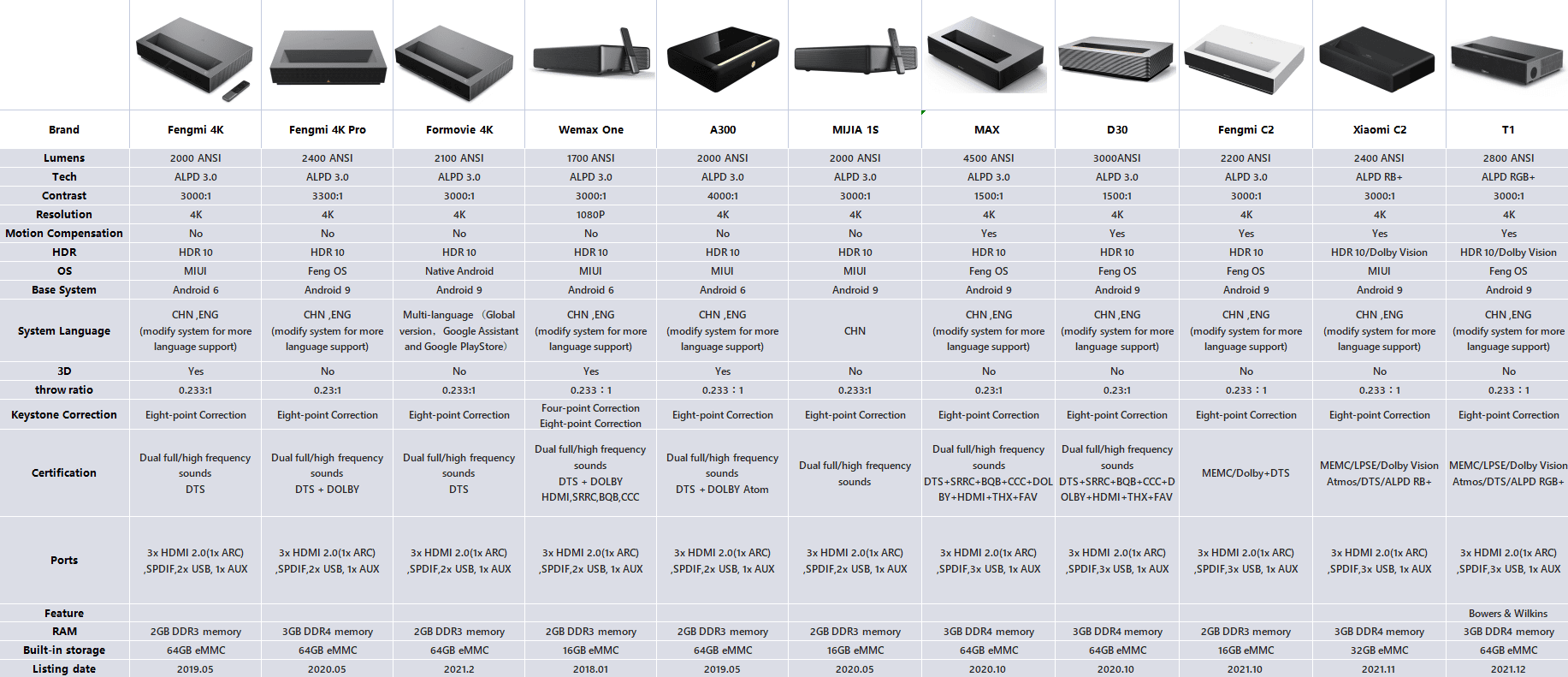
1080p models (MiProjA1 - codename: rainman)
- Xiaomi Mi Laser Projector (Chinese) | Model: MJJGYY01FM
- Xiaomi Mi Laser Projector (International) | Model: MJJGYY02FM
- Xiaomi MIJIA ALPD 3.0 (Rear Throw Laser) | Model: L185JCN
- Wemax One 7000 | Model: FMWS01C
- Wemax One Pro | Model: FMWS02C
4K models (MiProjLas2 - Codename: batman)
- Xiaomi Mi Laser Projector 4K (Chinese) | Model: MJJGTYDS01FM
- Xiaomi MIJIA 1S 4K | Model: MJJGTYDS04FM
- Wemax A300 | Model: L1668FCF
- Fengmi 4K Cinema Laser | Model: L176FCN
- Fengmi 4K Cinema Pro Laser | Model: L176FCNPro
- ??? | Model: L246
Equipment of the Xiaomi Laser Projector
DLP technology and short-throw projection
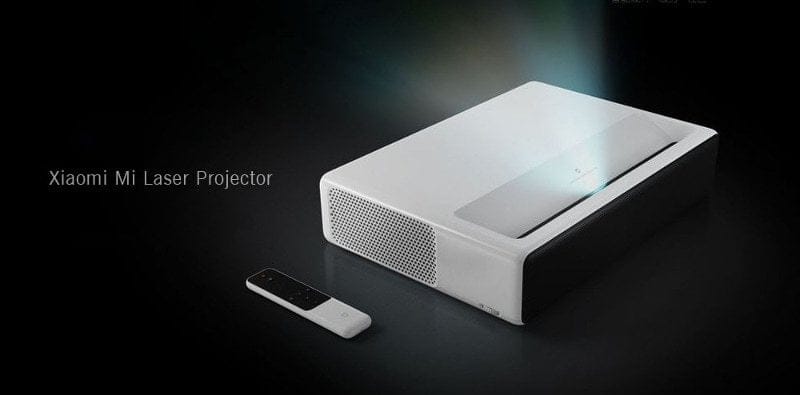
Let’s now look at the features of the Xiaomi projector. The projector uses Digital Light Processing (DLP) projection technology. The image is digitally projected onto the screen via micro-mirrors. The maximum resolution of the 0.47-inch DMD chip used here is 1920 x 1080 pixels (Full HD). As a short-throw projector, the Xiaomi projector is capable of projecting a particularly large image even from very short distances. This offers a wide range of possibilities, such as enabling an adequate home cinema experience even in the smallest rooms. The projection ratio is 0.233:1. Xiaomi specifies the lossless projection area as up to 150 inches.
Advanced Laser Phosphor Display 3.0
The projector's laser module is based on "Advanced Laser Phosphor Display 3.0" (ALPD 3.0) technology by Appotronics. The manufacturer is primarily known in the Asian home cinema market and is already one of the largest suppliers of laser technology there. The module consists of GaN-based blue laser diodes. Primary colours are generated by illuminated colour filters. The lifespan is stated by Xiaomi as at least 25,000 hours. The lumen rating of the Xiaomi short-throw projector is 5,000 ANSI lumens. This value is sufficient to produce a sufficiently bright image even in an undimmed room. It covers up to 85% of the NTSC colour gamut, and the contrast ratio is 3,000:1. Keystone correction (trapezoidal correction) is possible.
Smart TV function
Depending on the model you choose, the projector comes with a different user interface. The Chinese Xiaomi Laser Projector uses MIUI TV, based on Android 6.0. The international model uses Android TV version 8.1. There are also differences in the TV box hardware used.
- MIUI TV Box: Amlogic T968 with Mali T830 GPU | 2 GB DDR3 and 16 GB eMMC
- Android TV Box: Amlogic T962 with Mali 450 GPU | 2GB DDR4 and 16GB eMMC
Similar to a television's smart TV feature, the Xiaomi Mi Projector is equipped with a dual-band AC WiFi module and Bluetooth 4.0. This allows playback material to be streamed directly to the projector. However, MIUI TV is exclusive to the Chinese market. The user interface is completely in Chinese and does not come with Google apps. It lacks the Google Play Store, Netflix, YouTube and other useful apps.
But Android TV on the international model isn't perfect either. As mentioned earlier, the 3D function is missing and there are fewer picture setting options. Streaming services such as Netflix and Amazon Prime are also only usable to a limited extent. Due to the lack of Widevine L1 support, Netflix can only be streamed in SD.
HiFi sound and connectivity options
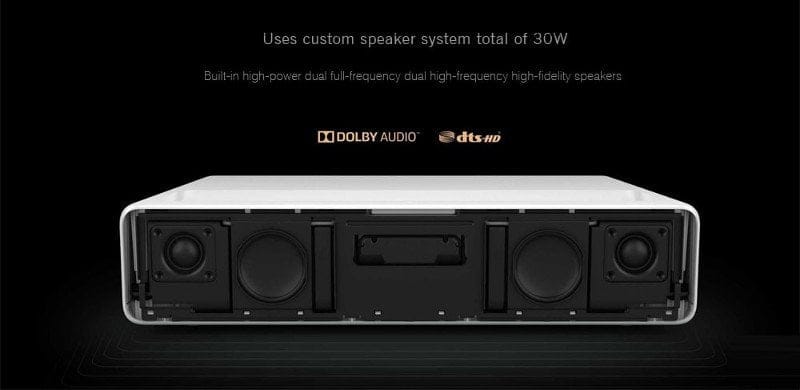
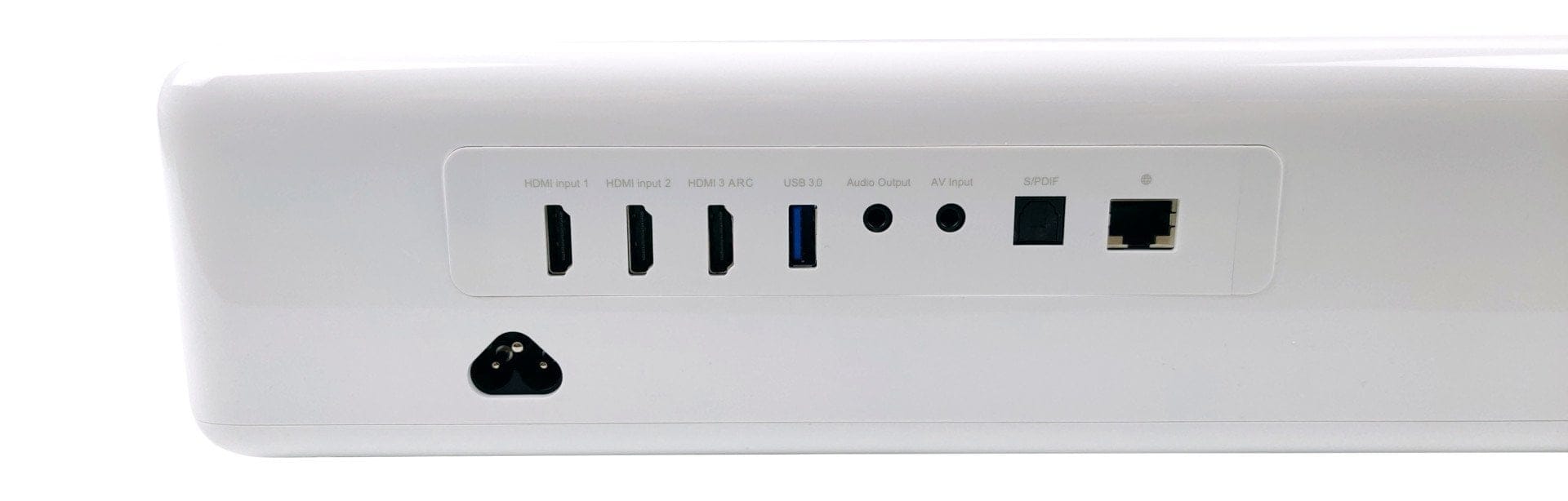
The Xiaomi Mi Projector is equipped with a total of 4 speakers, split into 2 full-range speakers and 2 tweeters. To support cinema-quality sound, the system features DOLBY Audio and DTS HD. The connectivity options include 3 HDMI 2.0 ports (one with ARC support), two USB ports (one USB 3.0 and one USB 2.0), a 3.5 mm audio output, an AV input, an S/PDIF port and an Ethernet port.
Other
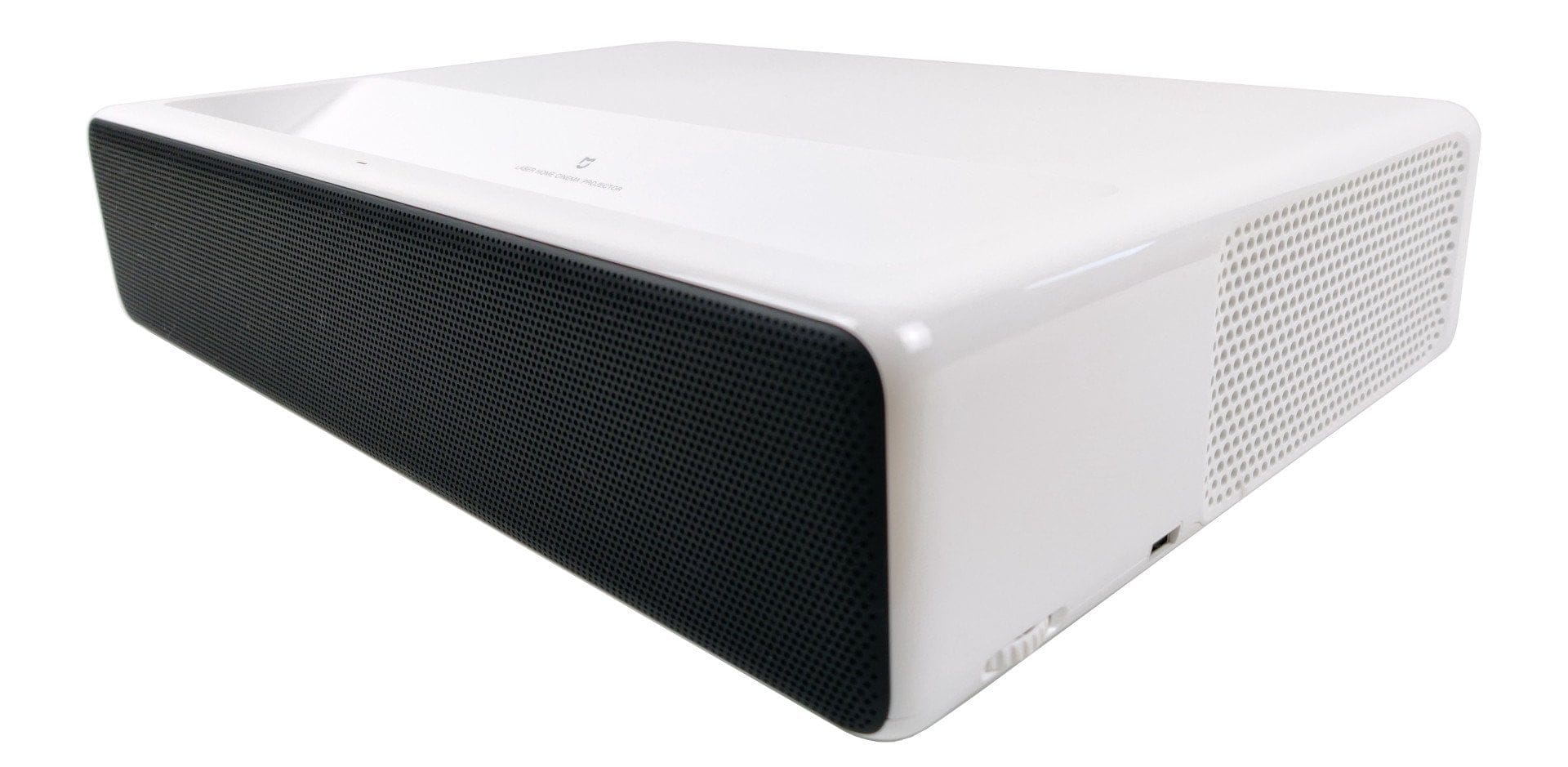
The dimensions of the beamer are 410 × 291 × 88 mm, and the weight is 7 kg. To protect eyes, the Xiaomi beamer additionally features a sensor that detects movement in front of the projection surface and dims the image. The power consumption is a maximum of 250 watts. When idle, the projector consumes less than 0.5 watts according to Xiaomi. The fan noise is specified by the manufacturer as less than 32 dB. The device is delivered including a multifunctional remote control.
Practical test of the Xiaomi Laser Projector
Brightness, black level and contrast
Xiaomi specifies the brightness of the laser at 5000 lumens. Brightness can be adjusted via the three projection modes "Normal", "Cinema" and "Highlight". There is no Eco mode! The measured brightness on a 90-inch projection surface (Gain 1.0), centred and in the brightest "Highlight" mode, is 1035 lumens. The measured black level is 0.43 lumens. The measured contrast ratio is 2419:1.
Daylight readability
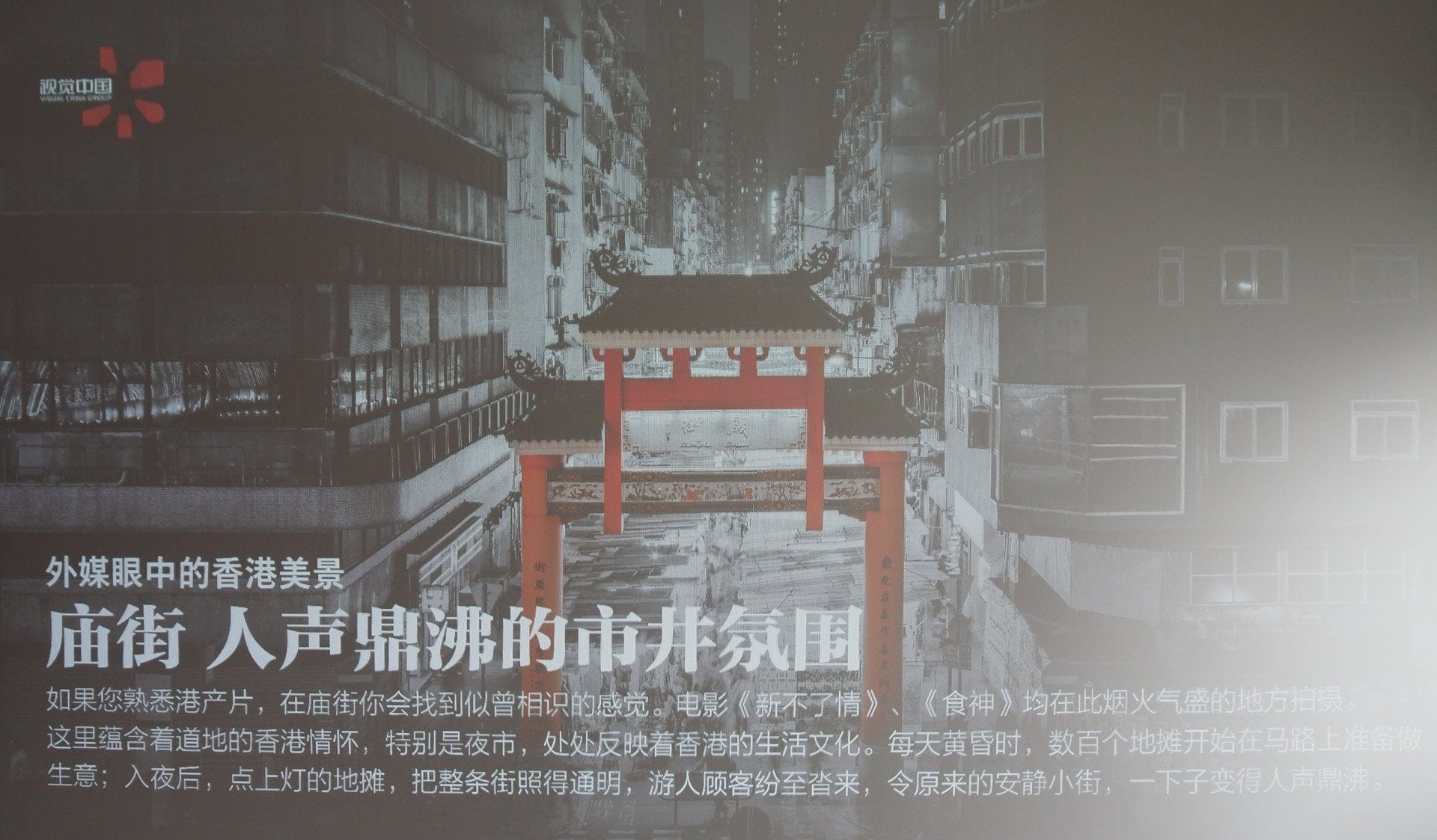
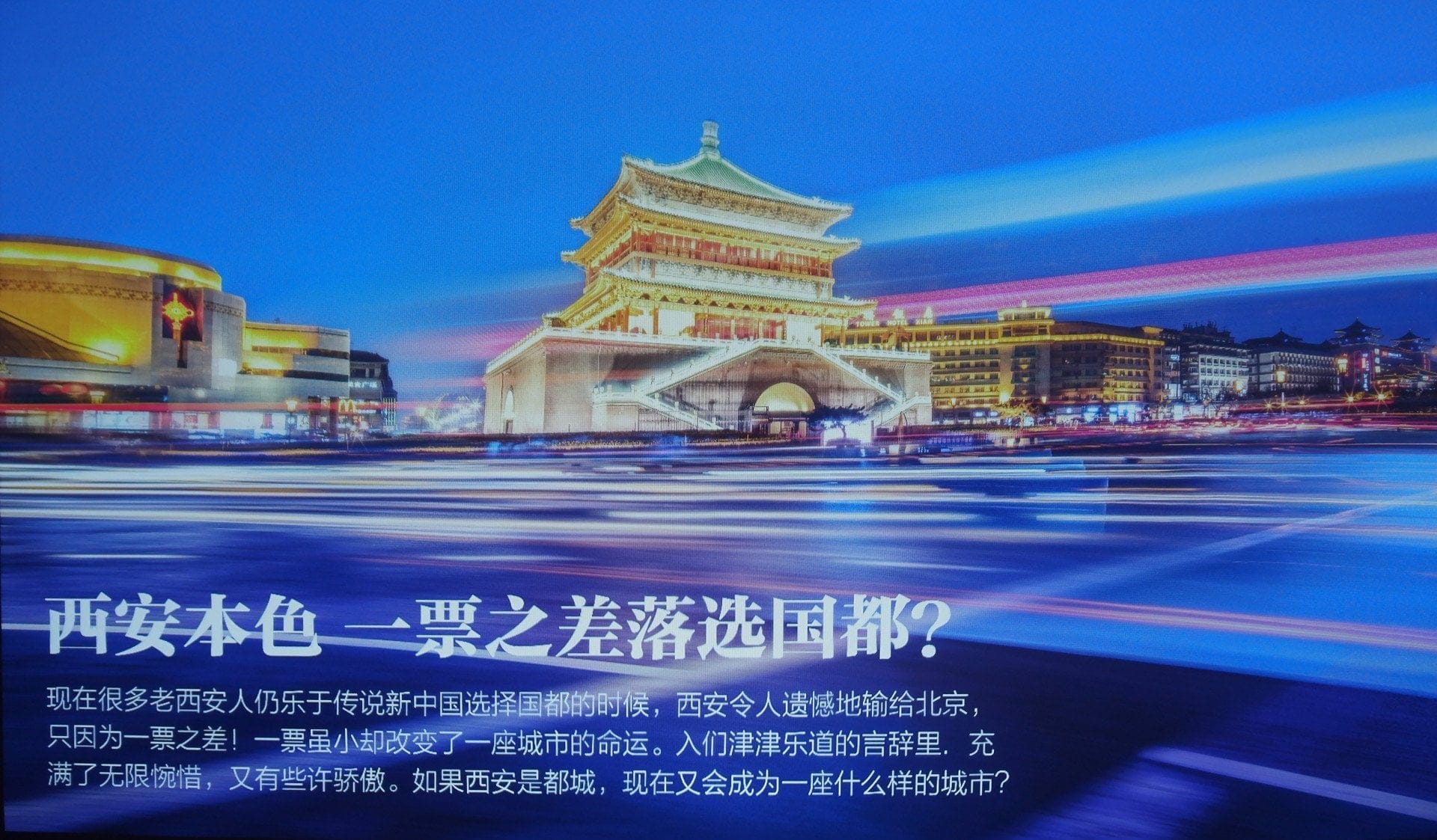
For projection surfaces >90 inches, the projector is rather unsuitable in daylight. Attached are test images, on a conventional 130-inch projection surface in daylight and in the dark. Better results can be achieved with a high-contrast screen (ALR). Such a screen, however, often costs more than €1000.



Resolution
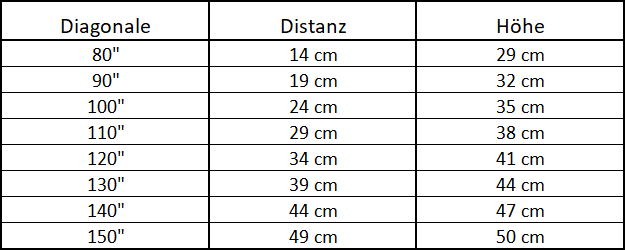
The projector has a native resolution of 1080p at a maximum of 60 Hz. 4K upscaling works without any issues. Individual pixels are only visible at very close inspection. Overall, the image sharpness is convincing, and the distribution of sharpness towards the corners is also unobjectionable, although slight blurriness can be seen. Here is an overview of the distances.
Grayscale and colour reproduction
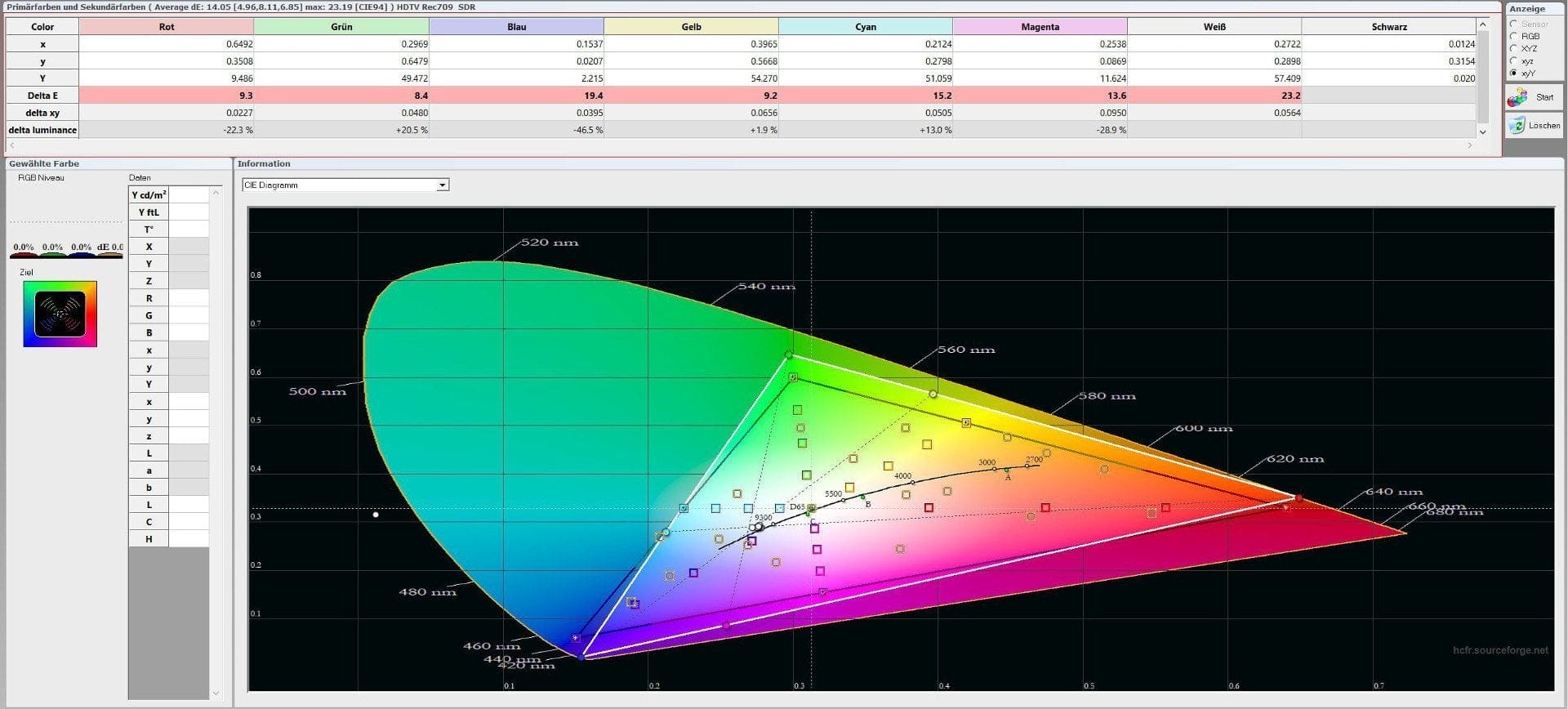
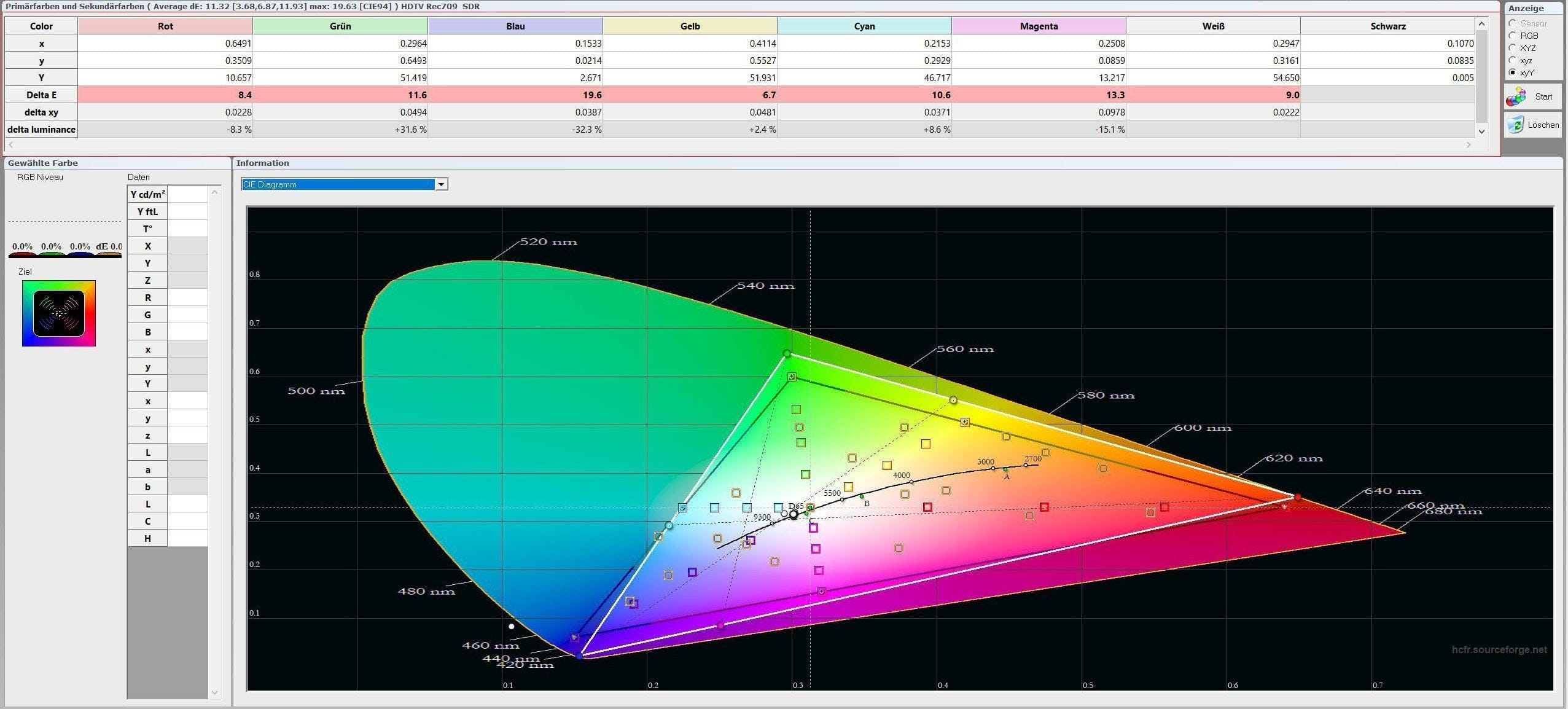
With factory settings, a lot of blue is added to obtain a bright white. In general, the colours are far from the Rec.709 standard. Out of the box, the Xiaomi projector operates in what is essentially a shop mode with rather garish colours. Image enhancements include a dynamic contrast mode and a dynamic colour mode. If you calibrate the projector, good results can be achieved, accompanied by only a slight loss of brightness and contrast. Those who do not want to calibrate themselves should choose the colour temperature “Warm” to achieve reasonably precise results.
Factory settings

Colour mode "Warm"

Sound and volume
The Dolby audio system delivers outstanding sound. The bass is clearly audible. It is a truly excellent speaker system and better than many soundbars.
The sound pressure level measured on the laser projector was 42 dB. At a distance of 3 meters, a value of 27 dB was measured. The volume is acceptable. During quiet film sequences, the beamer's fans can be heard as a high-pitched hum, but this largely disappears at normal playback volume.
MIUI TV and OSD
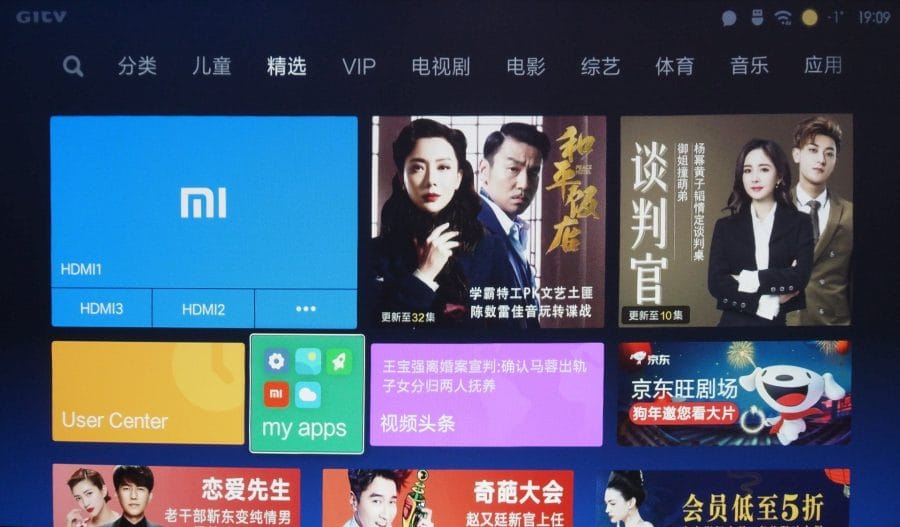
The menu navigation is somewhat clunky, as only 75% of the Chinese interface can be translated via a Settings.apk. However, one gets used to it quite quickly. The smart TV function is primarily aimed at Chinese users. Android apps can be installed via sideload. Netflix is not supported. Kodi runs up to version 17.4; the Kodi fork SPMC is operational up to and including version 17.6 Alpha 2. The integrated media player is very good. It plays pretty much everything! Connecting a Chromecast, Apple TV or any other TV box to the Xiaomi laser projector is no problem.
It is now also possible to root the projector. At XDA-Developers (Link), innovative developers have published the Mi ProjecTivy Tools, which extend the Xiaomi Laser Projector with useful functions. The OSD is integrated into MIUI TV. There are settings options for keystone correction (4-point and 8-point), manual focus and display (projection mode and colour mode). There is no frame interpolation. The only image enhancers are the aforementioned dynamic contrast mode and dynamic colour mode.
Other
Ceiling mount
Ceiling mounting is possible. Threads for a bracket are available. The image can be rotated 180° in the settings, i.e. inverted (flip mode). It is also possible to project a mirrored image (mirror) or both combined, i.e. rotated and mirrored (flip & mirror).
3D and gaming
The projector (China model only!) supports the 3D DLP-Link format. The image is pleasantly stable and bright. No ghosting occurs. Switching between SBS-H / TAB / FP is possible via the OSD.
The Xiaomi Laser Projector is less suitable for gaming. The input lag of more than 65 ms is clearly noticeable. While there is a special gaming mode, it is merely an additional display profile. Image enhancers are not automatically disabled in this mode.
Power consumption
The power consumption measured in “Normal” mode is 180 watts. In “Cinema” and “Highlight” modes, consumption rises to more than 210 watts. The standby consumption is an acceptable 17 watts.
Our verdict
With the Xiaomi Mi Laser Projector, Xiaomi presents a well-thought-out product with a decent feature set at an affordable price. Comparable short-throw projectors are hard to find here for less than €1300. I particularly like the simple design, the overall good picture quality, and the excellent sound of the Dolby speaker system. Points were deducted for fan noise. While it is just about acceptable, it can be quite distracting during quiet scenes.
It is important to pay attention to the different models of the Xiaomi Laser Projector before purchasing. If you choose the Chinese model, you will receive Chinese MIUI TV instead of Android TV. However, the projector supports 3D DLP-Link, which is unfortunately missing in the international model. It is recommended to import the Chinese model and use it with an external TV box. Even the international model with Android TV has problems with major streaming services such as Netflix or Amazon Prime due to a lack of DRM management.
Specifications
General
- Type
- DLP
- Chip
- 0.47” DMD 1080p
- Light source technology
- ALPD 3.0
- Brightness
- 5000 Lumens
- Brightness uniformity JBMA > 80%
- Color gamut
- NTSC 80% ~ 85%
- Mid-level contrast 2500
- 1 ~ 3500: 1
- Resolution
- 1920 x 1080 pixels
- Aspect ratio
- 16:9 (4:3)
- Projection size
- ~150"
- Throw ratio
- 0.233:1
- Contrast ratio
- 3000 : 1
Ports
- 3x HDMI 2.0 (1x ARC)
- 1x 3.5mm jack (audio out)
- 1x AV
- 1x USB Type-A 2.0 socket
- 1x USB Type-A 3.0 port
- 1x S/PDIF
- 1x RJ45
Other
- Speakers
- 2x full-range - 2x tweeter
- Audio
- DOLBY, DTS
- Smart TV
- MIUI TV
- 3D support
- Yes
- Lamp life
- >25,000 hours
- Power consumption
- 250W / 0.5W (Standby)
- Size
- 410 × 291 × 88 mm
- Weight
- 7 kg
Price comparison
| Store | Price | Link |
|---|
Comments (130)
The price is really a bold statement. I had already planned to buy a projector months ago and quickly abandoned the idea because I couldn't find anything suitable for me. A laser DLP projector with 5000 lumens brightness would be amazing even for €2,000. Please, please bring out a review of it. If it's good, I'll buy it immediately.
Do you think the price will drop further? I need a good projector by the World Cup at the latest.
In China, the projector costs the equivalent of €1,275. Usually, import shops are not far off the Chinese prices. It just takes a few months for the price to settle. If you really don't need the projector until the World Cup, the price will certainly have dropped by then.
Great, thanks for the information!
Hello, I have some questions about this projector. I hope you can answer them.
1. Which 3D glasses is it used with?
2. Do laser projectors require a special screen?
3. How do you replace the lamp?
It would be great if you could help me with that.
Hi, beer lover (cool nickname ;)). Of course we can answer your questions.
1. Conventional 3D DLP shutter glasses are used for the 3D function.
2. You don't need a special screen.
3. The “lamp” here is a laser module with diodes, which would need to be replaced. But with a lifespan of more than 25,000 hours, you hardly need to worry about that. Even if you ran the projector for 8 hours every day, you could easily use it for over 8 years.
Hi Timo,
thanks for your reply. What you describe sounds really promising, but I would still like to wait for your test report. Do you know when it will be published?
Hello beer lovers, a review sample of the Xiaomi projector has already been ordered and should (hopefully) arrive next month. If all goes well, a review can be expected in early January. Depending on the product, I usually take 2-5 weeks to thoroughly test the device in everyday life.
Hi Timo,
has the projector arrived yet?
Hi beer lovers, no, unfortunately not yet. The projector has been on its way since 04.12. I currently expect it to arrive in the first week of January. Once the device has arrived, an update will follow on this page. For my reviews, I first use the products in everyday life for about 4 weeks (depending on the product!) before I summarise the test report. However, I will post my first impression of the Xiaomi projector online sooner.
Hi Timo, thanks for this post. I have one of these and am very satisfied – the Chinese menu somewhat hinders usage. In your article, you mentioned the possibility of changing this via a theme launcher. As a Mac user not familiar with Android, I would appreciate some further links.
Hi Don Perignon, great that you already have the projector. Mine is still on its way, and I'm curious to see what it's capable of. The projector's MIUI TV should be translatable just like the MIUI TV of Xiaomi TV devices. Here are the steps:
1. Download the following file
2. Unpack the .rar archive and copy the .apk to a USB stick.
3. Insert the stick into the projector, access the stick and install/update the APK.
4. Switch to the new Settings app and change the language to English.
I hope this helped you. I would appreciate it if you could give me a quick reply to confirm if it worked.
Thanks for the quick reply – good man!
I will get back to you after the weekend and let you know.
To install the app from an external medium, you first need to tick the corresponding option in the projector's settings to allow it. The new Settings app then appears alongside the others. Unfortunately, switching to English is not possible, as the corresponding language library cannot be found. If you can somehow get it onto the device, it should work. Too bad, but thanks anyway!
Thanks for the feedback. Once the projector has arrived, I will check if the language can be changed somehow.
https://drive.google.com/drive/folders/1Giy91xRRSrToNINGR5d9eHaMA9_DuzMt
All compatible apps for the projector can be found here – including the Settings app. It works for the most basic settings if you choose English (not US).
Great, thank you very much for that!
It is also very fine that the projector's remote control works with the Apple TV 4K, so you only need the Apple one for gaming (motion sensor).
I am sure that this projector will change the home cinema market in Europe – in terms of quality and price. I wish you lots of fun with yours!
I am moving into a new apartment soon (in February) and am considering getting this projector instead of a 65-inch TV. I have no problems with shipping from China, and I am generally very satisfied with Xiaomi. Is the projector suitable as a TV replacement? Normally I watch series and films via the NVIDIA Shield and play via PC and PS4 Pro. I hardly watch normal TV anymore. All windows can be darkened with external roller blinds. I think the price will be around 1300 euros in the next few weeks. Then it would be very attractive price-wise. Are there any fundamental objections to using the projector as a complete TV replacement? The power consumption is also very moderate, and the lamp lifetime anyway. The width of the screen would then be about 210 cm and the viewing distance 4 m.
Perhaps someone else is planning a similar project and can offer advice on whether and how my plan can be implemented.
Thank you
Chris
Hi Christopher, I can't speak directly for this model here, as my Xiaomi projector is still somewhere between China and Germany, but I have been using a different projector for two years that has replaced the TV in my home. If you really want a home cinema feeling (>120 inches), you can't get around a projector anyway. What you should also consider is the right screen. On Amazon, I often see cheap screens for 150€. They will do the job, but if you want quality, i.e. a screen that doesn't warp over time, you have to dig deeper into your pocket. A tension variant would be recommended, for example. However, these start at 500€ upwards.
Hello Timo,
Thank you for the reply. I am aware that one should not skimp on the projection screen and have already factored this in. I was thinking of building my own framed screen with high-quality fabric and suitable masking. I have also watched a few test videos, which are consistently positive. I will probably just give it a try and buy the next time there is a special offer. If necessary, you can always sell them on eBay. Is shipping via priority line still straightforward?
If anyone spots a good deal, they can share it here. It will likely be interesting for many others too.
Can the projector receive HDR signals? Has anyone tested this yet?
There are currently significant shipping delays again with Priority Line. I still have two orders pending that have already been in transit for 30 days. GearBest mentions shipping times of up to 45 days. This should hopefully have calmed down again by January. I receive the current GearBest offers daily. As soon as there is a good one, it will appear in the post.
Regarding your question about HDR: According to the specifications on the official Chinese product page, HDR is supported.
http://stlasertv.com/xiaomi-mijia-laser-tv-first-detail-review-the-best-laser-tv-in-the-world/
Hi Timo, I project the image onto a very dark – almost black – wall. I know that sounds absurd at first, but it is possible with the light output and ensures a rich black. However, the surface must be completely flat, otherwise uncorrectable blurriness will occur. Textured wallpaper is absolutely taboo, as the projection angle would create many small shadows. There are screens with a special micro-profile for these short-throw projectors, but they are anything but cheap.
Hello,
I received my Xiaomi laser projector a few days ago. It was ordered from Gearbest not even 4 weeks ago.
I ended up here because I have been trying to change the language for the last three days. I knew it would be necessary when I placed the order.
Path 1: Manually installing Google apps ends in chaos.
Path 2: First installed and opened the Default Settings app, then opened the Google Installer. However, the installer does not install point three, and therefore does not install the subsequent points either.
If I use my IPTV box H96pro+, with all media libraries and KODI, the projector is quite fun. The picture is still okay to watch during the day in my very bright apartment. It is dark outside anyway right now.
I can only recommend buying a projection screen; it is only then that it becomes really fun., at least my wall is not smooth enough,
The integrated speaker system is designed for film (cinema) and is significantly better than I expected.
It is not suitable for listening to music. It is cinema and not a stereo system.
I've already gotten used to the size and never want to go back to one of those small “normal” TVs.
Does anyone else have experience and can help me with the language issue?
THANKS PATRICK BLUM
[email protected]
Hi,
The update states that the Google Play Store can be installed via sideload. Is there a guide available somewhere for this? I cannot find anything about it on the web at all...
Thank you in advance!
Regards,
Pr3dat0r
Hi Timo. I have the APK on a USB stick, and the projector recognizes the file. But I can't figure out where the menu is that lets me “allow” installing something from USB… Can you help?? Best wishes from Switzerland, Christian
Good article! Looking forward to the detailed test.
I am somewhat torn about whether switching to this would be an improvement for me. Currently, I have a Philips 8601 in 55 inches, which supports 4K. The image size displayed by the Xiaomi is obviously beyond dispute; it wins without a doubt. What I am more interested in is image sharpness, particularly with 1080p content and from a PlayStation 4 Pro, which, while not capable of native 4K, nevertheless delivers good sharpness.
@Timo
You definitely have the device by now, can you recommend it? I want it as a replacement for my 75-inch Samsung LH 6470. What do you think, suitable for daylight or rather not?
LG
Hi Hanspeter, the projector only arrived a few days ago (it was in transit for more than 50 days!) and due to time constraints, I haven't been able to really try it out yet. However, by the end of next week, I will have at least tested the projector somewhat and will be able to publish an initial interim conclusion. Depending on the product, I usually take 2-4 weeks for a completed test report.
Hello Timo !
Could you already take a closer look at it?
Frame interpolation? Daylight suitable? Your interim result? Purchase recommendation ?
My TV-DEVICE is broken and that's why I'm asking, so that I can order one.
Thanks
Are you selling your unit and for how much?
Hi Hanspeter, I have now been able to play around with the projector a bit. Regarding your questions:
1. There is no frame interpolation!
2. The projector is only limitedly suitable for daylight. With a 130″ projection area and no direct light input, you can still speak of an acceptable and reasonably bright image. Slightly dimmed, i.e. with shutters slightly open, is no problem. Which type of screen and area were you planning to project onto?
3. Interim conclusion: Menu navigation is somewhat clunky, as only 75% of the Chinese text can be translated. However, one gets used to it relatively quickly. The smart TV function is also questionable. It is primarily aimed at Chinese users. Nevertheless, Android apps can still be installed. What exactly is possible with them still needs to be tested.
I generally like the picture quite a bit. Sharpness, contrast and colour gamut are convincing. I will measure the light output soon. I also haven't tested the 3D function or the input lag in gaming yet. I will address these points in the final review. What I really liked was the speaker system. Not adequate for home cinema enthusiasts, but certainly sufficient for the average user. A 500€ soundbar with subwoofer hardly sounds better. Recommendation? Definitely worth buying so far!
I am not selling my unit. The new Xiaomi is replacing my old Epson projector. 😉
Hello Timo!
Overall, this doesn't sound good. With 5000 lumens, more should be possible than half-closing roller blinds …
I think you have helped me a lot, I'd rather wait for the LG HU80K.
And thanks 🙂
Hi, thanks for your reviews! We're thinking about buying this for the company, but we were told it doesn't have a “CE” mark, so we're not allowed to use it (in a business setting). Can you confirm or deny this?
thx
Hi Lukas, I can confirm that. There is only a CCC mark.
Hi Timo, thanks for the excellent review! Just one question. Can I play UHD BD, Netflix 4K and other content with the Xiaomi projector? Regards, Frank
Hi Frank, yes, you can do that. The HDMI 2.0 ports are HDCP 2.2 compatible, 4K works via upscaling, but there is no frame interpolation.
I would be interested to know
1. how large the diagonal is if I only have a cabinet that is 40 cm deep. So, from the wall to the front edge of the projector, I have 40 cm.
2. Whether you had to pay import VAT/customs duties when ordering from China?
Thank you
Hi Sven, I have published a table with the distances in the update above. At a distance of 40 cm you would have a 130" diagonal.
Depending on where you order, import duties naturally apply. Many shops now also offer "Delivery Duty Paid", "Germany Express" or the subsequent assumption of the duties. However, this projector is also regularly available with shipping from European warehouses. However, the quantity is severely limited and it is sold out after 1-2 days. I always try to point out the EU offer as quickly as possible as soon as it is available again with EU shipping.
Good evening. I understood that the smart TV of the projector cannot be used because many Chinese apps are installed and there is no such thing as Google Play. Couldn't you simply root the projector and install Play Services via sideloading? This is at least how it worked with my Mi TV Box 3, which now even runs with the Android TV Launcher!
Hi SPiderJoe, theoretically it would indeed be possible to root the Xiaomi projector. The MIUI TV module used is pretty much identical to that of the Mi TV 4, and there is a rooting tool available for that device. Furthermore, there is a universal rooting tool in Chinese forums that roots all Xiaomi home entertainment products released so far. BUT: The problem is rather that there are currently no ROMs available for download. If rooting fails, you would completely break the system, and the projector would be pretty useless. As soon as there is a ROM that you could flash in case of a brick, I would be willing to try it with the rooting tool ;).
Thanks for the review.
I have a question that has not yet been clarified. Can the device also be operated upside down?
Thank you for your reply.
Hi Andreas, the image can be rotated by 180° within the settings, i.e. turned upside down (flip mode). You can also project the image mirrored (mirror) and both combined, i.e. rotated and mirrored (flip & mirror).
Does anyone know if you can connect a universal remote control to the projector?
I would like to use my Bose remote as an all-in-one.
Hi Jonathan, that should work. CEC is indeed supported.
I own a Broadlink Pro, which allows me to control all my radio and infrared remotes via PC.
However, it does not support Bluetooth. The projector is controlled via a Bluetooth remote.
I did not fully understand the point about CEC. Most universal remotes send infrared signals and not Bluetooth – can the projector still be operated with an IR remote?
Hello Timo, thanks for the very helpful review. Can you say anything about the input lag when gaming? It doesn't have to be an exact measurement, a subjective assessment would be helpful for now. Regards P.
Hi Philipp, I will try out the input lag issue in the coming days.
Good review! I'm looking forward to the final test. I'm already itching to get started. I'd buy it immediately for 1,300. What additional costs are involved? Import/VAT?
Hi Marco, for orders from outside the EU, 19% EU VAT is added from €22, and from €150, depending on the type of goods, an additional customs duty applies. However, the projector is often also available from an EU warehouse. As soon as there are new deals from an EU warehouse, I will add them above!
Hello,
There are several warehouses available today: G-W-4, G-W-16, G-W-5, G-W-6
. Which one is recommended? I am considering buying one today. Thanks, LG
Hi Marco, thanks for the note. G-W-4 is in Poland, G-W-16 is in Spain, G-W-5 is in the Czech Republic and G-W-6 is in France. Experience shows that G-W-5 is the fastest warehouse.
Ok, thanks for the quick feedback. I'm still torn between the Xiaomi or a BenQ W1700. The Xiaomi has better usage options due to the short throw distance. Laser light is not to be dismissed either. I'm just afraid that the package will get wrecked in transit – or that non-transparent additional costs will arise. Furthermore, the device must be operable by my wife 🙂 It shouldn't have to struggle through deep Chinese menus when a source is connected, right?
The BenQ W1700 is certainly also a good choice. No additional costs (EU VAT or customs duties) are incurred, provided you order from an EU warehouse. There is always a shipping risk. Therefore, pay via PayPal without fail. If something goes wrong, you will get your money back 99% of the time there. The operation of the projector is largely unproblematic. The source selection is displayed directly after startup (see screenshot above). Otherwise, it can also be set that a source is selected automatically upon startup. CEC is also supported.
Ok, thanks. So the projector has your blessing – I gather that from all the information 🙂
One last point. You've had experience with 4K upscaling. Does it actually output 3840 x 2160? Is there a noticeable quality improvement? Thanks for the quick feedback.
Yes, once you enable HDMI 2.0, you can upscale to 3840 x 2160 @ 60Hz. However, it will not make much of a difference, as the projector still resolves only natively in Full-HD and does not use pixel shifting. The reason 4K playback material ultimately looks better is rather the higher bitrate and chroma subsampling. You will particularly notice a difference when streaming.
Sorry, what do you mean by enabling HDMI 2.0? I thought the device only supports 3,840 x 2,160 @30 for 4K output?! I intended to connect a PS4 Pro. The device cannot output native 4K anyway. But I would like to find out if it represents an improvement over, for example, the BenQ W1070 Full HD. Thank you
There is a dedicated HDMI 2.0 mode that is activated via the settings. You can then set the resolution of the source device to up to 4K@60Hz. You will not see any improvement in upscaling. However, when playing a UHD Blu-ray, you will likely see a slight difference. It ultimately depends on the playback material (bitrate when streaming, chroma subsampling, etc.).
Hello,
Cool device. But can you also use it to watch “regular” TV? Does it have a built-in tuner? If not, what options are available?
Hi Frankie, no, the projector does not have a built-in tuner. However, you can connect a receiver via HDMI.
Hi, is it possible to use Amazon Prime? Installation works, logging in also works, I get to the selection page, and then nothing happens. Same with Google Play (only installation works). Otherwise a very good projector, especially with a grey screen, and with the tip: set sharpness to 0.
Hi Vladimir, no, Amazon Video does not run on MIUI TV. However, you can connect an external TV / streaming box (Chromecast, FireTV, etc.) and play Amazon Prime through it. HDMI 2.0 and HDCP 2.2 are supported.
Hi, where did you get the information that the projector will be sold in Europe for €1300 from summer 2018?
That would naturally be great because you would naturally have the following advantages.
2 years warranty
Lower price
Pure Android menu in German
EU plug
Better customer service
Your statement is the only thing preventing me from buying from China (EU warehouse).
Kind regards
Andreas
Hi Andreas, Xiaomi showcased the projector at the MWC (Mobile World Congress). The projector was already presented there running Android TV, and there were indications of a launch in summer 2018. The price of 1300€ could be realistic, but I expect it to be closer to 1500€+. The projector is initially set to be sold only in Spanish Mi Stores and possibly via Amazon.
Thanks for the quick reply.
Would you recommend I wait or buy now?
Do you see the advantages of the European version as I do, or have I made a mistake?
Do you perhaps have an equivalent UST projector available in Germany that you could recommend to me?
Thanks in advance
Difficult. Handling the warranty through a retailer based in the EU is naturally easier, but many China shops offer to send the defective device back to an EU address (best to ask customer service!).
The advantage is purely Android TV. But do you even need the additional TV Box function? I personally always use my devices with a separate streaming/TV box (e.g., Fire TV). Otherwise, the menu navigation is in English (with a patch).
You do not need to worry about the plug. You can connect the projector using a standard appliance power cable. As I said, I do not believe the price will be lower (see other Xiaomi products already officially offered in the EU). At the moment, everything regarding the summer release is still very vague. The statement came solely from an employee there.
Ok
I would like to pair the projector with my iPhone and preferably use it wirelessly via the SKY Go app.
Is that possible without any issues?
If so, Android TV would be of little importance.
What do you actually think of the stated 5000 lumens?
Pure marketing, or does the figure refer to the output power of the laser?
You wrote that you measured 1035 lumens.
How do you see the comparison with other UST projectors?
Is it better or only equivalent?
Many thanks
Andreas
Hi Andreas, unfortunately I am not familiar with Sky Go. Possibly the app could be installed via sideloading. Alternatively, according to reports online, Sky Go is also available as a Kodi plugin. I am currently trying to get Kodi working on MIUI TV.
The specified 5000 lumens is what the light source theoretically delivers. The 1035 lumens are what ultimately reach the screen. Compared to other projectors, especially the LG HF85JG, the projected image of the Xiaomi projector is slightly brighter.
Hello,
I would like to mount the projector to my ceiling and control the projection size via drawer rails.
Can anyone tell me the thread sizes and spacing of the four holes on the underside?
Perhaps someone has a better mounting option for it?
Hi Thomas, the distances are 23.5 cm and 13.5 cm, and the threads are M4.
Hello,
how did you establish the connection between the projector and a 3D-DLP shutter glasses?
Best regards
Hi Tim, you just need to switch on the glasses and select the corresponding format (SBS-H / TAB / FP) via the projector's display menu during playback.
I'm struggling with the same problem right now. I have two Toshiba FPT-AG02G glasses from my TV, but they don't connect automatically. Even when I go to Settings > Devices > 3D, a “Please wait” message appears, then after waiting a long time, the Settings app kicks me out…
Is this due to my device or are the glasses simply not suitable?
Hi Andreas, I do not need to connect my 3D glasses via the settings. The connection is established automatically as soon as I select the respective 3D mode (SBS-H / TAB / FP). I am not specifically familiar with the Toshiba glasses. I have tried it so far with two cheap Andoer G15s and an Acer 3D DLP glasses, and it worked without any problems.
Hello Timo,
Thank you for the detailed review.
Actually, I wanted a 4K projector for PC gaming, because the field of view becomes significantly larger in shooters or racing games.
How exactly is the situation with 4K content?
Do I get the same field of view as with native 4K, just in 1080p?
Sorry, I haven't fully grasped it…
Hi Thomas, in this case, your source device would send a 4K signal to the projector, which accepts it but ultimately outputs only at 1920 x 1080. This is comparable to, for example, a PC monitor that only resolves in FHD but can still display 4K UHD videos. The only advantages are the ability to display UHD material and 4K streams, which look better due to higher bitrate and chroma subsampling. However, you will not be able to project more than 1920 x 1080 pixels onto the screen.
In my opinion, the Xiaomi projector is unsuitable for use as a gaming projector. The input lag is more than 65 ms. Depending on what you are playing, you will notice the delay.
Hello. After the great comments and explanations on this page, I'm almost convinced to get one of these beauties myself. I just have two requests. Is it possible to state the width and height for 150" so I can build a screen, and is there a way to output a list with an explanation of the individual Chinese characters in the menu with German translations, so you can navigate the menu without an update. Thanks to all and happy Easter, Hasipapa
Hello,Hello.
I calculated my first question myself.
60″ 132 x 75 cm
70″ 154 x 88 cm
80″ 176 x 100 cm
90″ 198 x 112 cm
100″ 220 x 125 cm
110″ 240 x 137 cm
120″ 264 x 150 cm
130″ 286 x 162 cm
140″ 308 x 175 cm
150″ 332 x 187 cm
These are the approximate screen sizes. I hope this helps others too.
But I don't speak Chinese, so I need help with that.
Happy Easter.
Hi Hasipapa, sorry for the late reply. A translation of the individual menu items would certainly be an advantage. I will get started on a translation over Easter.
Hi Timo.
Thanks for your quick response. The translation isn't super urgent.
I first have to negotiate with my seller. That might take a little while.
So. And now I wish you a happy Easter.
Greetings from Norway,
Hasipapa
This video translates the individual terms into English. Translating them further into German should then no longer present any problems.
youtube.com/watch?v=D5Xqws6cWXU
Hello Thomas.
Thanks for the reply, but my English is dreadful.
However, on this link, near the bottom, there is a link to download the English language app and a sequence of images showing how to install it. I can understand that. This is also a helpful guide. Maybe we’ll be lucky and the Chinese programmers will take pity on foreigners and release an international language app for installation. By the way, I’m supposed to receive the new gem next week. I think it will be great. I have one silly question left. I only calibrated my old 60" TV via YouTube after two years. And the result was significantly better. Has any of you tried something similar? So, thanks again until next time.
Regards Rainer
Hi Hasipapa, I assume you want to calibrate to Rec.709. By default, blue is boosted quite a bit (see the measurements above). You can already get good results in “Cinema” mode with the “Warm” color profile. I'll send you the color profile I calibrated with the colorimeter tomorrow.
I won't get my projector for another 1 to 2 weeks. But I've read on various forums that there is no “universally perfect” setting for contrast, color, etc., because it depends on many different factors, such as the brightness of the room, the type of screen …
You're welcome to try a suggested setting exactly as it is, but I'd recommend taking some time to experiment yourself. Everyone perceives things differently, too.
The projector will arrive on the European market in the summer. It was already presented at MWC 2018 in Barcelona. A global multi-language ROM will be included then, and I assume this ROM can also be flashed onto the Chinese projectors.
Thanks to you both. I've fired up my backup HDP 1590 projector. It runs at 2,500 lumens. When projecting onto the screen with the other one at 5,000 lumens, how is it perceived in general? Twice as bright or even four times, how should that be taken? Just wondering.
Rainer wishes you a nice weekend
The projector has 5000 lumens at the light source, but only 1/3 of that (1666 lumens) on the image surface (screen). However, brightness is consistently rated as very high in all tests. Even in daylight (no direct sunlight on the screen), the image remains clearly visible.
Hello Timo,
please excuse the question, is the complete review of the beamer finished? Or is there more to come?
How far away from the screen do I need to sit in order to watch a film in HD quality on a 100-inch surface acceptably? Could it be that the image is too coarsely pixelated at this size due to the missing 4K resolution?
VG
Niko
Hi Niko, the green box at the top contains the bullet-point review of the projector. I will of course expand on this in full prose soon. I usually take several weeks (sometimes even months) to write detailed reviews in order to cover all areas and to see how the device performs in daily use over time.
Regarding viewing distance: There is no one-size-fits-all answer to where the perfect viewing distance lies. It depends primarily on the viewer. Personally, I would recommend a distance of 3.00 to 3.50 metres for 100 inches. I project onto just over 130" at a viewing distance of 5.20 metres. You can only see the pixel grid if you stand directly in front of the screen.
Thanks for the quick reply! Looking forward to your final report!
Hi... Can the image size be adjusted continuously?
Hello, hello.
I've had my Xiaomi projector since Thursday, and three things stood out when I started using it. First, the fan is loud, but you only notice it in very quiet scenes. Second, the picture is amazing. Third, the drop in quality on private channels is noticeable because of their low image resolution. You can adjust the picture continuously from 55″ to 150″. The whole image rises from 10 cm to 49 cm above the floor, so you need enough ceiling height. After three days of testing, I settled on these settings: Brightness: 62, Contrast 29, Saturation 39, Sharpness 60, Hue 53, Colors Standard. I'm always open to suggestions for improvement. A screen or a smooth white wall is essential for enjoying movies. Switching from Chinese to English was no problem thanks to all the help online. GAMES: So far I've only played “Sniper Elite 4,” and the difference between a 60″ plasma TV and the 150″ projector is extreme. The daytime scenes are clear, and the nighttime gameplay has great contrast. The resolution is excellent; at 150″ you can see so much more. Today I'm going to try GTA 5 and FarCry 5 on my PS4. I've downloaded several relaxing videos from YouTube and played them. Scenes of the Caribbean with water, sand, sun, and palm trees, autumn forests with rivers, and nighttime shots with a full moon and waves are simply fantastic. I'M THRILLED. Since my living room faces south, I have to use roller blinds during sunny days. There are no compromises in daylight; in the evening, you can watch with a floor lamp on without complaint, because the picture stays clear. With no extra lighting, the picture is brilliant. By the way, the projector has one huge advantage. Unlike flat screens, it has no backlight, so your eyes aren't constantly strained. I installed a simple Bluetooth keyboard to browse the internet faster. It worked well. And now I need your help. Since the projector runs Android, you also need apps. Unfortunately, the YouTube app doesn't run on this system. Does anyone know an alternative? And I'd love a browser that can play YouTube in full screen and at full resolution. Thaaanks. So, those were my first impressions. And I already love my projector. One more advantage: since I got the projector and a screen, I come into my living room and don't see a black box. That alone is a reason to get this projector. That's all from me for now. I'd love to hear about your experiences. Greetings from Norway, Hasipapa
Hello. I found an alternative to the YouTube app: OGYouTube-v4.2. If you install it, you also need to install MicroG-for-OGYT-v2.0. Now I just need an excellent browser. Many thanks and greetings from Norway.
Hi Hasipapa, thanks very much for sharing your experience. Unfortunately, I can't help you with the apps, as I completely switched from the projector's MIUI TV to external media players (Nvidia Shield). You could try installing the “Aptoide TV” app. It's basically a combination of an app store and a Smart TV interface. You can use it to install and try out apps without any problems.
Hello Timo. Many thanks.
I want to make a comparison video between the Philips HDP 1590 and the Xiaomi mi Laser later. Otherwise, I look forward to the Football World Cup.
Greetings to all.
Is there anything new regarding the European version with Android TV? Is it likely that there will also be a new ROM separately for flashing existing devices?
Hi, I'd be interested in that too! Unfortunately, Google isn't coming up with anything…
Hi, there are no new updates so far.
shame
Does the projector have any hardware buttons, or do I absolutely need to use the remote control? What happens if I want to use it purely as a playback device? Do I always end up on the MIUI TV interface, or does it remember the last source and play it again when switched on?
Right then, I'll just answer my own questions.
The projector has no hardware buttons. However, if you connect an Apple TV via ARC HDMI, you no longer need the original remote control. Apple TV on = projector on; Apple TV shuts down, projector turns off. Brilliant.
The remote control is only needed to change the input.
Great, thanks!
Can you recommend it as a TV replacement? I'm especially worried about the fan...
The fans are definitely too loud. However, it is a rather pleasant hiss. It is only distracting in quiet scenes.
I sit about 3m away from the projector.
Thank you
Hi,
Where did your information about the International Version and Android TV come from? The device is not listed at all on the Global site, and apart from here, I can find absolutely no information suggesting there is an International Version.
Hi Totti, here is the link: https://www.mi.com/en/mi-laser-projector-150/specs/
Hi Timo, you're quick 🙂 Thanks for the link. I hadn't found it under “All Products” myself, so it probably isn't available to the public yet.
Hi Timo,
Link to the Weman One Pro does not work. Could you please take a look?
Hi Tayfun, thanks for the tip. It has been fixed.
Hello everyone.
According to the latest information, Xiaomi has launched a new projector with 7000 lumens.
At the moment, it is only available in black. But that's not certain. The connections are the same, and so are the picture settings. It is “only” brighter. That should definitely make a difference in daylight.
So, enjoy.
By the way, I've had the 5000 model for almost two months, and watching sports is simply fantastic. At this size, the difference in quality between private TV (banding), HD-West (blemishes on large faces), and ARTE or Sevus-HD is enormous. On German TV, the differences between cheap ARD and ZDF productions and American movies are just as stark. But gaming (I use a PS4) is a pleasure. By the way, this is a laser projector. If the screen moves with a regular projector, areas become blurry; with a laser projector, only the perspective changes. The images are always sharp. Well, I hope I've helped a little with your decision. My next replies will be in two weeks.
And with that, goodbye.
Hi Hasipapa, the “new” model is the Xiaomi Wemax One. Wemax is also the manufacturer of the actual Xiaomi projector, which is why the design is the same. The Wemax One uses identical hardware. It doesn't actually reach 7000 lumens, of course. The luminous flux reaching the screen is only slightly higher than that of the Xiaomi projector. According to Chinese tech websites, this is because the Wemax One uses the same laser diodes, but higher-quality ones.
Here's THE SOLUTION FOR 3D DISPLAY ON THE PROJECTOR, since this question has come up several times, has puzzled me for a long time too, and unfortunately wasn't answered in enough detail by Timo. Once you've started the 3D movie and it's being projected onto the screen, press the “Menu” button on the remote. That's the button on the far right with the three horizontal lines. A selection menu will then appear over the movie. Select the display settings, where you can choose the 3D mode (SBS-H / TAB / FP), among other things. The 3D function is disabled by default. Select the appropriate option and enjoy the movie in 3D (make sure the glasses are turned on first)!!!
Hello,
I haven't been able to find much information on the shipping dimensions. Since I am limited to 76", I would like to know if it can be mounted close to the wall! Are there any experiences with this?
Regards
The projector, as I understand it, can project a minimum of 80 inches.
Italy already has the International Android version available to buy, and I am considering ordering from there. Have you already bought it?
Hi Hellmann, that works. If I place the projector close to the screen, I get a diagonal of approx. 60".
Hello Timo,
You write that for a 100-inch screen, the height is 35.
How is the distance measured, from the top edge of the projector or the bottom edge or sideboard?
Thank you in advance
Hey Nikolas, the height is measured directly from the standing surface.
Hey Timo, thanks!
Could you please tell me if the fan can be heard during normal living room movie viewing? I have concerns that it is too loud and might become annoying over time, if we should replace the TV with the projector.
You will hear the fan. That applies to most projectors, however. Depending on the temperature, it rotates at different speeds or is louder/quieter. You can actually get used to it quite well. Personally, I only notice it during particularly quiet film scenes.
Hello Timo,
Does the projector have various eco / light modes? The LG Allegro, for example, has 3 light modes to save energy. A positive side effect is that the fan also becomes significantly quieter, approx. 26 dB. Does the Xiaomi also have such a function to reduce the fan noise? Thanks in advance.
P.S.: It's a shame that you can't test the projector live anywhere, that would make a purchase decision easier
Hi Niko, unfortunately there is no ECO mode. However, it might be possible to replace the fans later. There was a discussion on this topic in one of the forums.
Hello Timo, thanks for the quick reply
Hello,
Are there currently any interesting vouchers?
Hello Timo...
My projector has been switching off automatically after about 5-10 minutes for some time now?
Do you perhaps have any idea what could be causing this or where I can change it?
I would like to know that too; I have the same problem.
...the problem now occurs with me too (end of 2021). Before switching off, a field with Chinese characters is briefly displayed. Afterwards, you can switch the device back on immediately and it then runs without any further glitches.
Any ideas?
Hi Oli, have you happened to root the projector or install Projectivy Tools?
No, I haven't. Should I try the tool?
Hello, I would like to set up the projector outside under my carport with a portable screen. Is the projector intended for this purpose, or should one avoid it and choose a short-throw projector instead?
No 3D after software update version 2.0.297.7.
The projector has been updated to this version, since then the 3D menu option has disappeared.
Does anyone have any idea where to find the menu now?
Adele
Thanks for the informative article. I am currently trying to orient myself. Here is what I gathered:
Mjjgyy01fm First model Chinese with MIUI
MJJGYY02FM First model European with Android 8
MJJGTYDS01FM Second model 4K but again MIUI? Or are there two variants here too?
Thanks for the help