
Contents
Design, build quality, and included accessories
If there were a ranking of Apple AirPods clones, the Realme Buds Air would rank very highly. Apart from minor deviations in detail, the design emulates the expensive branded headphones. The plastic Realme Buds Air are available in white, black, and yellow. A single earbud weighs just 4 grams. The earbud head is ergonomically shaped and omits interchangeable ear tips.

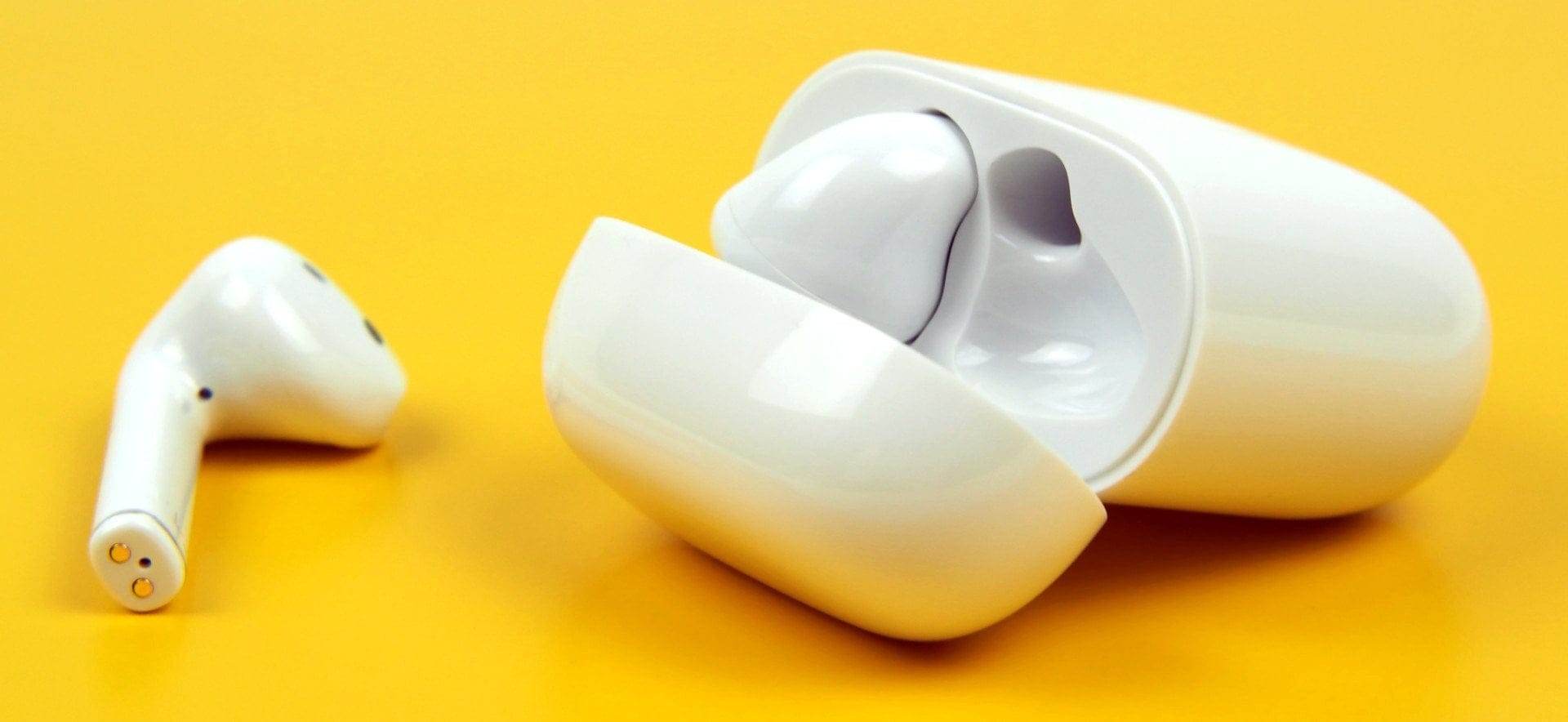
The earbud driver is not just a speaker but also contains various sensors. For instance, the side houses the proximity sensor for wear detection. When the earbuds are removed from the ear, music playback pauses automatically.
Touch control is handled by the outside of the earbud housing. This transitions into a slim stem, which features a noise-reducing microphone in the upper part. The end of the stem houses the two charging contacts and another microphone. The Realme Buds Air have no IP certification and are not waterproof in any other way.
The charging case is also very compact and fits easily in a pocket. The weight of the case including the earbuds is 42 grams. The earbuds sit magnetically in the charging case. The same applies to the lid, which closes magnetically. The USB-C socket is located on the underside of the charging case and is used to charge it. A discreet pairing button with a status LED above it adorns the front.
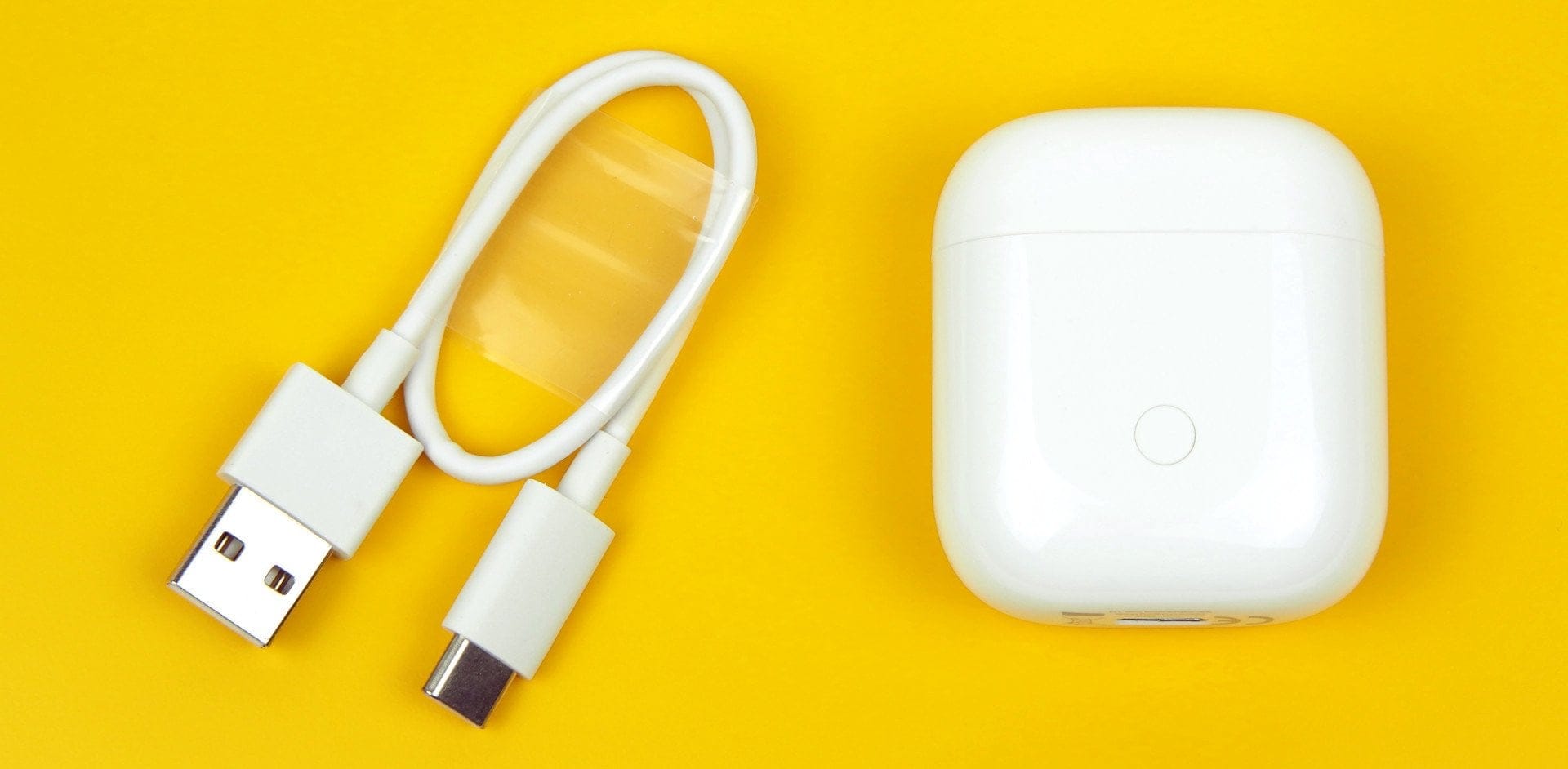
The build quality of the earbuds is mediocre. A point of criticism is the seam on the earbud, which consists of two parts. Not only does it look unsightly, but it also collects dirt very quickly. The build quality of the charging case, however, is not open to criticism. The box contents include the earbuds, the charging case, a USB-C charging cable and a quick-start guide.
Wearing comfort
The Realme Buds Air fall under the category “Semi-In-Ear”. Unlike conventional in-ear headphones, the earbuds sit only lightly in the ear canal. How well the Realme Buds Air stay in the ear depends heavily on the individual wearer. Due to the lack of ear tips, there is no option for individual fitting. Instead, there is only a one-size-fits-all design, which according to Realme provides no problems for most wearers.
From our own experience, the Buds Air sit comfortably and lightly in the ear. There is a certain amount of grip, but a sense of security is lacking. Abrupt movements quickly cause the earbuds to slip, requiring readjustment. This frequently triggers the touch controls, interrupting music playback or launching the smartphone assistant.
Setup
The Realme Buds Air are Google Fast Pair compatible. This simplifies the connection process with an Android device. To pair, you simply need to open the charging case. Nearby devices then receive the Fast Pair request, which can be accepted with a single tap. The connection is established automatically, without having to search for the device in the Bluetooth settings.
The connection process without Google Fast Pair is also straightforward. Open the charging case, hold down the pairing button for 3 seconds and select the Realme Buds Air in the Bluetooth settings. The blinking green status LED indicates whether the headset is in pairing mode.

Sound quality
Each earbud has a 12 mm driver with a liquid crystal polymer diaphragm. Unfortunately, there are no specifications regarding frequency response, impedance or sensitivity.
Bass, mids and treble
How well headphones sit, or in the case of in-ear headphones seal the ear canal, has crucial effects on sound quality. The semi-in-ear design of the Realme Buds Air, especially regarding isolation, is not the best choice.
This is primarily noticeable in the bass range, which is somewhat lacking in ‘punch’. To counter this, Realme boosted the bass (Dynamic Bass Boost). Nevertheless, the Realme Buds Air do not achieve a solid bass foundation. There is a lack of depth, and the bass is noticeably imprecise.
The mids are rendered pleasantly warm. Vocals in particular come through well. At high volumes, the mid-range appears slightly too harsh. Locating individual instruments is possible to a certain degree. When there is too much happening at once, the Realme Buds Air are quickly overwhelmed and tend to become muddy.
The high-frequency range is slightly attenuated and lacks a little brilliance. Despite the many minor shortcomings, the Realme Buds Air are by no means poor-sounding in-ear headphones. They convey a certain dynamism and create a pleasant soundstage with stable localization. They certainly provide listening pleasure for everyday use. However, the Realme Buds Air do not meet high demands.

Bluetooth
The audio processor is called the "Realme R1". The chip supports the current Bluetooth 5.0 connectivity standard and is characterised by a particularly low latency of just 120 milliseconds. High-resolution audio codecs, such as aptX, are not supported. Instead, you have to make do with AAC / SBC. The stable transmission range is between 8 and 10 metres.
The low latency of the Realme Buds Air is understandable. Bluetooth headphones often suffer from delays in audio-video sync. This does not apply to the Realme earbuds. Image and audio are synchronous, making the headphones suitable for watching films.
Gaming Mode
To achieve the lowest possible latency, the Realme Buds Air offer a special Gaming Mode. To activate it, the touch surface of both earbuds must be held for a few seconds. The active Gaming Mode is indicated by the sound of a starting engine. There are hardly any audio differences between Music Mode and Gaming Mode. However, occasional audio dropouts may occur in Gaming Mode.

Controls and headset
Touch control
Inside the outer side of the earbud housing is a touch sensor that registers touches. Depending on the touch pattern, you can control music playback (play, pause, skip), answer or reject calls, or activate the smartphone assistant. Volume control is not possible.
In testing, the touch controls proved reliable despite the small contact area. In 9 out of 10 cases, the touch was recognised and executed correctly.
Microphone
Each earbud is equipped with two microphones. The microphone placed at the lower end is the main microphone. The microphone located at the transition between the stem and the earbud head is responsible for noise reduction.
The voice quality is good and background noise is effectively filtered out. A slightly metallic or muffled sound is perceptible depending on the situation, but is largely kept in check.
Battery
There are good and bad approaches regarding the battery. The fast charging time of the Realme Buds Air is successful. Just 15 minutes in the charging case and the earbuds are already 60 per cent charged. A complete charging process takes approximately 25 minutes. The earbuds can be charged up to four times with a full charging case.
The downside is the battery life. The Realme Buds Air achieve only 2½ to 3 hours of music playback continuously. This places them at the lower end of the range compared to other TWS headphones.
The charging case can be charged via USB-C (USB 2.0) or even wirelessly (Qi). The charging process takes approximately 80 minutes via USB-C and 130 minutes wirelessly. The LED indicator lights up in red (empty), yellow or green (full) depending on the charge level.
Our verdict
6,6 out of 10 pointsYou have to like the design of semi-in-ear buds. Whether it's an expensive brand model or the Realme Buds Air, the special shape of these earbuds brings disadvantages. A lack of ear tips also means a lack of adaptability to the wearer. This negatively affects wearing comfort and even the sound quality. Unlike a conventional in-ear, which usually fills the ear canal, gaps occur with semi-in-ear designs that impair the overall sound image.
The Realme Buds Air clearly lack bass depth, which the advertised Dynamic Bass Boost also fails to compensate for. The mids, on the other hand, sound pleasantly warm and full, while the highs lack a bit of brilliance.
An interesting approach is the touch control. In the test, this worked surprisingly well and demonstrated consistently high detection accuracy. The microphone's voice quality is convincing.
There are good and bad approaches regarding the battery. With a total charging time of only 25 minutes, the earbuds charge relatively quickly. On the other hand, the battery only lasts 3 hours. There is a plus for the Qi charging capability of the charging case.
Specifications
General
- Drivers
- Dynamic driver
- Size
- 12 mm
- Frequency range
- Unbekannt
- Impedance
- Unbekannt
- Sensitivity
- Unbekannt
Bluetooth
- Standard
- 5.0 BLE
- Range
- up to 10 meters
- Profiles
- *HSP
- *HFP
- *A2DP
- *AVRCP
- Codec
- *SBC
- *AAC
Other
- Microphone
- Yes (CVC)
- Operation
- Touch
- Battery
- 2-3 hours
- Size
- 41 x 16 x 15 mm
- Weight
- 4g per earbud
What’s included
1x Realme Buds Air, 1x charging case, 1x USB-C charging cable, 1x user manual
Comments (1)
Hello everyone, thank you first of all for the detailed review. Could you also tell me what the difference between the Realme Buds Air and the Realme Buds Neo is?