Contents
Tivique, Acemagic, and the issue with model names
The Tivique LX15 Pro is also sold under the name Acemagic LX15 Pro. Acemagic is best known for its mini PCs, where the brand has been offering devices with good value for money for some time.
It is therefore not entirely far-fetched that the manufacturer is now also selling laptops. Technically, the leap from mini PC to notebook is smaller than you might initially think, since Acemagic already has experience with mobile AMD or Intel platforms.
However, it is important to note that not all LX15 Pro models are the same. The device is available in various hardware configurations. The base model tested here uses the AMD Ryzen 3 4300U. For an additional charge, versions with the Ryzen 5 7430U or Ryzen 7 5700U are available. So if you're buying one, pay very close attention to the CPU, because devices with nearly identical names can differ significantly.
Packaging and contents
The Tivique LX15 Pro arrives in an unremarkable brown cardboard box. That is in keeping with its price range and is perfectly fine. Inside are the laptop, a 65-watt power adapter and a separate cloverleaf-to-Schuko power cable.

Charging is via a traditional DC barrel plug, not USB-C. This is not a functional problem, but USB-C with Power Delivery would have made the device much more versatile in everyday use.
Since the keyboard comes with a US English QWERTY layout as standard, Tivique includes thin rubber overlays. These let you adjust the layout visually to German, French, Spanish or UK English.

Design, build quality and feel
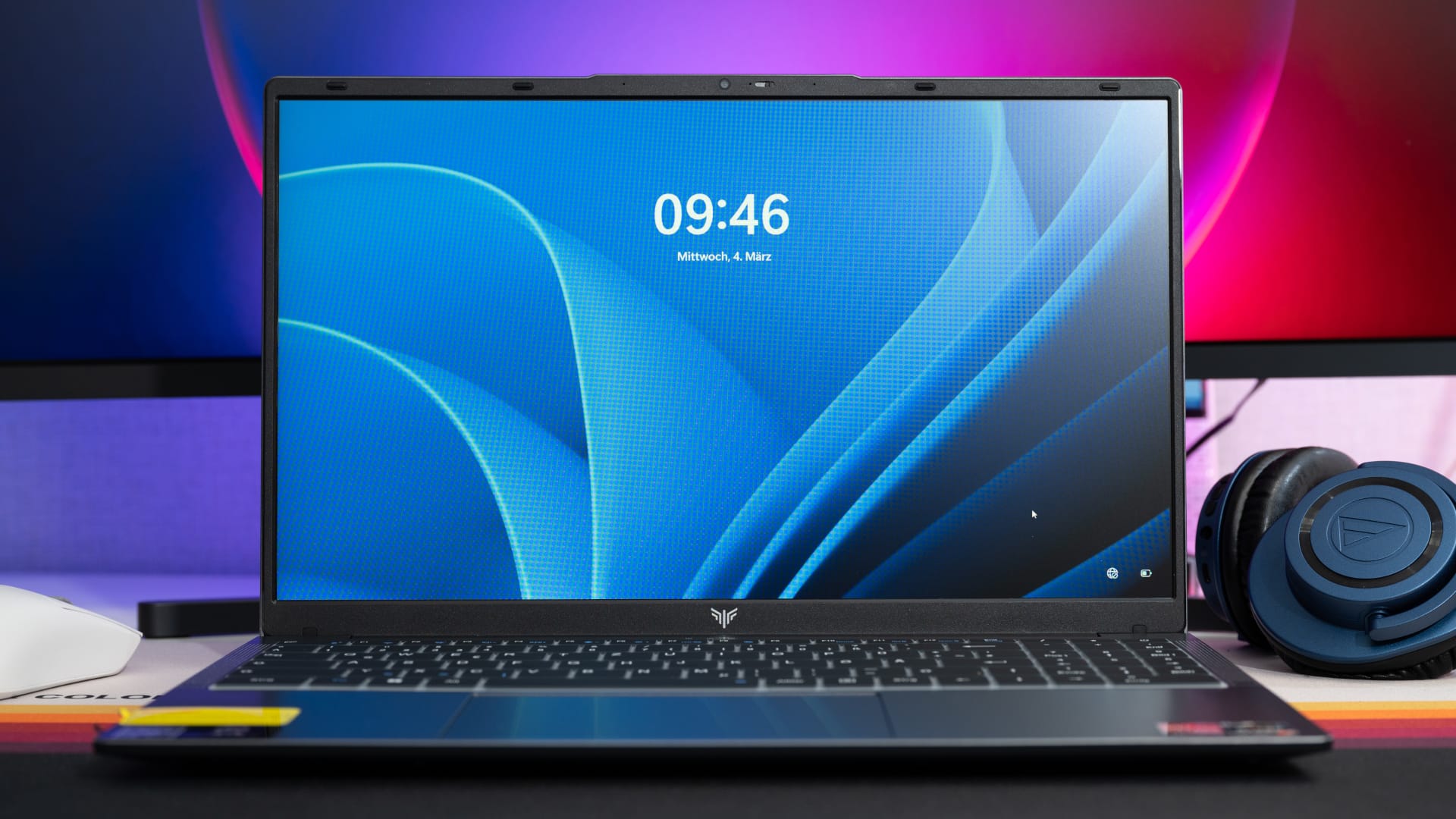
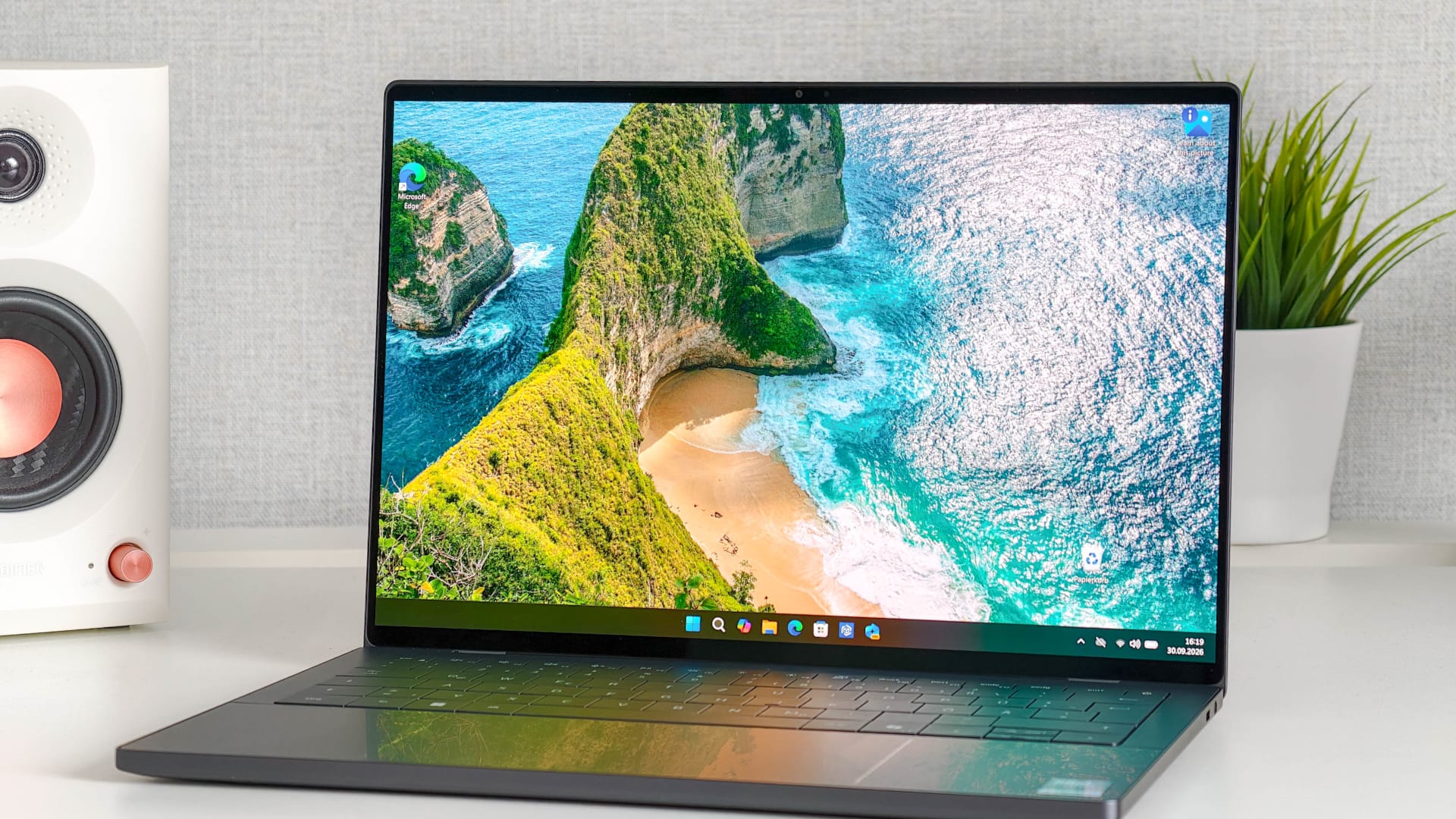
The casing is made of anthracite-coloured plastic. It looks simple and understated, which I see as a plus in an affordable office laptop. Fingerprints are barely visible on it.
The material quality is clearly entry-level, however. The plastic does not feel cheap in the worst sense, but it does not feel premium either. The casing visibly gives way somewhat under pressure. The LX15 Pro is therefore not particularly torsionally rigid.

One small but annoying issue concerns the stickers on the left of the palm rest, which are very difficult to remove without leaving residue. This is no disaster for an inexpensive device, but it does not leave a good impression.
The hinge is quite stiff. You have to hold the bottom of the notebook when opening it, so opening it one-handed is practically impossible. On the plus side, the hinge opens smoothly and holds the display firmly in place.

Ports

The port selection is decent for this price range. On the left you'll find:
- Kensington lock: yes
- DC barrel plug charging port
- USB-C (USB 3.2 Gen 1)
- HDMI 1.4
- USB-A (USB 3.2 Gen 1)
On the right, there is:
- USB-A 2× USB 3.2 Gen 1
- microSD card reader
- Audio 3.5 mm jack for headphones/microphone

The number of USB ports is impressive. HDMI 1.4 is entry-level, and the lack of USB-C charging is another major drawback. HDMI 1.4 is sufficient for an external Full HD monitor, but higher resolutions and refresh rates quickly become limiting. That said, the Ryzen 3 4300U is hardly suited to anything more demanding.
There is no LAN port. However, that's not unusual for a device in this category and price range.
Keyboard and touchpad
The keyboard is a full-size keyboard with a number pad. This is practical for office work, spreadsheets and simple texts. However, the basic layout is US QWERTY. If you can touch-type, you can simply set Windows to German and get used to it. But if you rely on the labels, you’ll need to use the rubber overlay.
These overlays are thin and fit reasonably well, but they change the typing feel. It becomes softer, a little less precise and less direct. That is acceptable for occasional use, but anyone who types many pages of text every day will probably want a keyboard with a QWERTY layout built in. The keyboard is also missing a backlight.

The touchpad is a good size, but does not feel particularly premium. Windows gestures generally work, but clicks do not feel very precise. I would recommend an external mouse for extended work.
Display
Tivique uses an unknown 15.6-inch IPS panel with 1920 × 1080 pixels and 60 Hz. At least you get the right basics: Full HD, IPS instead of TN, and viewing angles that aren't completely unusable.

In everyday use, the display feels responsive and is perfectly adequate for office work, browsing, YouTube, and basic photo viewing. However, the color balance is noticeably warm, which takes some getting used to. You can adjust the color temperature, saturation, and contrast somewhat via the AMD graphics driver, which is also recommended.
The brightness is sufficient for indoor use. You can work comfortably in an office or a brighter room. In the dark, the brightness can be turned down far enough that the panel isn't unpleasantly glaring.
Outdoors, however, the display is only usable to a limited extent. In sunny conditions, you should definitely find a shady spot.
Webcam and speakers
A 1 MP webcam with 1280 × 720 pixels sits above the display. As expected, image quality is basic and good enough for brief video calls, but no more than that. The mechanical cover is a plus; it is activated with a slider to the right of the camera.

The speakers are located on the left and right sides of the chassis. They're adequate for system sounds, YouTube, and basic video calls. In terms of sound, however, expect little bass, limited volume, and rather thin audio.
Internal layout and hardware
The underside can be opened using 11 screws. This is pleasantly straightforward. There is also a glued-in grille as a dust guard beneath the plastic cover.

Inside, you can see the 54.72 Wh battery, the small speakers on the left and right, and the hardware itself. It's good to see that Tivique hasn't soldered everything in place.
The components include:
- 512 GB KEYWA KY510 M.2 SATA SSD (2 slots)
- Realtek RTL8821CE Wi-Fi
- RAM 1× 16 GB DDR4-2666 SO-DIMM (2 slots)
- 54.72 Wh battery
The empty RAM slot is one of the biggest advantages. Out of the box, memory runs in single-channel mode, which particularly holds back the integrated Radeon graphics. Adding a second compatible 16 GB DDR4 SO-DIMM module enables dual-channel mode.

The SSD is an M.2 SATA SSD, not an NVMe SSD. In realistic terms, that means roughly 450 to 550 MB/s for reads and somewhat less for writes. That is enough for everyday use and office work, but modern NVMe SSDs are significantly faster.

Ryzen 3 4300U
The AMD Ryzen 3 4300U is no longer a new processor, but it remains an interesting option for an affordable laptop. It has 4 cores but no SMT, so it has only 4 threads. This sets it apart from higher-end Ryzen models such as the 4500U, 5500U and 5700U.
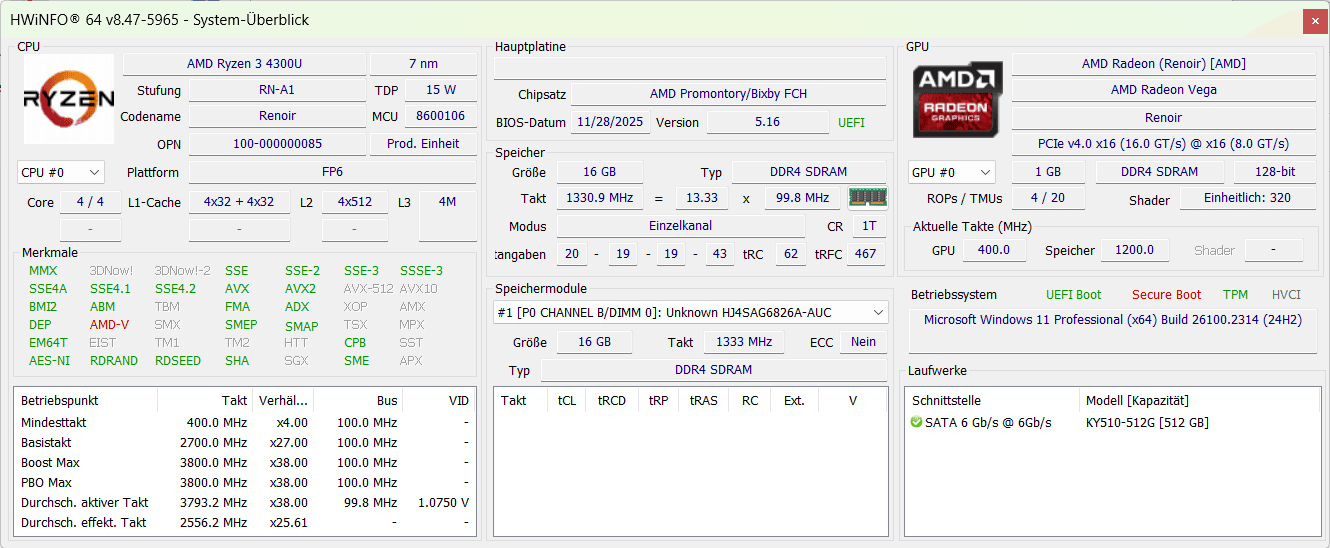
The performance is sufficient for everyday tasks, but the limits become apparent with heavier multitasking. Lots of browser tabs, Windows updates running in the background and a larger installation at the same time can slow the system down.
Compared with very affordable Intel N100, N95 or N97 devices, however, the Ryzen 3 4300U often feels more capable in everyday use, especially when there is enough RAM.
Wi-Fi and Bluetooth
For wireless connectivity, Tivique uses the Realtek RTL8821CE. It supports Wi-Fi 5 / 802.11ac and Bluetooth 4.2. Wi-Fi 5 is sufficient for browsing, streaming, and office work. But if you expect high Wi-Fi speeds, better stability, or modern standards such as Wi-Fi 6, you won't get them here.
Bluetooth 4.2 is also rather old. A mouse, keyboard, and headphones will work, but range and efficiency are not up to current standards.
Benchmarks and gaming
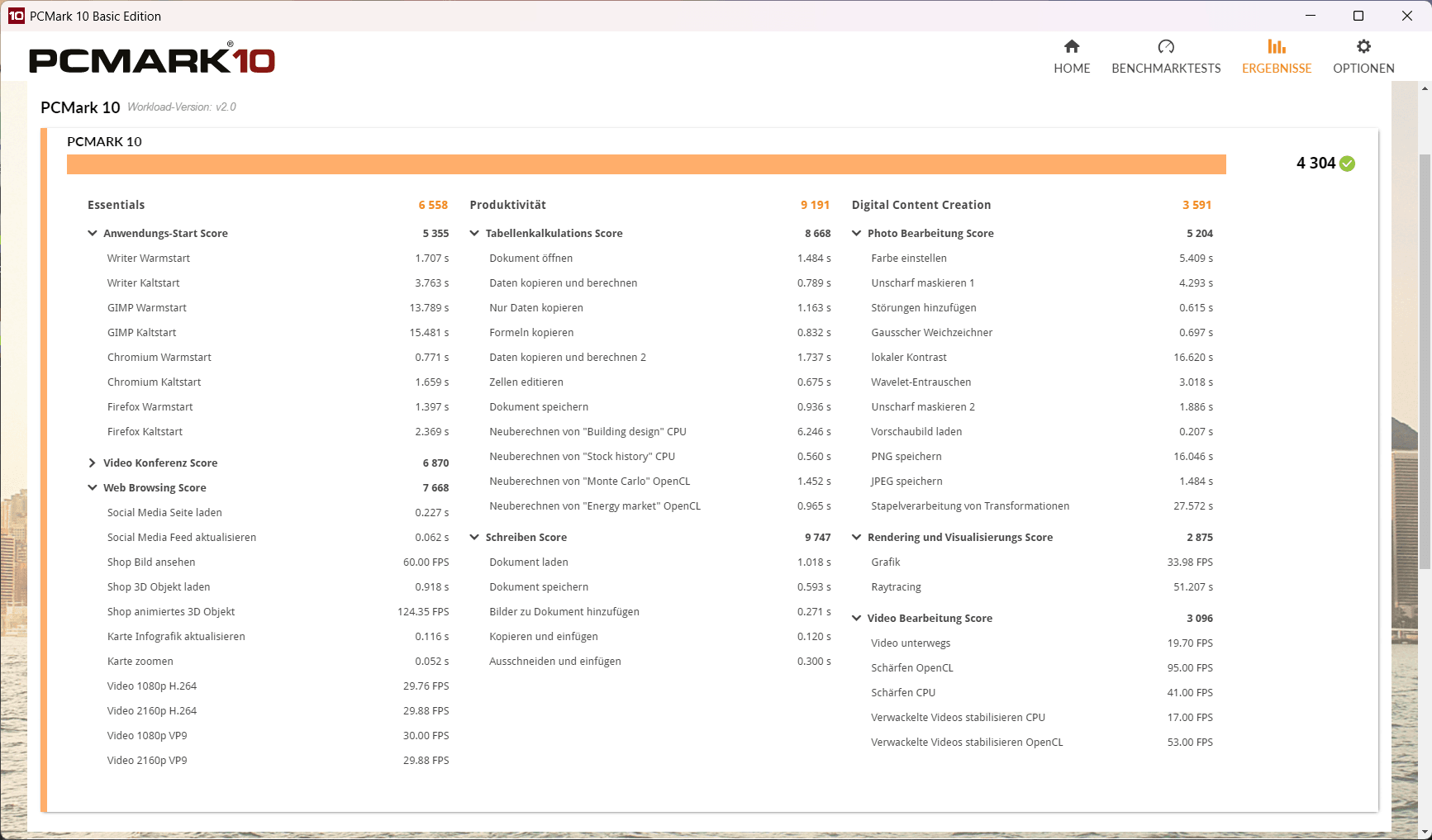
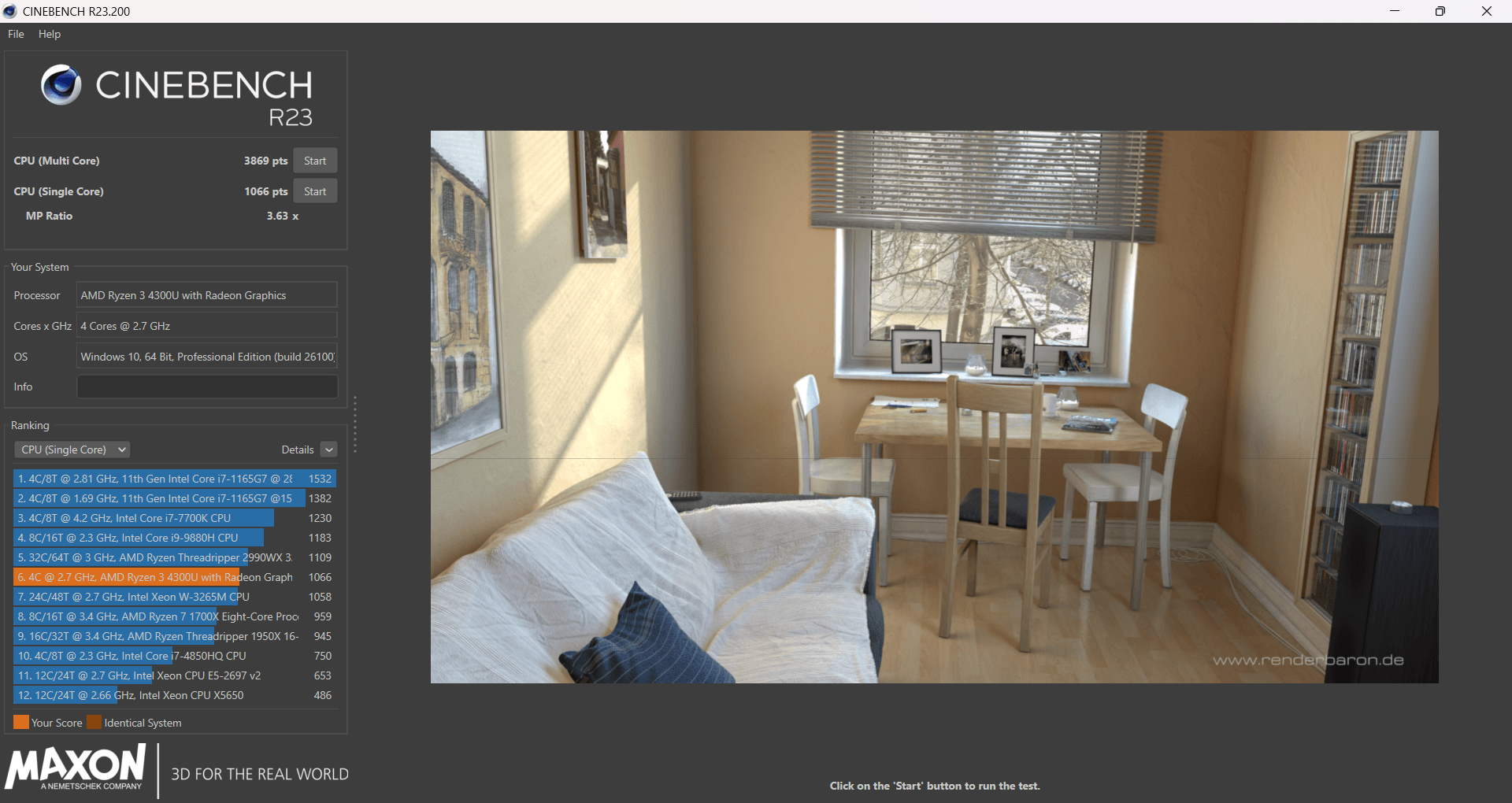
The Ryzen 3 4300U outperforms traditional budget CPUs such as the Celeron, N4020, N5100 and older Atom variants. However, it is no match for modern Ryzen 5 or Core Ultra laptops. A Ryzen 5 7430U or Ryzen 7 5700U in the same chassis is more powerful, but also more expensive.
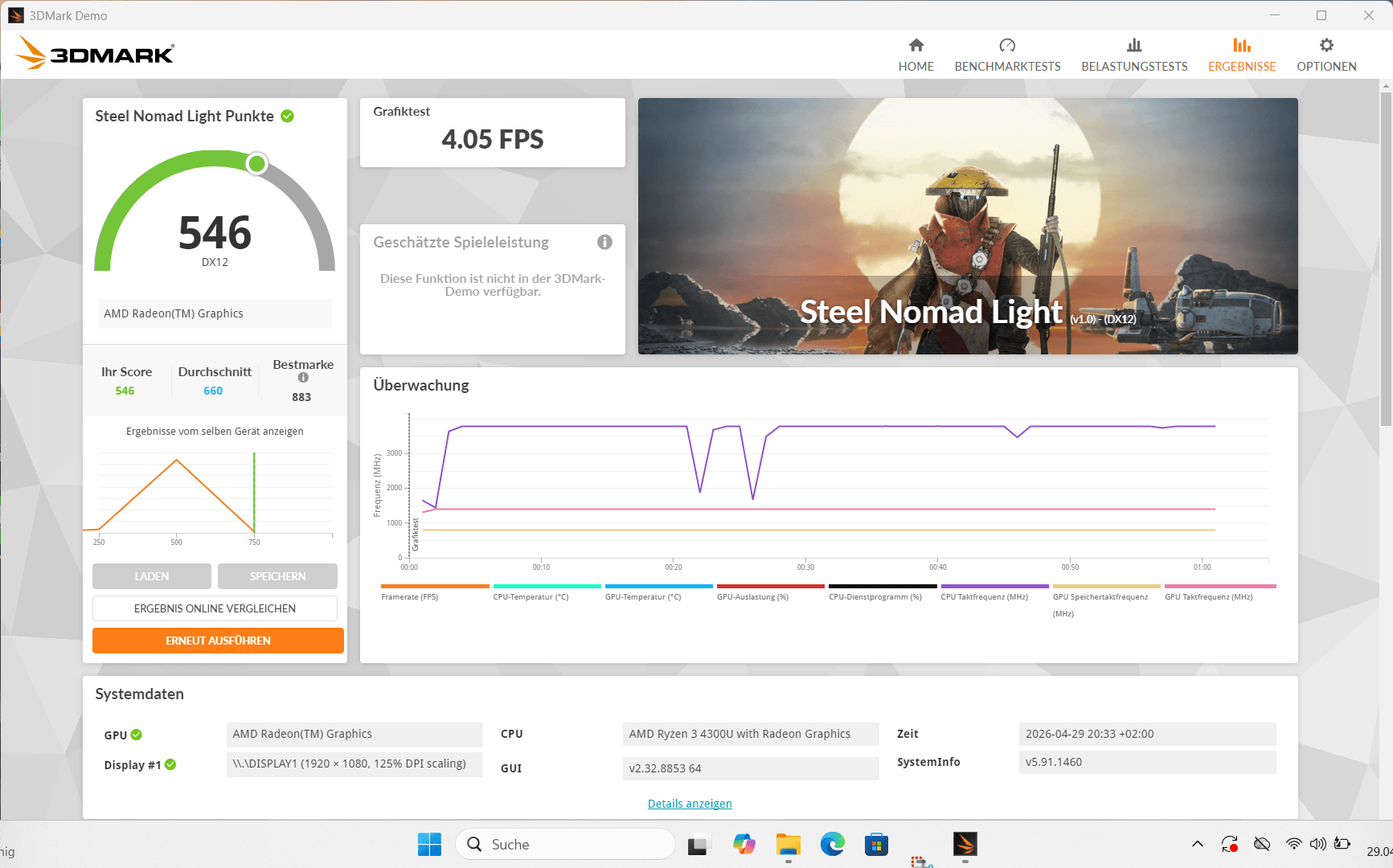


Gaming is only possible to a very limited extent on the Tivique LX15 Pro. The Ryzen 3 4300U's integrated Radeon Vega graphics are generally more capable than many older Intel iGPUs, but here they are held back even further by the single-channel RAM.
Games such as older strategy titles, Hades, Stardew Valley, Terraria and Minecraft at low settings, as well as older classics, are playable. More demanding titles require 720p, low detail settings and plenty of patience.
Battery and noise
The battery has a decent capacity of 54.72 Wh. Expect around 5–7 hours of office work at low brightness, about 4 hours of video streaming, and less than 3 hours under load.
With typical power consumption of around 15 watts, the CPU is designed to be very efficient, significantly reducing cooling requirements. As a result, the device is often pleasantly unobtrusive in everyday use. For simple tasks such as browsing, office work or video streaming, the fan is either very quiet or even switches off completely from time to time.
Under load, the fan spins up a little more, but remains relatively quiet, with a slight hiss.
Our verdict
For around 350 euros, you get a full-fledged office notebook with 16 GB of RAM and a capable Ryzen CPU. At the same time, the overall package sometimes feels as though existing components have been put together as efficiently as possible. An older CPU, SATA SSD, basic Wi-Fi module, and single-channel RAM make for a system that works, but isn't optimally balanced. The laptop reliably does its job in everyday use, but you'll have to accept compromises in many areas.
That is precisely why it is worth looking beyond the obvious options. In the price range around 350 euros, used or refurbished business devices such as the Lenovo ThinkPad T14 are often the more interesting choice. They may not always offer the same memory configuration, but they make up for it with significantly better build quality, higher-quality displays and more mature technology overall.
Even so, the Tivique has its place. If you're looking for a new device with a warranty, modern looks, quiet operation, and a ready-to-use setup that requires no tinkering, this is a straightforward package. The LX15 Pro is therefore not a bad deal, especially for beginners, students, or as an inexpensive second laptop, as long as you know what you're getting into.
Specifications
Processor and memory
- CPU
- AMD Ryzen 3 4300U (Renoir, Zen 2, 7 nm)
- CPU clock speed
- 4× 2.7 GHz (boost up to 3.7 GHz, no SMT)
- GPU
- AMD Radeon Vega (5 CUs, 320 shaders, up to 1400 MHz)
- RAM
- 16 GB DDR4-2666 SO-DIMM (single-channel)
- Internal storage
- 512 GB M.2 SATA SSD (KEYWA KY510)
- Storage expansion
- Yes (2× M.2 SATA, 1× free)
Display
- Display size
- 15.6 inches
- Display resolution
- 1920 × 1080 pixels
- Aspect ratio
- 16:9
- Pixel density
- ~141 ppi
- Display refresh rate
- 60 Hz
- Display type
- IPS
- Display brightness
- approx. 250–300 nits (estimated)
- Other
- slim bezel
- Matte panel
- Standard colour space (no wide gamut)
Cameras
- Front camera
- 1 MP (1280 × 720)
- Features
- mechanical privacy shutter
- Video (front camera)
- 720p
Wireless
- Wi-Fi
- Wi-Fi 802.11 a/b/g/n/ac (Wi-Fi 5), dual-band
- Bluetooth
- 4.2
Ports
- USB-C
- 1× USB 3.2 Gen 1 (no charging, no display output)
- USB-A
- 3× USB 3.2 Gen 1
- HDMI
- 1× HDMI 1.4
- Audio
- 3.5 mm jack (headset)
- Card reader
- microSD
- Charging port
- DC barrel connector
- Kensington lock
- Yes
Battery
- Battery
- 54.72 Wh
- Fast charging
- 65W wired (proprietary)
Other
- Operating system
- Windows 11 Pro
- Audio
- Stereo speakers
- Case
- Plastic (anthracite)
- Cooling
- active fan
- Size
- approx. 15.6-inch class (~360 × 240 × ~18 mm)
- Weight
- approx. 1.6 kg
Price comparison
| Store | Price | Link |
|---|
Comments