Contents
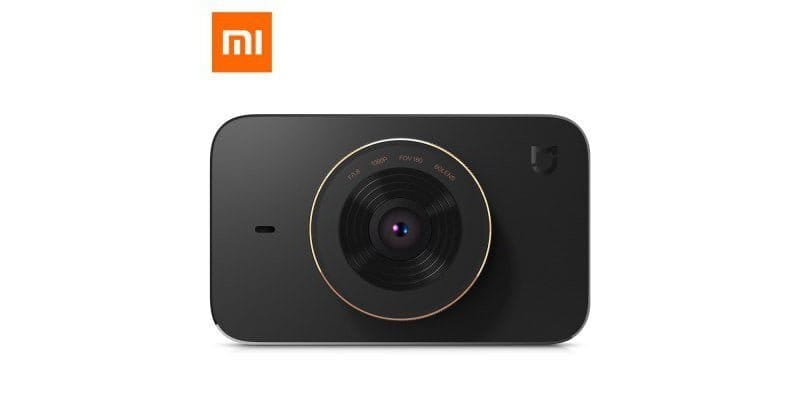
Xiaomi MIJIA Car DVR - Dash Cam
DSP and Image Sensor
The internal hardware of the MIJIA Dash Cam is based on a combination of an MSTAR MSC8328P image processor and a Sony IMX323 CMOS. The image sensor has a native resolution of 2.19 megapixels and a sensor size of 1/2.9 inch. To produce detailed and noise-free video recordings even in poor lighting conditions or at night, Xiaomi uses a large f/1.8 aperture. Videos are recorded at a maximum of 1920 x 1080 pixels and can be saved to a microSD card in a loop. Audio recordings are captured synchronously via an additionally integrated microphone. Video compression is carried out according to the H.264 standard. The recording format is MP4.
WiFi and app
Via an integrated WiFi module, the Xiaomi dashcam can create its own Wi-Fi network. The supported WiFi standards are 802.11b/g/n. Using the matching Xiaomi app, direct access to the camera is possible. In addition to live video output, archived video recordings can be downloaded to the smartphone or tablet. A driver assistance system (ADAS) is missing. GPS is not supported.
Display and power supply
On the rear, the dash cam has a TFT LCD display with a 3-inch diagonal and HD resolution. Control is via capacitive buttons below the display. The dash cam is powered by a car USB charger (5V 2A). This is included in the delivery. The built-in 240 mAh battery serves only as a reserve. For example, if the MIJIA Dash Cam is activated by the G-sensor while parked and without a car power source, the battery allows the camera to record a short clip of the events.
Conclusion
The new Xiaomi MIJI car camera presents itself as a straightforward dash cam with comparatively few additional features. In particular, a driver assistance system and the option for GPS recording would have been desirable functions. Whether the camera achieves the promised recording quality in poor lighting conditions will only become clear after the first test reports are published.
Manufacturer's product page: mi.com/mj-carcorder/
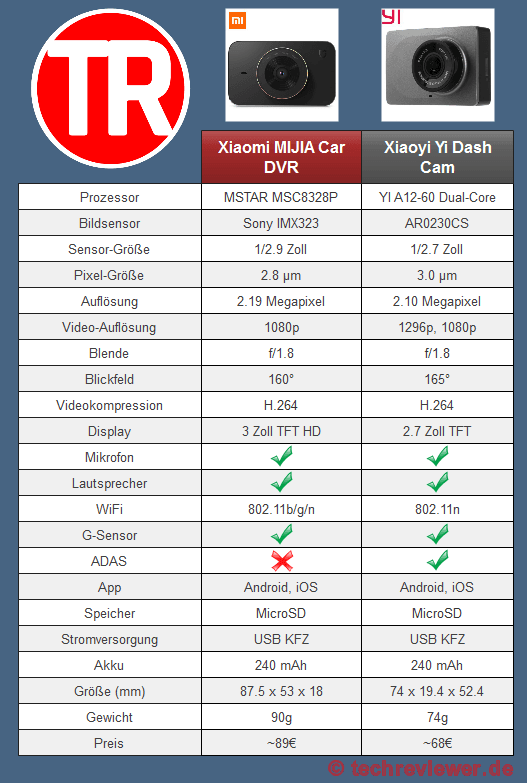
Comparison
Xiaomi MIJIA DVR – Xiaoyi DVR
Specifications
DSP and Image Sensor
- DSP
- MSTAR MSC8328P
- CMOS
- Sony IMX322
- Sensor size
- 1/2.9 inch
- Pixel size
- 2.8 μm
- Aperture
- f/1.8
- Field of view 160°
- Resolution
- 2.19 megapixels
- Video resolution
- 1080p
- Video compression
- H.264
Display
- Display type
- TFT LCD
- Display size
- 3 inches
- Display resolution
- HD
Connectivity
- Wi-Fi
- 802.11b/g/n
- App
- Android and iOS
Power supply
- USB
- Yes
- Vehicles
- Yes
- Battery
- 240 mAh
Other
- Microphone
- Yes
- Speakers
- Yes
- Storage
- MicroSD
- ADAS
- No
Dimensions and weight
- Size
- 87.5 x 53 x 18 mm
- Weight
- 90g
Comments (11)
Would you rather recommend the YI or the MIJIA?
Hi, the camera was only released in China today. I would wait for the first sample shots. Looking purely at the spec sheet, the older Xiaoyi Cam is more convincing!
Thanks, then I will wait a bit longer. I like the look of the Xiaomi MIJIA better. But if the one from Yi makes better videos, I wouldn't mind the appearance either. The missing GPS bothers me a bit.
The app does not work with Windows Phone?
Hi Heiko, no, the app is only available for Android and iOS devices.
Hello,
The menu structure is entirely in Chinese. Is there an overview available anywhere?
Hi Torsten, I have added the images with the translation to the article.
thank you.
I still have a problem, unfortunately. When I try to connect the app to the camera, the percentage counts up. It breaks off every time at 22%. It then says: Couldn’t download plug-ins. Both are connected to Wi-Fi. Perhaps you know a solution? Thanks in advance.
Are you using the Mi Home app from the Play Store, or did you download it from the Mi Store? Changing the app’s language to “Mainland China” might help.
I got the app by scanning the QR code. I followed your advice, but it didn’t work. After switching to “Mainland China,” I was asked to log in again. Then I tried a few things, installed the app from the Play Store, and couldn’t log in at all. So I quickly created a new account, and everything worked right away.
Thanks so much for your time and effort.
Kind regards
Everything you need is included (very fast shipping!!), simply plug it in and you're good to go. The battery lasts 45 minutes at maximum usage of all gadgets, otherwise you can choose between the cigarette lighter or USB port. The videos are nicely sharp, even in the dark.