Contents
Preface: Xiaomi Air 13
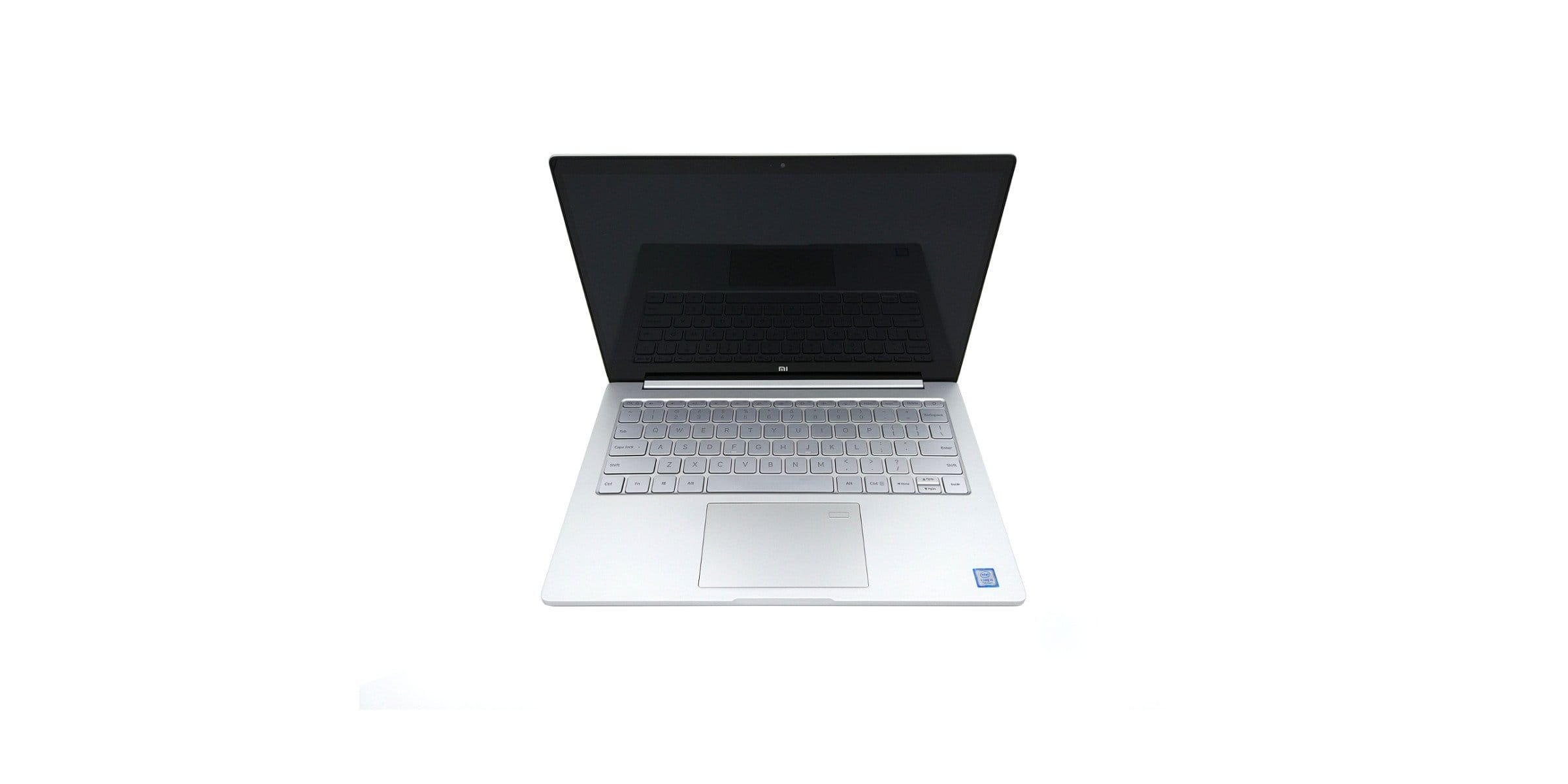
Last year, the Chinese electronics giant "Xiaomi" launched two laptops with the Xiaomi Air 12 and the Xiaomi Air 13, which in 2016 primarily convinced through a modern hardware setup at a low price and a design reminiscent of the Apple MacBook Pro. A year later, Xiaomi is launching two new models. Although the design has remained the same, both models have experienced a significant hardware upgrade. Above all, the Xiaomi Mi Notebook Air 13.3 looks impressive on paper, surprising with a powerful Intel Core i5-7200U processor, optionally also available with an Intel Core i7-7500U, a dedicated Nvidia MX150 GPU and a substantial 8GB DDR4 RAM. The laptop is available from just €600.
Design, build quality, and included accessories
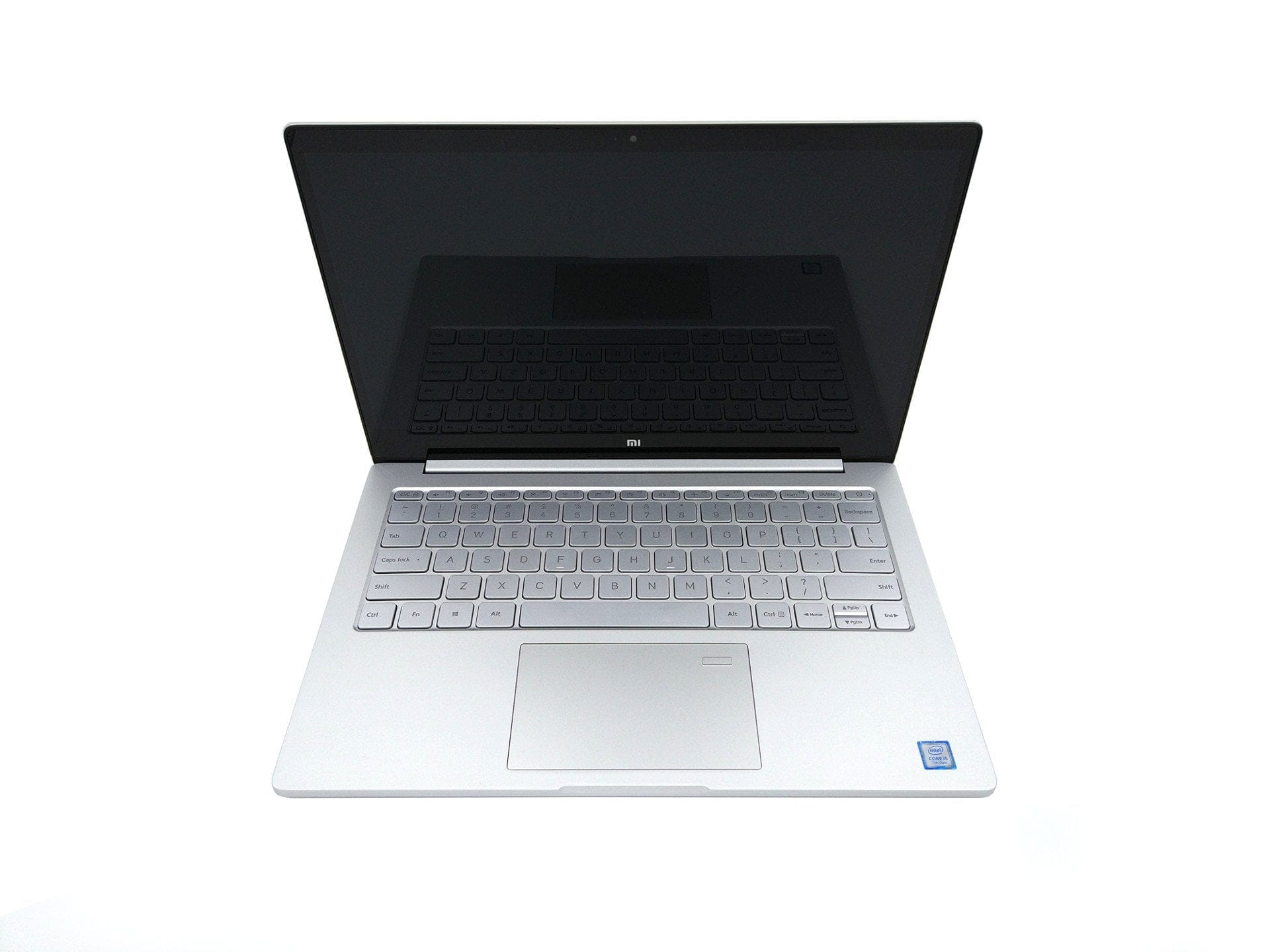
Xiaomi has also opted for a simple design for this model, which – at least externally – lacks a manufacturer’s logo. The casing is made entirely of aluminium and resembles an Apple MacBook Pro primarily due to its silver colour. Manufactured in so-called unibody design, i.e. milled from a single block of aluminium, the casing offers particularly good stability and no visible seams.
The Xiaomi Mi Notebook Air 13 is constructed as follows: The chassis dimensions are 309.6 mm in length, 210.9 mm in width and a height or thickness of just 14.8 mm. The weight of the entire notebook is a light 1.3 kg, which will especially please mobile users.
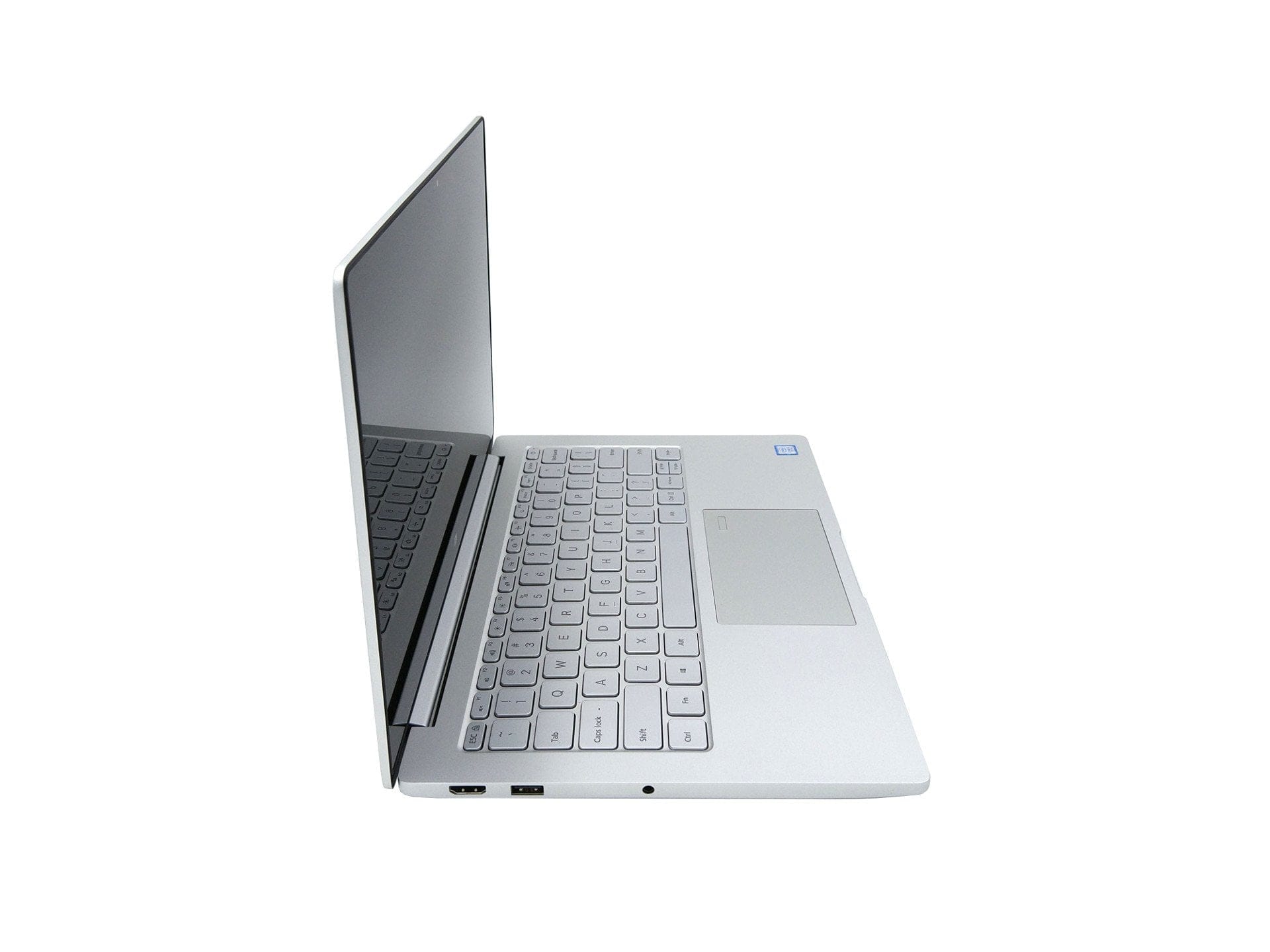
The laptop's connectivity options consist of a USB-C port, which can be used for data transfer, power delivery and as a video output, two USB 3.0 ports, an HDMI port and a 3.5 mm audio jack. A memory card slot is missing! The port placement is well chosen.

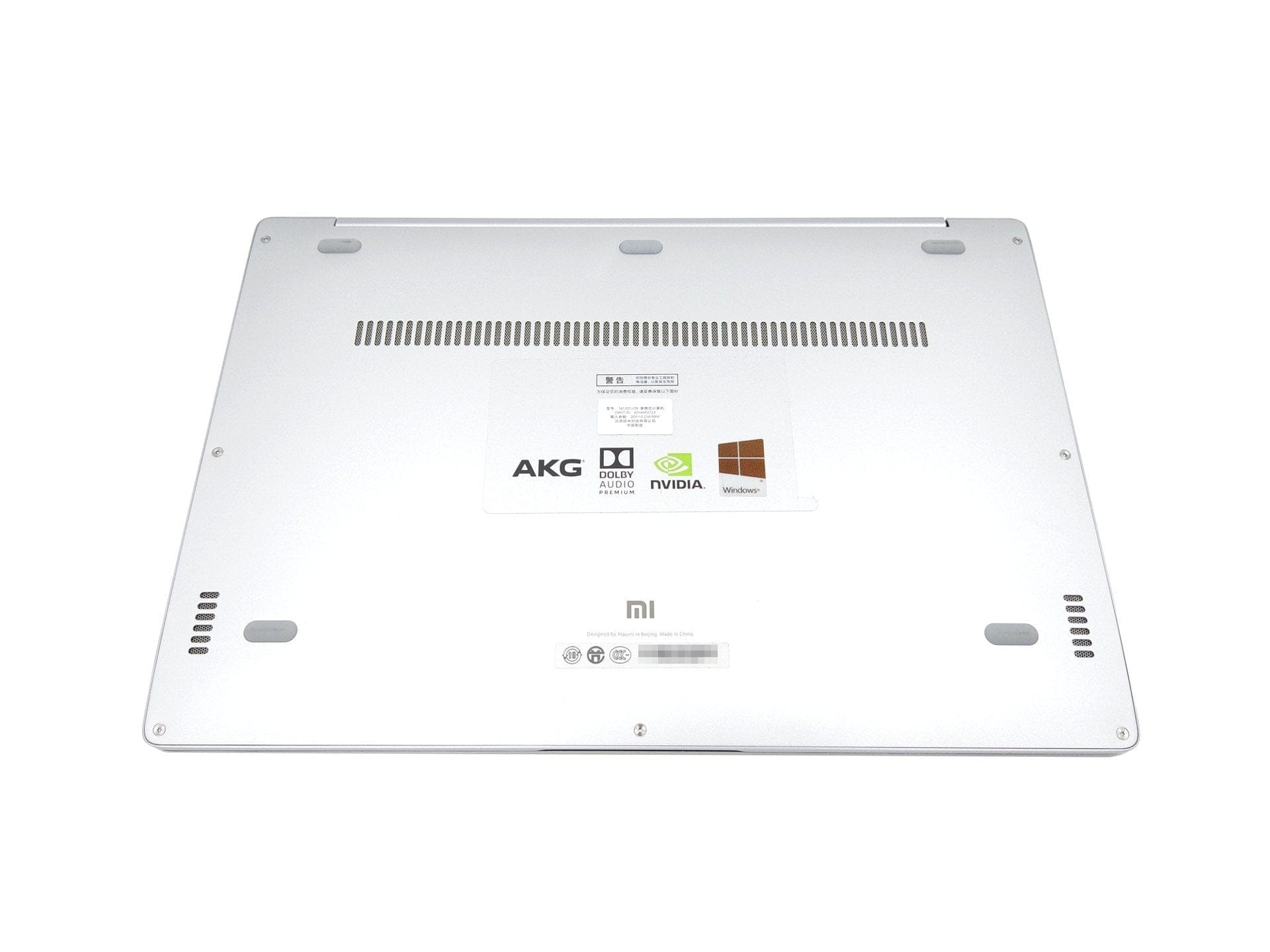
Five rubber feet on the bottom ensure a stable placement. It also displays information, including a reference to an AKG speaker system, support for Dolby Audio, and other details about the laptop itself. This information is all on one sticker and can be removed to preserve the simple design. A significant difference from the smaller Xiaomi Mi Notebook Air 12 is that the Air 13 has an active cooling system and therefore features ventilation slots on the bottom. The stereo speakers are also located on the underside.
To access the notebook's interior, the bottom panel can be removed. The base plate is secured with 7 Torx screws. The internal hardware components are neatly arranged, allowing for straightforward access. This enables the battery, fan and M.2 SSD to be easily replaced.
In summary, the Xiaomi Air 13 notebook impresses – based on the first impression – with its simple and very high-quality design, as well as clean build quality without gaps, paint defects or other flaws. The scope of delivery includes the notebook, a charger with a NEMA-1 connection, which means you need an additional EU adapter to use the supplied charger, as well as a Chinese user manual.
Keyboard and touchpad
Most Xiaomi products are intended for the Chinese market and partly for the international market. Accordingly, the notebook is only available with an English keyboard layout (QWERTY). The "chiclet" style keyboard features silver keys with a smooth surface and black lettering.
The keys are comfortably sized and positioned so that no relearning from a conventional PC keyboard is required. The typing feel is generally good. The key travel is short, with a noticeable pressure point, and the click noise is barely audible. Thanks to the solid unibody housing, the keyboard does not give way even under stronger pressure.
To allow work with the Xiaomi Air 13 even in the dark, the keyboard has backlighting. The lighting is activated by pressing a key. The brightness cannot be adjusted.

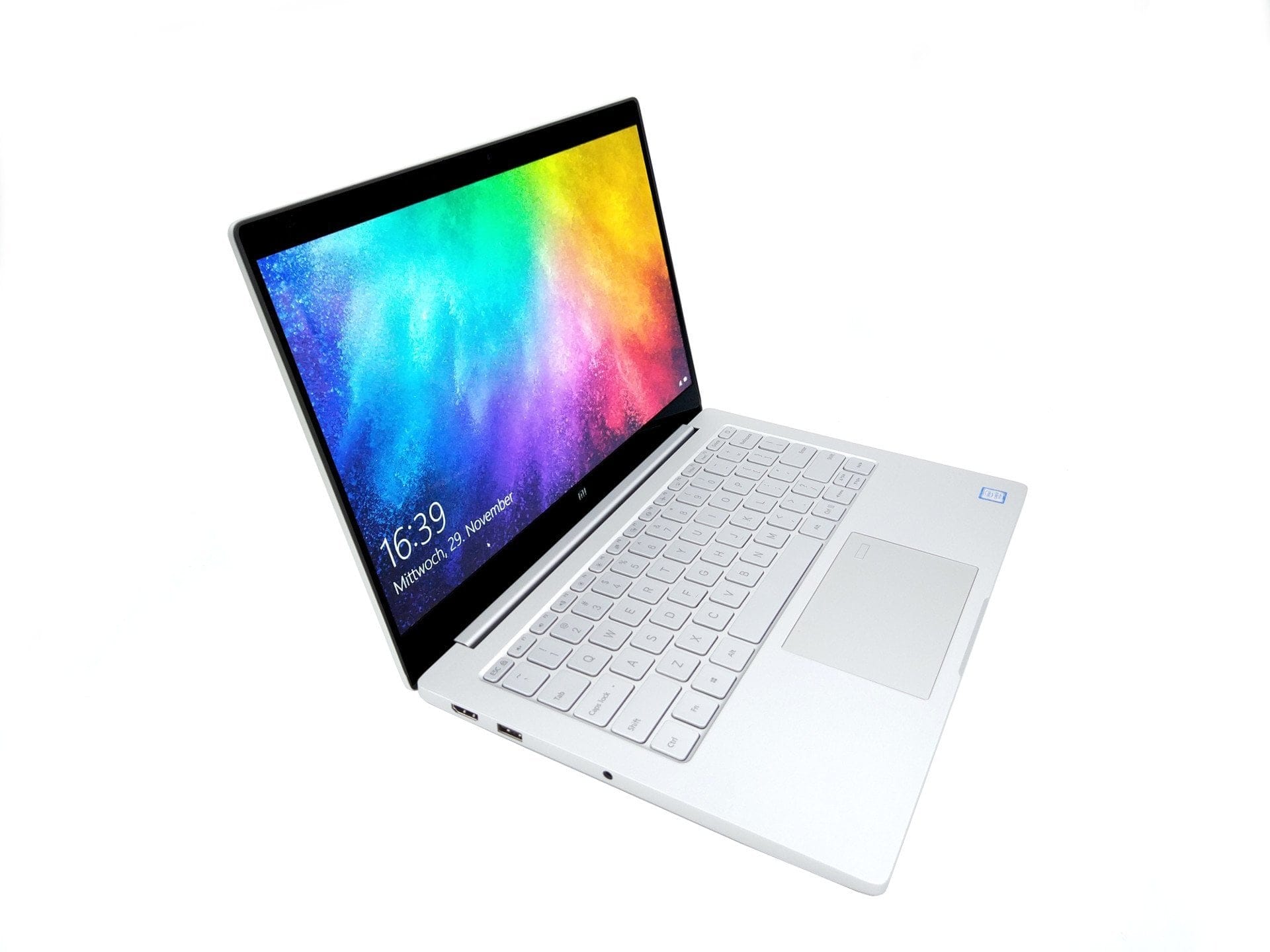
The comfortably large touchpad recognises both touch and click inputs. An especially smooth surface ensures ideal glide. The touch surface reacts to inputs and clicks with extreme precision. No ghost touches occurred during the testing phase. The cursor stays exactly where it should. Click inputs are convincing thanks to a pleasant and, above all, crisp pressure point. Touchpad gestures, such as two-finger scrolling, are also integrated and were recognised precisely in our test. A significant new feature compared with previous models is the fingerprint scanner, located in the upper right area of the touchpad. It boasts a high recognition rate and unlocks the notebook in a fraction of a second.
Display
The 13.3-inch display opens via a single hinge, with a maximum opening angle of 130°. The display lid can be opened one-handed. At the same time, the hinge is adjusted so that even strong vibrations do not cause unintentional closing. When opened, the simple black display appears with a protective (and also reflective) glass surface. Below the display is an "MI" brand logo adapted to the notebook's design.
The display is of the IPS type and has a resolution of Full HD, i.e. 1920 x 1080 pixels. Sharp and Samsung supply the panels. The Xiaomi Air 13 unit tested here, for example, is equipped with the Sharp LQ133M1JW15 panel (SHP1447). However, it is also quite possible to get the notebook with a Samsung 133HL09-M01 panel.
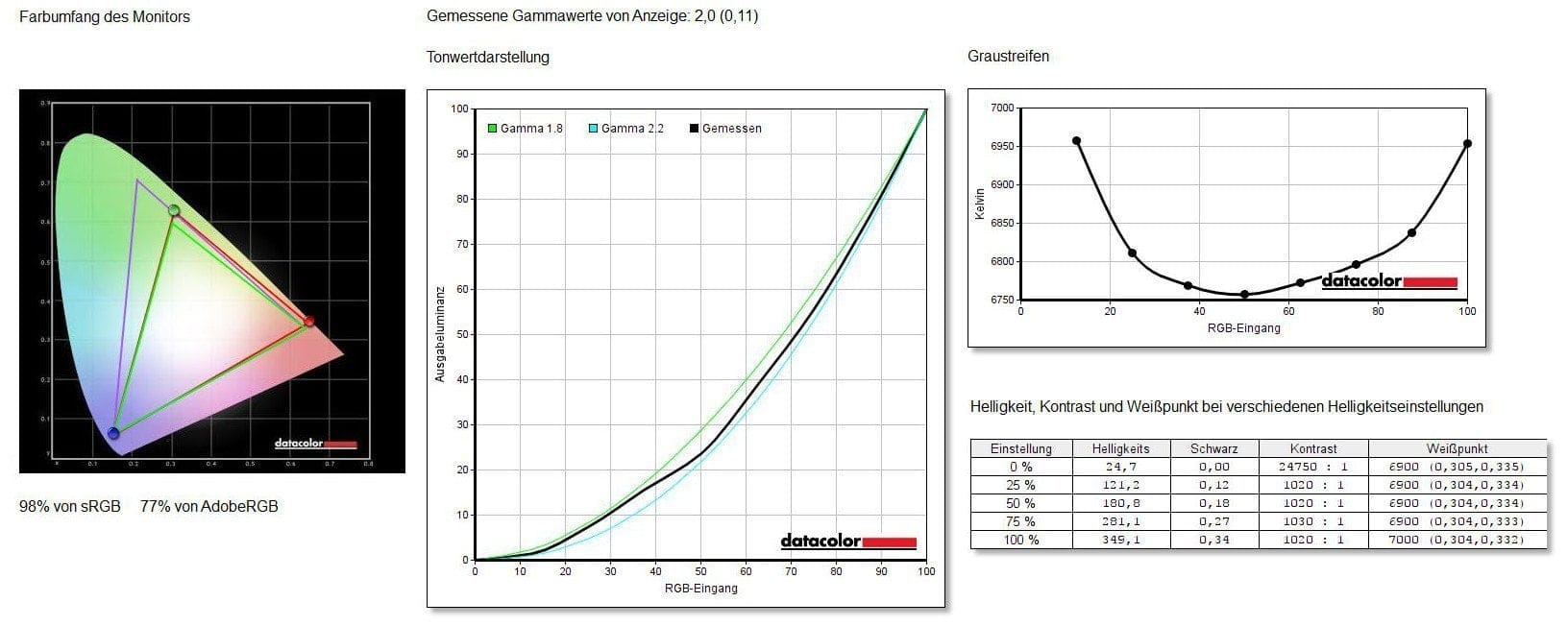
Measured with a colorimeter, the display covers 98% of the sRGB colour gamut and 77% of the AdobeRGB colour gamut. The luminance of the notebook, which Xiaomi itself specifies only as 300 cd/m², is even exceeded, amounting to 349 cd/m².
In everyday use, the display performs extremely well. The representation is sharp, and thanks to the particularly vivid colour reproduction, the display appears very lively. The black level is also surprisingly good, truly deserving of the term “black”. The panel's viewing angle stability is also convincing. Whether viewed from above, from the sides or from below, the image sharpness and colour reproduction remain well preserved. Working outdoors is somewhat critical. The reflective display glass can lead to reflections. Nevertheless, the display offers sufficient brightness to work with the notebook outdoors as well. Readability becomes significantly more difficult only under direct sunlight.
Performance
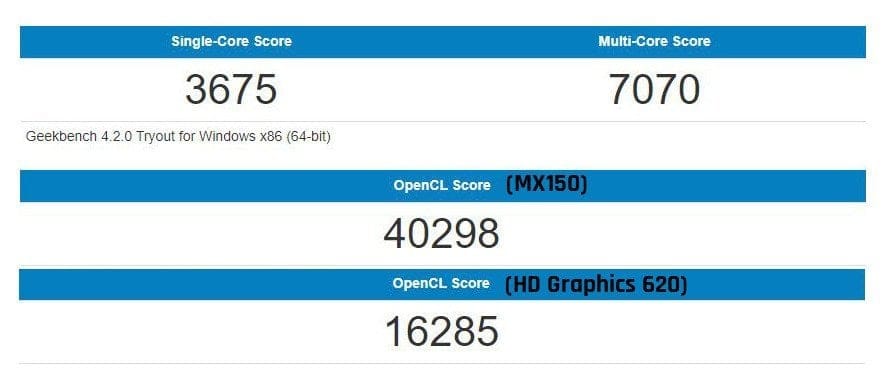
The Xiaomi Notebook Air 13 is available with two different processor options. The notebook we tested is the “smaller” model and offers an Intel Core i5-7200U processor. The more powerful model instead offers an Intel Core i7-7500U. Both models share a dedicated Nvidia GeForce MX150 graphics card with 2 GB of GDDR5 graphics memory.
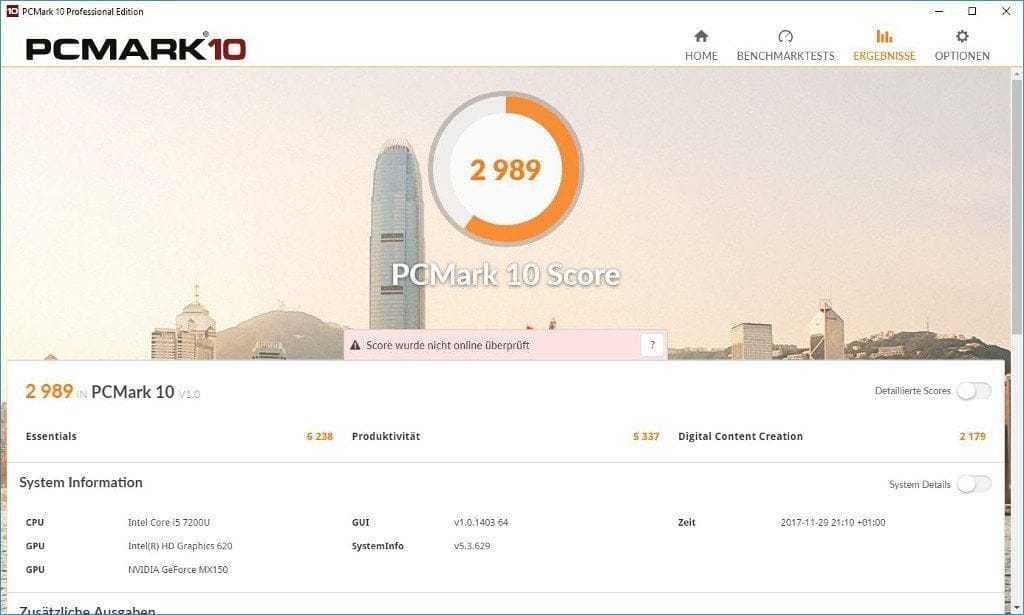
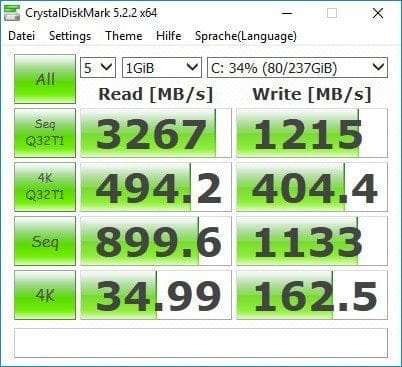
The Intel Core i5-7200U is a dual-core processor whose cores run at a base clock of 2.5 GHz and in turbo mode up to 3.1 GHz. Intel specifies the TDP for this processor, released in Q3 2016, as 15 watts. Hyper-Threading is supported. The processor graphics are an Intel HD Graphics 620, which is accompanied by the dedicated Nvidia GeForce MX150 graphics card. The memory configuration consists of 8GB DDR4 RAM and a 256GB SSD (PCIe) from Samsung. Optionally, the notebook is also available with a more compact 128GB SSD. The storage can be expanded via an additional M.2 SSD slot.
System performance
In practice, the Xiaomi Air 13 notebook delivers excellent performance. The boot process takes hardly any time. Read and write access to the SSD is comparable to powerful desktop PCs. In general, Windows 10 runs butter-smooth on this notebook. All office work, playback of 4K video material and web browsing with numerous tabs do not quickly overwhelm the 2017 model of the Xiaomi Air 13. Even cutting and rendering high-resolution videos is possible with this notebook.
Gaming performance
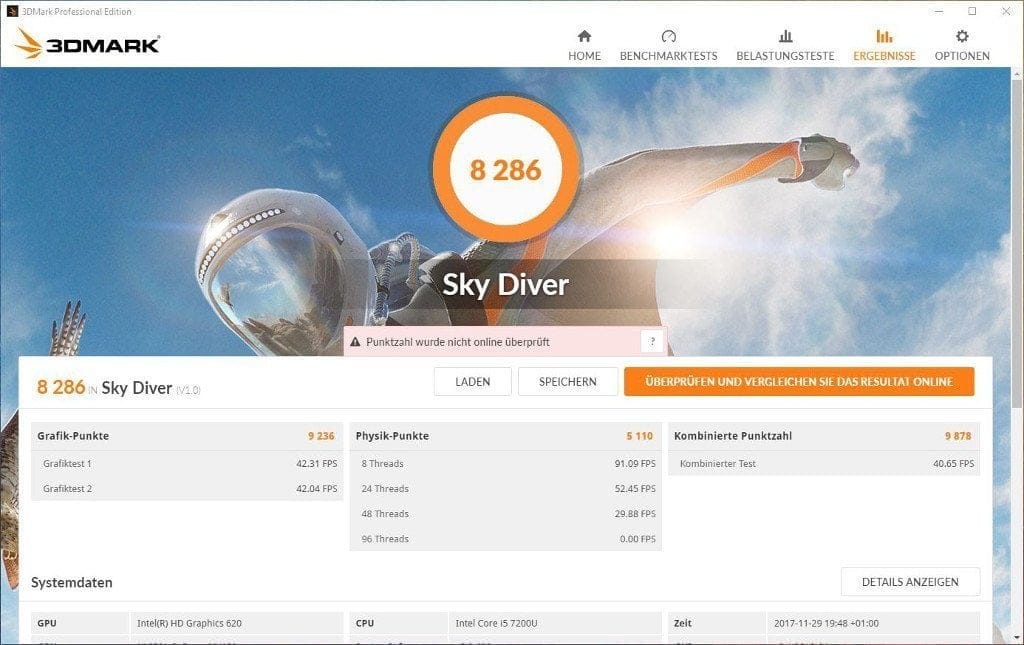
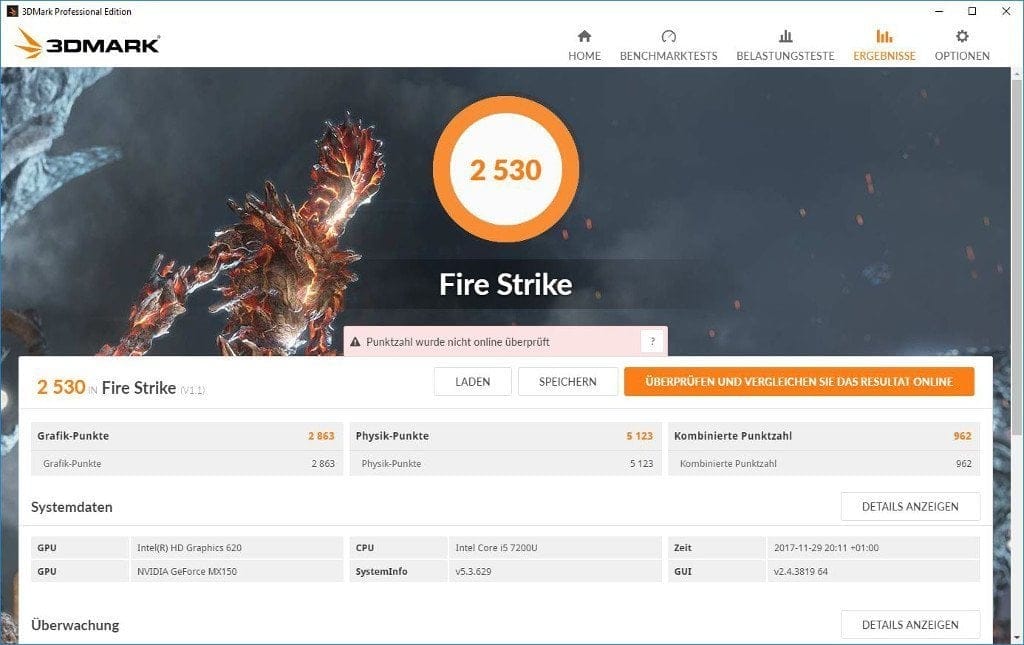
With the Nvidia GeForce MX150, a mobile variant of the Nvidia GeForce GTX1030, the notebook is well-equipped for older, but sometimes even newer game titles. Games such as the older "Call of Duty Modern Warfare 2" or "Blur" run smoothly without issues, even at higher graphics settings. Surprisingly, however, current titles such as "PlayerUnknown’s Battlegrounds" also run at up to 35 FPS, provided the graphics settings are adjusted accordingly.

Cooling performance
The active air cooling keeps the heat development well under control. There was no automatic "underclocking" of the processor / graphics performance even under several hours of full load. However, the final measured case temperature reached a hot 48°C at the hottest spot after about 2 hours of full load. The aluminium casing is simply a good conductor of heat. The fan noise can be described as pleasant in just a few words.
Windows 10 CN or Windows 10 EN
Windows 10 is pre-installed, however the Xiaomi Air 13 is only delivered with a Chinese Windows 10 installation. Accordingly, users are greeted by a Chinese system interface whose language cannot be changed. Only a fresh installation of Windows allows the language to be changed!
Camera
Centred above the display is a 1 megapixel camera, which captures images and videos with a maximum resolution of 1280 x 720 pixels. A small indicator LED to the left of the camera indicates whether the camera is active. Sound is recorded via a well-hidden microphone, located above the camera. Disturbing background noise is largely filtered. Nothing stands in the way of spontaneous voice or video calls with this equipment.



Speakers and headphone jack
All models in the Xiaomi Air Notebook series are equipped with an AKG speaker system. AKG Acoustics GmbH has specialised in audio technology since 1947 and is headquartered in Austria, thus ensuring the best quality 'Made in Austria'.
The installed 2x 2 Watt AKG speaker system offers a wide frequency range with particularly balanced sound. The sound chip is a Realtek ALC255. For a movie night in bed or spontaneous music listening, the integrated speaker system is more than adequate. The speakers also achieve a pleasant volume level and do not distort even at maximum volume. Playback via the 3.5 mm audio output also leaves nothing to be desired. Whether used with external speakers or headphones, the sound is detailed and clean.
An interesting addition is the compatibility with DOLBY Audio. The DOLBY user interface offers an equalizer and predefined sound profiles that are optimised for the respective media being played, for example. All settings can also be adjusted individually.
Connectivity
Wireless transmissions are handled by an Intel Dual Band Wireless-AC 8265 chip. This card, with two antennas, can connect to both 2.4 GHz and 5 GHz networks. MU-MIMO is supported. Bluetooth is available in version 4.2. Wireless use caused no problems in everyday life. Whether on Wi-Fi or with an existing Bluetooth connection, transmission stability and data throughput were consistently good. The Xiaomi Air 13 laptop does not have an Ethernet port.
Battery
The 4-cell battery has a capacity of 40 Wh. Battery life depends heavily on how the laptop is used. For typical everyday use, such as web browsing, listening to some music, checking emails and word processing, the battery life averages 7 hours. Display brightness was set to 50 percent throughout testing. Depending on the display brightness setting, battery life can increase or decrease by an hour. Under full load, which is often reached with demanding PC games, the battery life is only 2 hours. Simply watching videos is much gentler on the battery, so the battery life averages 8 ½ hours.
The fast charging function of the Xiaomi Air 13 is particularly welcome. After just 30 minutes, the battery is more than 50% charged. A full charge takes 85 minutes. The notebook is charged via a standard USB-C port. The charging status is indicated by a small LED.
Our verdict
The Xiaomi Mi Notebook Air 13 is a successful notebook that allows hardly any criticism when measured against its price. The notebook convinces with very good build quality and an appealing, simple design. Working with the keyboard and trackpad works well, even if you have to get used to the QERTY layout. The display is rich in colour, delivers good screen brightness and convincing viewing angle stability. The only criticism is the reflective display glass.
The notebook’s internal equipment is impressive and offers decent system and gaming performance. The ample memory configuration, both regarding RAM and SSD, is also positive. Unfortunately, Xiaomi omits a memory card slot.
The sound from the AKG speaker system leaves nothing to be desired. The same applies to the sound via the 3.5 mm audio output. The notebook performs consistently well on WLAN and there is nothing to criticise regarding the Bluetooth connection either. A slightly larger criticism is the comparatively small battery, which delivers only average runtimes. However, this criticism is offset by the notebook's fast charging function, as the battery is more than 50 per cent charged again after just 30 minutes!
Specifications
Display
- Resolution
- 1920 x 1080 – 176 PPI
- Diagonal
- 13.3 inches
- Contrast ratio
- 800:1
- Brightness
- 300 cd/m²
Performance
- CPU
- Intel Core i5-7200U
- GPU
- Intel HD Graphics 620 + Nvidia GeForce MX150
- RAM
- 8GB DDR4 RAM
- Internal storage
- 256GB PCIe SSD
- Storage expansion
- M.2 SSD slot
Ports
- 1x USB Type-C
- 2x USB 3.0
- 1x HDMI
- 1x headphone jack
Battery
- Capacity
- 40 Wh
- Runtime
- up to 11 hours
- Charging time
- 85 minutes
Other
- Wi-Fi
- Dual-band AC WiFi (2.4 + 5 GHz)
- Bluetooth
- BT 4.2
- Speakers
- 2x 2 W AKG
- Fingerprint scanner
- Yes
- Size
- 309.6 x 210.9 x 14.8 mm
- Weight
- 1.3 kg
What’s included
1x Xiaomi laptop, 1x charger, 1x user manual
Comments (2)
Does the display have touch functionality?
Hi Ldui, no, the display does not have a touchscreen.