Contents
Review: ECOVACS DEEBOT T20 OMNI
Manufacturers of intelligent robot vacuums constantly invent new features to make cleaning more efficient and comfortable. The DEEBOT T20 OMNI, a mid-range model in the ECOVACS T-series, features two significant improvements worth highlighting.
Firstly, it can automatically lift the mop when traversing carpets, enabling simultaneous vacuuming and mopping. Secondly, it can clean the mops with 55°C hot water, which cleans the mops thoroughly and reduces the need for machine washes.

Interestingly, the DEEBOT T20 OMNI even surpasses the current premium model, the DEEBOT X1 OMNI, although it omits the AIVI camera, which turns the vacuum robot into a mobile surveillance camera, and the built-in water tank, which supplies the mops with water during operation.
ECOVACS DEEBOT T20 OMNI: Design and build quality
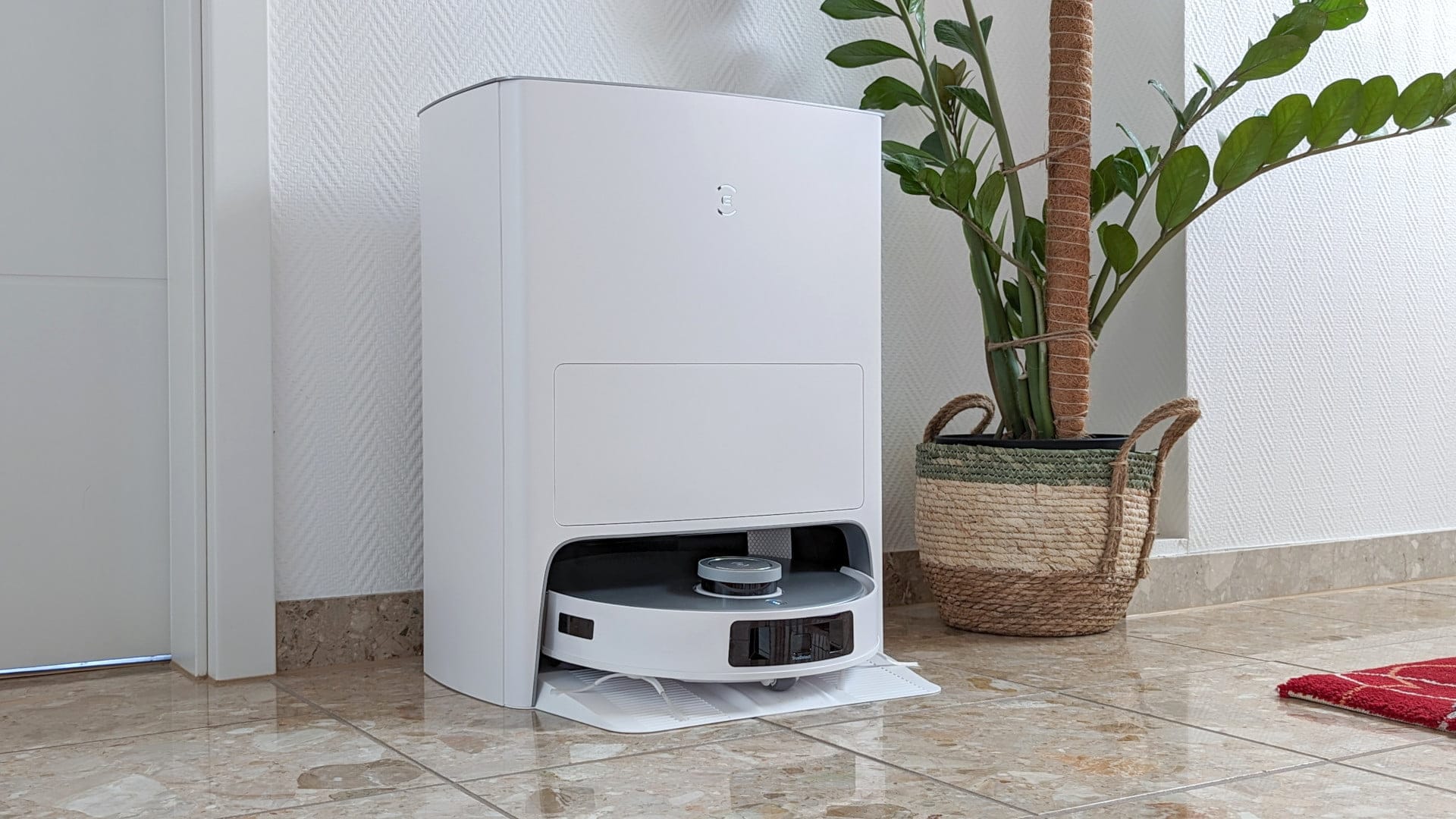
The continuity and consistency in the design of the DEEBOT T20 OMNI emphasise its belonging to the ECOVACS family. Both the vacuum robot and the All-In-One cleaning station share distinctive similarities with the DEEBOT X1 OMNI (review) and its predecessor, the DEEBOT T10 OMNI (review).
Although the cleaning station is quite large (58 x 45 x 43 centimeters), the DEEBOT T20 OMNI, which is currently only available in white, integrates seamlessly into various interior styles.
Cleaning station
The cleaning station is a large affair for good reason. When you flip the station's silver lid upwards, a removable 4-litre clean water tank and a 4-litre dirty water tank are revealed. Both are visually well separated from each other.

Between these tanks, there is enough space to store, for example, the included cleaning brush. The DEEBOT X1 OMNI made better use of this space and even included a suitable storage box for accessories.
Generally, ECOVACS has cut costs on the included accessories. Instead of the usual two dust bags, only one is included, and the mopping pads are also provided only in a single version.

Separate from the water tanks, a 3-litre dust bag is located in a drawer below, into which the vacuum robot empties its dust container after each cleaning run. The drawer can be opened by pressing a hidden switch from below.
The full dust bag can be disposed of in general waste like a conventional vacuum cleaner bag. Replacement bags can be reordered cost-effectively on Amazon or in the ECOVACS shop.

The robot vacuum can be activated via a control button on the lid of the cleaning station. Compared to the DEEBOT X1 OMNI, which offers additional functions such as calling the robot back to the station or starting mop cleaning, the DEEBOT T20 OMNI lacks these features.
The power cable is plugged into the back of the cleaning station. There you will also find a practical carrying handle and a device for winding up the power cable.

The cleaning station ends at the bottom with an angled base plate. The vacuum robot parks backwards into the station, so the mopping pads protrude into the cleaning basin. There is no need to worry about potential water puddles. The cleaning basin is designed so that nothing can leak out. Scalding from the 55°C hot water is also not possible, as the cleaning of the mopping pads takes place in the inaccessible rear area of the station.

Robot vacuums
The vacuum robot itself has a classic round shape. With a diameter of 36.2 centimetres and a height of 10.35 centimetres, it is not among the most compact devices on the market, but should be able to drive under most beds and sofas. The height is due to the laser tower, which protrudes visibly from the top and gives the DEEBOT T20 OMNI its navigation capabilities.

The silver lid of the vacuum robot is magnetically attached and completely removable. Whether you prefer a flip-top or a removable lid is a matter of taste. Personally, I prefer this design because it makes it easier to access the buttons and the dust container underneath.

As is typical for ECOVACS, there is a power switch and a WiFi button.

The dustbin has a capacity of 300 ml. While this is 100 ml smaller than the dustbin of the DEEBOT X1 OMNI, it does not matter, because as soon as the bin is full, it is automatically emptied in the station.
New is the improved particulate filter in the dust container, which has been supplemented by an additional activated carbon layer. The activated carbon filter helps to bind odours and dust particles even more effectively.

On the front of the DEEBOT T20 OMNI is the bumper, which protects the vacuum cleaner robot from collisions. To avoid such situations from the outset, the vacuum cleaner robot is equipped with several sensors on the sides as well as on the underside.
The TrueDetect 3D 3.0 recognition system, which is essentially a crosswise arranged camera, detects obstacles and ensures that the robot vacuum does not touch them. How effectively this works, we will come to later.

What ECOVACS has omitted this time is the AIVI camera, which can be used to plan surveillance runs. This function can be helpful for monitoring your own four walls but also carries the risk of unwanted surveillance. At this point, everyone should decide for themselves how useful this function is for them.
The underside of the DEEBOT T20 OMNI houses the two rotating mop pads and the side brushes, which click firmly into place in the device. The robot vacuum controls the lifting and lowering of the mops by automatically rotating them out and in. This achieves a height difference of 9 millimetres. The mop pads themselves are made of a particularly absorbent material that stores water for a long time. A good decision, as the DEEBOT T20 OMNI dispenses with an integrated water tank.

To the delight of those with long hair and pet owners, the main brush bristles have been replaced with a pure rubber roller, in which hair gets tangled much less frequently. At the same time, the ends of the brushes have been improved, so that hair also tangles less there and is easier to remove.

ECOVACS DEEBOT T20 OMNI: Setup
Setting up the DEEBOT T20 OMNI should be easy even for non-technical users. The first requirement is downloading the ECOVACS Home App, which is available in the official stores for Android and iOS devices.
Subsequently, the app guides users through the individual setup steps with pictures and in an easy-to-understand manner. During the setup process, the vacuum cleaner robot requests the access data for the home Wi-Fi. It is essential to ensure that a 2.4 GHz network exists. Connection to a 5 GHz network is not supported.
The app is clearly structured and, thanks to regular updates, shows ECOVACS' commitment to continuously improving the app.
Mapping
During initial setup, there is the option of a quick mapping process, which creates a room map in just a few minutes without vacuuming or mopping. A distinction is made between the classic 2D room map and a 3D room map, which additionally displays objects such as furniture and carpets.


With the room map, you keep an eye on where the vacuum robot is and what progress it has made during the ongoing cleaning. Adjustments, such as naming rooms, separating rooms or merging them, are made via the map settings. Restricted zones can also be defined in the settings, which the vacuum robot should not enter when vacuuming and mopping or only when mopping. It is possible to create up to three different maps. The accuracy of the map display is good.
Cleaning mode
A total of five cleaning modes are available. In "Zone" mode, it is possible to target specific rooms for cleaning. The "AUTO" mode performs an automatic cleaning of the entire area. In addition, there are three more specialised modes.
The special "Home" mode, available only in 3D map display, cleans the area around furniture and carpets. In contrast, the "Custom" mode in 2D display allows drawing cleaning zones on the map.
Newly added is the "Household" mode 2.0. In this mode, the vacuum robot remembers, for example, how long it has been inactive or analyses which rooms are frequently heavily soiled. Based on these parameters, it automatically adjusts its cleaning behaviour.
Settings
To access settings, you need to swipe upwards from the bottom of the home screen. ECOVACS has introduced a new structure for settings, now divided into cleaning settings, station functions, and other settings.


Previous versions had grouped all settings in one place. Clarity has suffered slightly with this new division. Here are the available setting options:
Cleaning settings:
- Cleaning modes: “Standard”, “Mopping”, “Vacuum and mop”
- Cleaning: Once or twice
- Suction power: Adjustable to the levels "Quiet", "Standard", "Maximum" and "Maximum+"
Functions of the station:
- Cleaning cloths
- Empty dust
- Air drying
Other cleaning settings:
- Cleaning efficiency: “Standard”, “Deep” and “Quick”
- Corner deep cleaning: Corner deep cleaning
- Carpet cleaning strategy: Auto suction power boost, carpet detection, carpet avoidance, ignore carpet
- Cleaning sequence: Defines the order in which cleaning is performed.
- Intelligent cleaning: Mopping pad moisture (Low, Standard, High), cleaning interval (Deep, Daily, Efficient), hot air drying time (2 hours, 3 hours, 4 hours), self-emptying (Auto, Intelligent), continuous cleaning, 3D obstacle avoidance TrueDetect, area unit
- Cleaning schedule: Schedule by weekdays and time
- Language
In addition, there are general settings, including a child lock, cleaning protocol, YIKO voice assistant and wear report for the parts.
YIKO voice assistant
One of the main functions of the DEEBOT T20 OMNI and the ECOVACS Home app is the YIKO voice assistant. There have been significant developments here too, showing that ECOVACS is gradually getting to grips with the voice assistant.
The voice assistant now understands more than 20 voice commands in various languages, covering almost all functions of the robot vacuum cleaner. For example, you can start, pause and end various cleaning modes via voice command, send the robot vacuum to its station or query information such as battery level, location and current task.

During testing, I deliberately chose not to check for speech errors in advance, but to communicate freely with YIKO. In 90 percent of cases, YIKO understood what I wanted from it. However, I had to repeat the starting command "Okay YIKO" slowly several times, as it was not understood when spoken quickly. Another problem is the microphone sensitivity. While the robot vacuum is working, you practically have to shout at it from close range for it to react.
If you do not want to use YIKO, it can be easily disabled in the app. Whether the voice assistant is active or not can be read from the vacuum robot's status LED: an orange LED indicates that the voice assistant has been deactivated, while a blue LED indicates that the voice assistant is accepting commands.
ECOVACS DEEBOT T20 OMNI: Field test
Automatic mop lifting function
A major drawback of the DEEBOT X1 OMNI was having to remove the mopping pads every time to vacuum carpets. Over time, this is quite annoying and leads to significant limitations, especially in rooms with many carpets or even wall-to-wall carpeting.

ECOVACS has responded by giving the DEEBOT T20 OMNI an auto mop-lift function, enabling it to vacuum and mop on all floor types simultaneously. When the robot vacuum approaches a carpet edge, it automatically lifts the mopping cloths by 9 millimetres, keeping them just above the floor.

ECOVACS has implemented the automatic mop-lifting function well. Only when the robot vacuum is roughly half on the carpet, the mops are raised quickly, making mopping right up to the carpet edge possible.
This even works on high-pile carpets, although in this case the mopping pads are partly dragged across the pile, which can lead to water residues. Even when the robot vacuum is on the carpet with a mop attached, it can happen that the mopping pads continue to rotate and the carpet becomes slightly damp.
Mopping result
The cleaning result is impressive. Thanks to the high contact pressure, the mops easily scrub even dried coffee stains off the floor. However, for stubborn stains, the vacuum robot has to drive over them multiple times, which means that manual mopping is ultimately faster.

Edge cleaning
The edge cleaning feature has proven useful, activating every seven days in AUTO or household mode. The DEEBOT T20 OMNI briefly pushes its mopping pads to the room edge during this process.
However, this feature isn’t one hundred percent effective either, so dirt remains in corners and hard-to-reach areas. But at least – ECOVACS has come up with a feature that many other manufacturers currently lack.
Missing water tank
The missing water tank is not a disadvantage. Even if the robot vacuum returns to the station every 10 minutes to refresh its mop pads, they remain moist until the end. However, one can see that the moisture distribution gradually decreases.
For less dirty floors, it is sufficient to set the moisture level of the mopping pad to low in the settings. The mopping leaves no streaks, so the robot vacuum leaves a clean damp line. Approximately 4 litres of fresh water are required for an area of about 70 square metres.
Hot water mop washing technology
The mop cloths are cleaned in the cleaning station. The advantages of using hot water (55°C) for this are obvious. Greasy dirt is better dissolved by hot water and bacteria are killed at the same time.
Testing quickly revealed that the mop pads become cleaner thanks to hot water cleaning. Pet owners in particular know the problem of dirt quickly accumulating on the mop during cleaning. However, I would still recommend regularly washing the mop pads in the washing machine to remove the remaining dirt particles from the pads.

According to ECOVACS, the heating system is secured on several levels. The water supply and the electronics are separated, so that in the event of a leak, no major damage can occur. A temperature sensor monitors the water temperature. If it rises above 55°C for more than 3 seconds, heating is automatically stopped.

The dirty water generated during cleaning ends up in the 4-litre dirty water tank. It is recommended to dispose of the grey slurry directly in the toilet and rinse the tank thoroughly to prevent unpleasant odours from developing in the first place.
Vacuuming
The suction power of the DEEBOT T20 OMNI reaches an impressive 6000 Pascals (Pa). This makes it one of the most powerful robot vacuum cleaners currently on the market. Despite the high suction power, the noise level remains reasonable. The robot vacuum cleaner picks up dirt on hard floors very effectively. Of 100 grams of household dirt distributed across the test area, 95 grams were vacuumed up.
Results were slightly worse on carpets. Even there, it sucked up a mere 91 grams. The robot vacuum can climb carpet edges up to a height of 2 centimetres. Hair rarely gets tangled in the rubber roller. However, it happens somewhat more often on the rotating side brushes. Hair can be cut loose using the included cleaning tool.
The full dustbin is emptied by the robot vacuum at the end of a cleaning cycle into the 3-litre dust bag. The bag has multiple filter layers and securely traps the dirt. It should be replaced at the latest after three months.
Navigation
There is room for improvement in navigation. Overall, the DEEBOT T20 OMNI navigates the rooms reliably, but sometimes it appears somewhat disoriented. This is evident in the fact that the robot vacuum stays in the same spot for a while, frequently spins in circles, or re-cleans areas that have already been cleaned. ECOVACS should address this issue with future updates.

The TrueDetect 3D 3.0 obstacle detection can be relied upon in most cases. Compared to the DEEBOT X1 OMNI, the function has been noticeably improved. The DEEBOT T20 OMNI almost always recognises scattered cat toys and black charging cables as obstacles and reliably steers around them.
It becomes more difficult with white cables or shoelaces that lay too flat on the floor for its detection radius. The vacuum robot likes to drive over those. However, most other vacuum robot brands also fail at these objects.
Battery
The robot vacuum uses a typical 5200 mAh battery, which ECOVACS claims should last up to 240 minutes continuously. In testing, the battery lasted approximately 150 minutes before the robot vacuum had to return to the station. It automatically returns there once the battery level drops to 15 percent.
Converted into square metres, the vacuum robot can clean around 120 square metres of area in one go. The charging time, which takes almost 6 hours, leaves a bitter aftertaste. Anyone who wants to clean multiple floors with a large area in one go will quickly run into time constraints.
Our verdict
The ECOVACS DEEBOT T20 OMNI proves to be a valuable household helper, efficiently mastering a wide range of cleaning tasks. The combination of vacuuming and mopping thanks to the automatic mop-lifting function, as well as maintaining clean mops through hot-water mop-washing technology, are standout features. Usability is user-friendly thanks to an intuitive app, the YIKO voice assistant, and straightforward setup.
Despite these advantages, there are some aspects that leave room for improvement. For instance, the robot can occasionally lose its orientation, and the battery charging time seems somewhat slow. Furthermore, the ability to detect objects is not always reliable. Regardless of these points, the DEEBOT T20 OMNI offers solid overall performance that results in commendable cleaning results.
Specifications
Cleaning
- Suction power
- up to 6000 Pa
- Suction modes
- Quiet, Standard, Max, Max+
- Noise levels
- below 68 dB
- Container
- 300 ml dust
- Mopping system
- OZMO Turbo 2.0
Navigation
- Mapping
- TrueMapping 2.0 (LDS)
- Object recognition
- TrueDetect 3D 3.0
- Room map
- Yes (3 floors)
- Room layout
- Yes
- Restricted areas
- Yes
- Virtual Wall
- Yes
- Housekeeper mode 2.0
- Yes
- Deep cleaning mode
- Yes
Connectivity
- App
- ECOVACS HOME
- Connection
- WiFi 2.4 GHz
- Alexa
- Yes
- Google Home
- Yes
- Other
- YIKO AI voice interaction
Battery
- Capacity
- 5200 mAh
- Runtime
- up to 260 min
- Charging time
- 6.5 hours
Emptying station
- Suction power
- 21 kPa
- Bag type
- Disposable
- Dust bag capacity
- 3 L
- Mop cleaning
- Hot water (55°C)
- Mop drying
- Hot air
Size & weight
- Size
- 36.2 x 36.2 x 10.35 cm
- Weight
- 3.7 kg
What’s included
1x robot vacuum 1x dust collection station 2x side brushes 2x mopping pads 1x dust bag 1x cleaning brush 1x cleaning tool 1x power cable 1x manual
Price comparison
| Store | Price | Link |
|---|---|---|
| Amazon | 545,08 € | Go to store |



Comments (11)
Hi Timo
I have two in testing. Did you not notice any rattling? Not always, but occasionally it happens.
Compared to the x1, I find the t20 a bit louder, or rather it squeaks more. This is presumably due to the rubber rollers in apartments with tiled floors.
Hi Björn,
Thanks for your feedback. The rubber roller can indeed be slightly louder than the brush roller of the X1 OMNI in some situations. I have also frequently made this observation with other models with a rubber roller.
Regarding rattling, I noticed nothing unusual during my tests. I ran it again just now and did not hear any noticeable rattling.
Hi Timo, that’s very strange. My two blades cut like a tractor; I would be happy to send you the video if you are interested.
I would also point out that prices are usually higher in the Ecovacs web shop than on Amazon. After speaking with Ecovacs support, they offer a price guarantee on their web shop but not on Amazon. This means there is no discount, as the device is listed on Amazon for 999 euros and directly at Ecovacs for 1099 euros.
Best regards
Hi Björn,
That doesn’t sound good at all. Please feel free to send me the video/link via email. You can find the email address on the contact page.
Have you tried removing all the brushes one by one and checking if the problem persists?
Hi Timo, first of all, thank you for your very informative review. It has already been a great help to me. 🙂 There is one question I haven’t been able to find an answer to yet. I would mainly like to use the robot vacuum for daily mopping (we have two Golden Retrievers). Do you happen to know if the robot vacuum is compatible with cleaning agents? Thank you in advance. 🙂
Hi Beate, it is possible to add cleaning fluid to the fresh water tank. ECOVACS even sells its own cleaning agent for this purpose.
You should make sure not to use any sticky cleaning agents. For example, I wouldn't add the classic Frog brand neutral cleaner, as it is rather viscous and forms flakes in the water. This then likes to clog the narrow tubes.
Hello Timo,
I have the following question, as I couldn't find any information about it in the various media.
Can you select specific rooms for cleaning with the DEEBOT T20 OMNI? I can do that with the “Medion” robot vacuum I got from Aldi!
Hello Horst,
Yes, sure, that also works with the T20 OMNI. You can divide rooms as you wish and tell the robot vacuum to clean and mop only this specific room, only clean, or only mop.
Hello!
As an iRobot owner, I was looking for a household helper with a mop. The T20 is perfect! I'm still having a little trouble with the app, as it's more complicated than the iRobot app, but I'll get the hang of it!
I did, however, notice two ways in which it is “less” good than the iRobots.
The T20 doesn't vacuum as well along the edges of rooms and furniture, and it can't handle slopes of 30–35° … which is a real shame, as I'd like to connect two rooms in my house. The iRobot managed that without any problems. Do you have any ideas?
Hi Aurélie,
If the robot vacuum cleaner cannot cross the threshold between two rooms, the only option is to build or buy a threshold ramp. Amazon offers a wide range of them.
But do you think it can overcome a ramp?
We thought it would be like the Roomba in this respect. It is not just a threshold, it is a step for which we built a ramp with a 30-degree incline. We will add some more slip resistance.
Only threshold strips are sold on Amazon.